You've spent days refining a floral pattern on screen. The petals balance, the palette feels right, and the repeat looks continuous in the preview. Then a mill sample arrives with a faint seam, colors that have shifted, and a surface that rubs off too easily. The artwork wasn't necessarily the problem. The production decisions around it may have been.
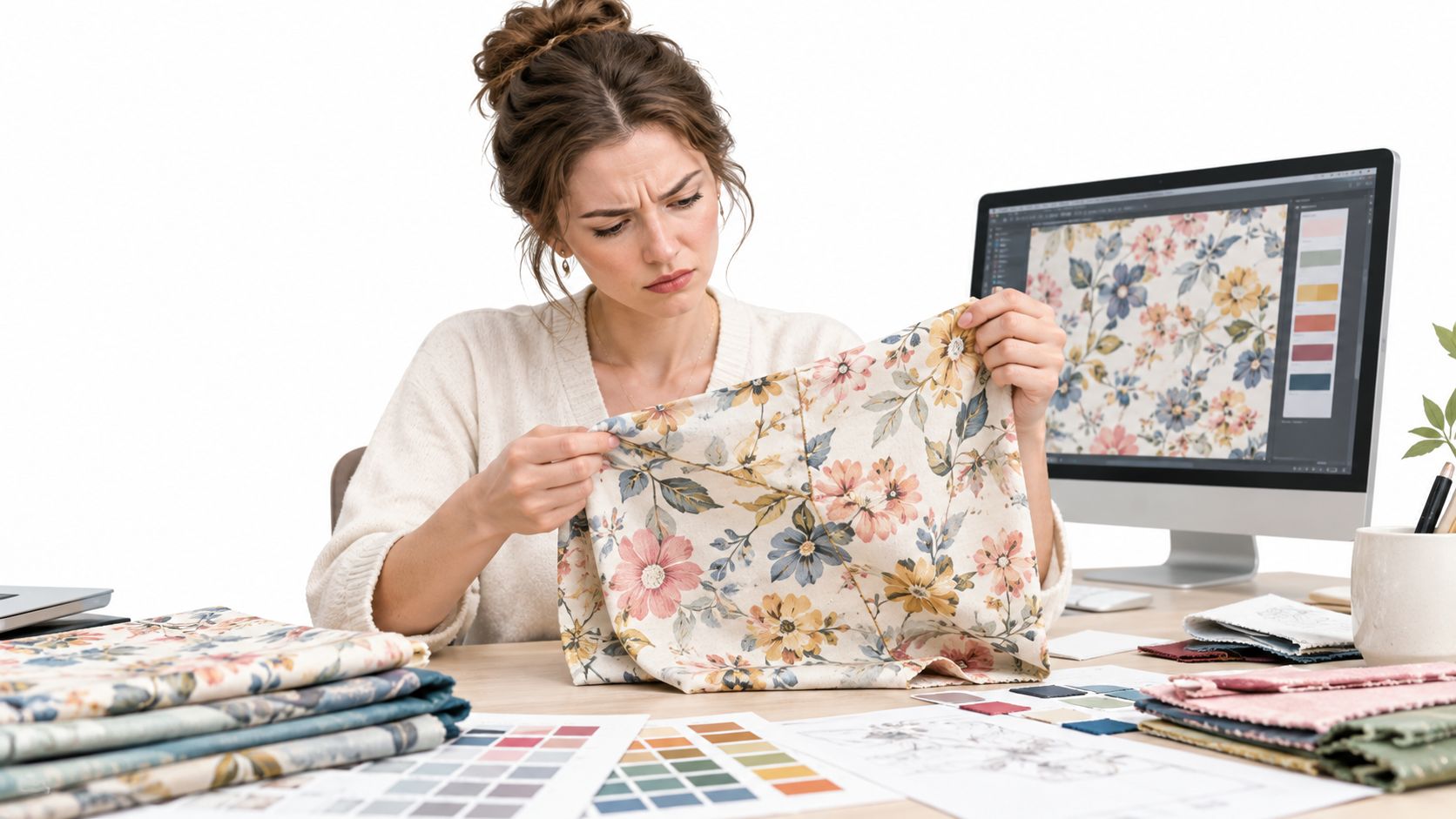
A surface design pattern isn't just an attractive image. It's a visual system that has to behave on a material, at a particular scale, through a particular manufacturing process. Its success depends on decisions about the motif, repeat, color, file, substrate, and rights to use the artwork.
The useful work happens between the first sketch and the approved factory sample. You'll shape a concept into a repeat system, build colorways for real materials, prepare files that preserve the design, and give the supplier instructions clear enough to reproduce it. The thumbnail gets attention. The engineering choices make the pattern work.
Table of Contents
- Why Pretty Files Fail at the Factory
- What a Surface Design Pattern Actually Is
- Choosing the Right Repeat System
- Building Colorways That Survive Contact with Reality
- File Formats and Asset Preparation
- Engineering Patterns for the Factory
- Production-Readiness Checklist for Pattern Assets
- Rights, Reuse, and the Long Life of a Pattern
Why Pretty Files Fail at the Factory
A floral repeat can look flawless in a small software preview and still fail on fabric. A leaf crossing the edge of a tile may not line up with its continuation. A color that looks deep on a monitor can print differently on a textured substrate. And if the ink doesn't hold up to rubbing or washing, a visually successful sample may still be wrong for its intended product.
Those problems often show up late because designers and factories are solving different parts of the same job. The designer is judging composition and color; the production team is also checking repeat dimensions, registration, substrate behavior, print method, and durability. If the handoff file doesn't answer those questions, the supplier has to interpret the design, and interpretation can introduce unwanted changes.
Practical rule: Treat every pattern as artwork plus instructions for how that artwork should be made.
A reliable workflow has five connected jobs:
- Develop the concept: Choose motifs and a visual language that suit the product and brand.
- Build the repeat: Decide how the pattern tiles, what scale it needs, and how it will fall across the material.
- Prepare colorways: Define the colors and separations in a way that can be checked against the intended substrate.
- Prepare the files: Keep the artwork, repeat dimensions, and production exports organized and legible.
- Hand off to the supplier: State the substrate, process, tolerances, and quality expectations rather than sending an image alone.
That sequence turns a pattern from a pleasing screen image into a manufacturable design. It also makes problems easier to locate: a visible seam is a repeat issue, while a color or crocking failure calls for a closer look at color management, ink, substrate, and process.
What a Surface Design Pattern Actually Is
Surface design is the practice of creating artwork or visual systems for surfaces such as fabric, paper, ceramic, vinyl, and molded plastic. Pattern design is one part of that broader discipline. Some surface designs are single illustrations or placed graphics; a repeating pattern is built to continue across a surface without an obvious break.
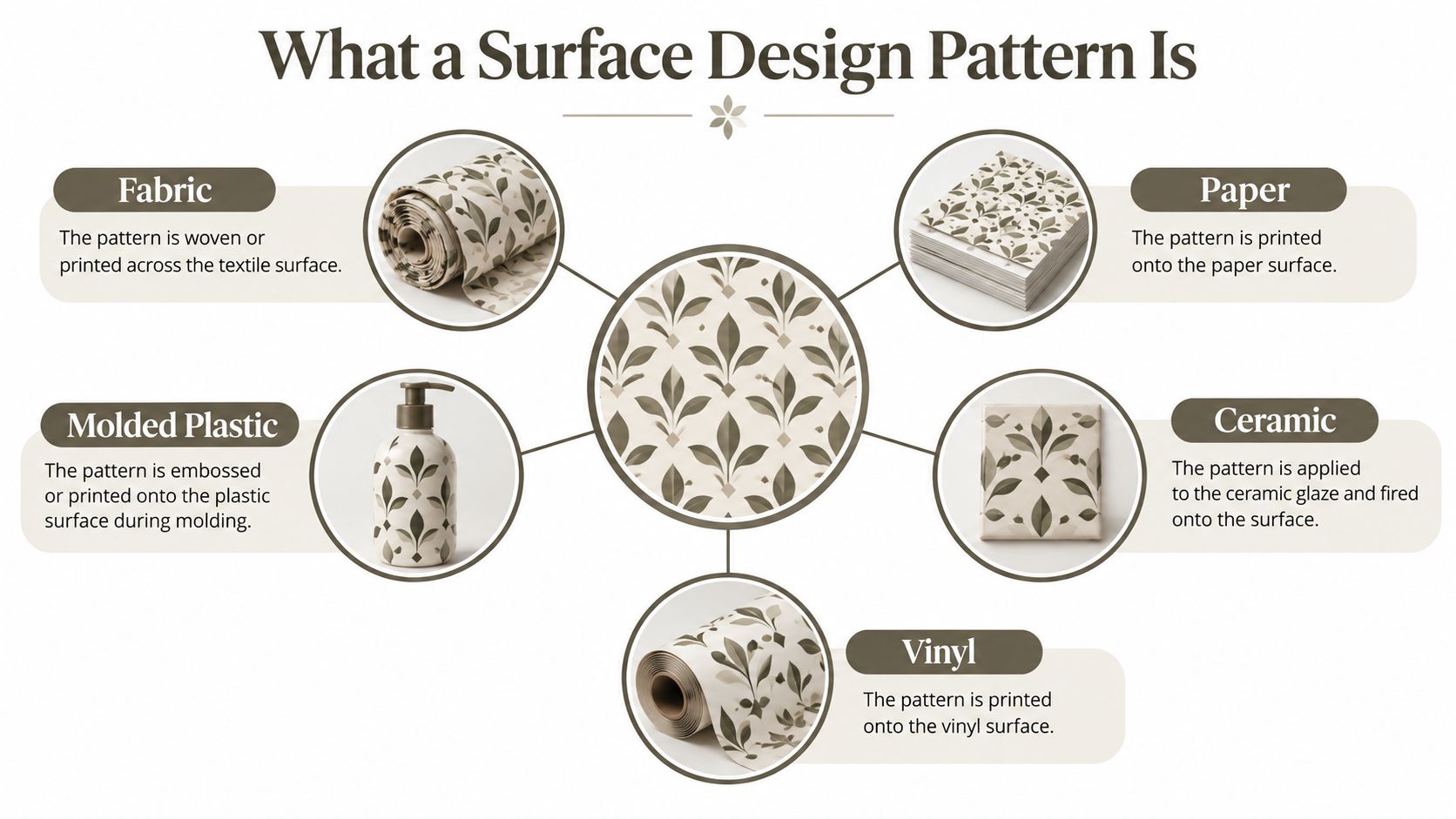
A little vocabulary makes production conversations much clearer:
- A motif is one design element, such as a flower, leaf, or geometric shape.
- A tile is the defined artwork area used to build a repeat.
- A repeat is the arrangement that recurs as the tile is placed across a surface.
- A placed print is positioned for a particular item or area rather than repeated continuously, such as a graphic centered on a shirt front.
Pattern design has a long history of linking visual style with material and method. William Morris and the British Arts and Crafts movement helped make surface pattern a defining feature of modern decorative arts. Morris and Co. was founded in 1861, with the stated aim of improving the quality of decorative arts and raising design to the level of art, as described by the National Trust's history of William Morris. Morris's natural motifs, especially plant forms, were composed to repeat across wallpapers and fabrics, and his practice drew on methods including hand-cut woodblocks, printed textiles, hand embroidery, and traditional looms.
A repeat's structure and color relationships matter because the design has to remain recognizable when it travels beyond the original drawing. The Victoria and Albert Museum describes a sourcebook containing nearly 400 Morris textile and wallpaper patterns arranged by decade. His Strawberry Thief has remained in use for 135 years on products ranging from footwear to household items, according to the Cleveland Museum of Art. The lesson is practical: a strong surface design pattern is more than a memorable motif. It's an adaptable visual system that can work across categories and scales.
Choosing the Right Repeat System
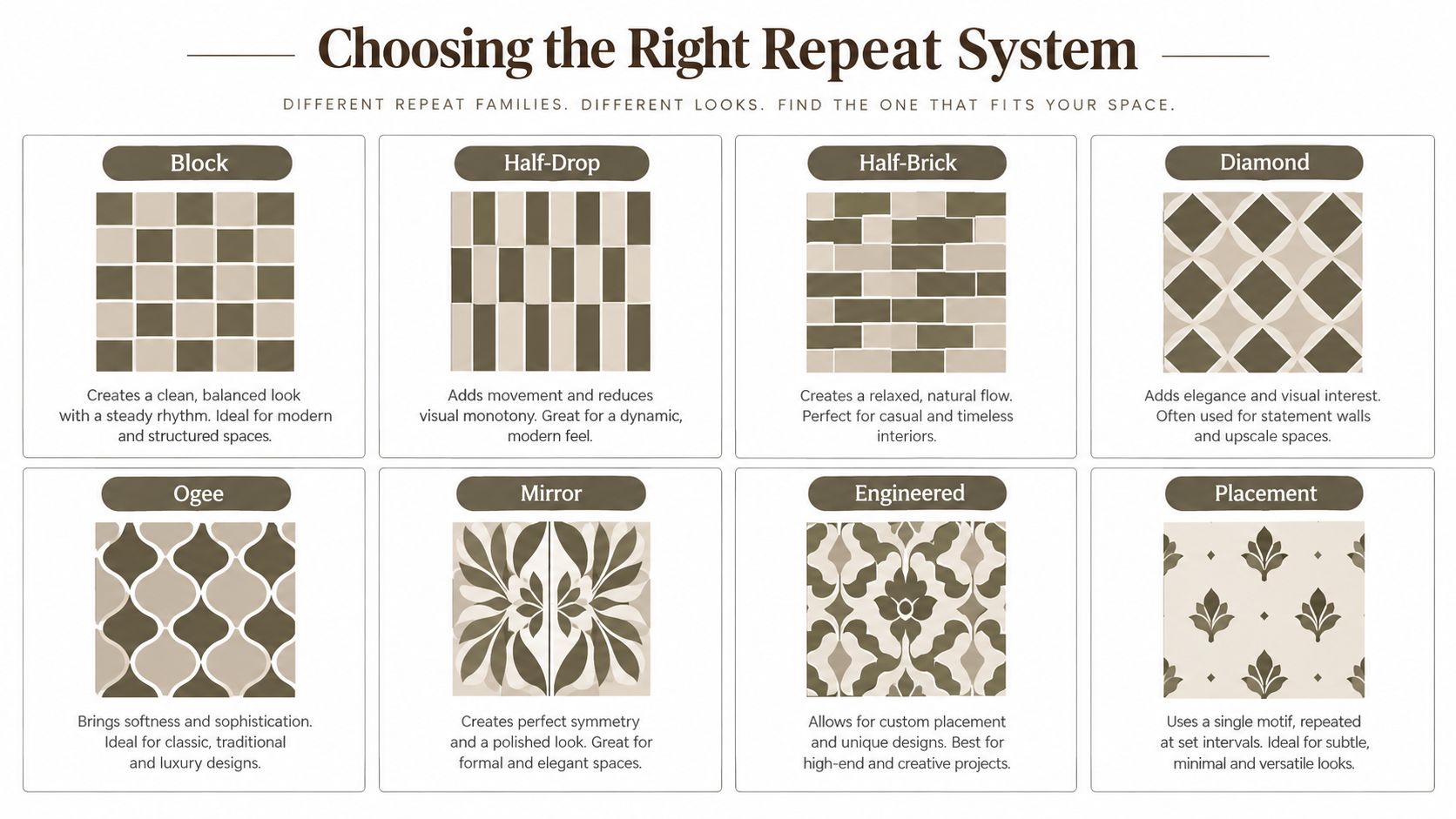
A repeat type determines how motifs meet as a tile is copied across a surface. Choose one by looking at the product, the motif's direction, and the visual rhythm you want. A pattern that feels lively on a small accessory might read as stripes on a garment when seams and fabric grain change how the motifs line up.
Match the repeat to the visual rhythm
- Block: Motifs align in straight rows and columns, like squares on graph paper. It's easy to engineer and suits clear, geometric designs, but strong alignment can create visible grids or stripes.
- Half-drop: Each successive row shifts vertically by half a tile. The stagger breaks up rigid lines and works well for florals, though it can be harder to track when checking the edges.
- Half-brick: Each column shifts horizontally by half a tile, like a brick wall. It gives motifs a relaxed flow and can suit both apparel and home textiles, but the tile needs careful checking across its offset.
- Diamond: Motifs align along diagonal paths or inside diamond-shaped units. This can create a formal, directional effect for wallpaper or textiles, but may make the design feel strongly angled.
- Ogee: S-shaped curves form a repeating enclosure or flowing frame. This suits decorative florals and traditional-looking patterns; its curves can become crowded if the motifs are too large.
- Mirror: Artwork reflects across an axis. Mirroring can quickly create symmetry for decorative panels or borders, but repeated reflection may look mechanical if the motifs are highly irregular.
- Engineered: Elements are positioned for a specific product or layout rather than treated as a simple all-over tile. It offers control over placement, but needs clear product dimensions and cutting information.
- Placement: A single motif or composition is designed for a defined location, such as the center of a cushion or garment panel. Placement gives precise control, but it won't automatically cover other shapes or sizes.
Think about what happens after printing, too. A half-drop that looks balanced on a flat screen may land differently across a cut-and-sew garment, where seams interrupt the repeat. A bedding design often needs to feel calm across a large area, while gift wrap can support a more continuous all-over rhythm.
| Repeat Type | Best For | Watch Out For |
|---|---|---|
| Block | Geometrics and aligned motifs | Straight lines can become obvious |
| Half-drop | Florals and irregular motifs | Offset edges need careful validation |
| Half-brick | Relaxed all-over prints | Horizontal cadence may show on large areas |
| Diamond | Diagonal or formal compositions | Strong directional effect |
| Ogee | Flowing decorative designs | Curves can crowd large motifs |
| Mirror | Symmetrical panels and borders | Reflections may look overly regular |
| Engineered | Product-specific compositions | Requires precise layout information |
| Placement | A defined focal area | Not suitable as an all-over repeat |
A clear choice is one you can explain to a non-designer: “We're using half-drop so the flowers don't form obvious vertical columns,” or “This is a placement print because the artwork must sit inside a specific panel.”
Building Colorways That Survive Contact with Reality
A colorway isn't a quick palette swap. It's a deliberate version of the master artwork, designed to retain its visual character on a particular material and through a particular print process. A navy that appears rich on screen may look different on unbleached cotton, recycled polyester, or coated ceramic.
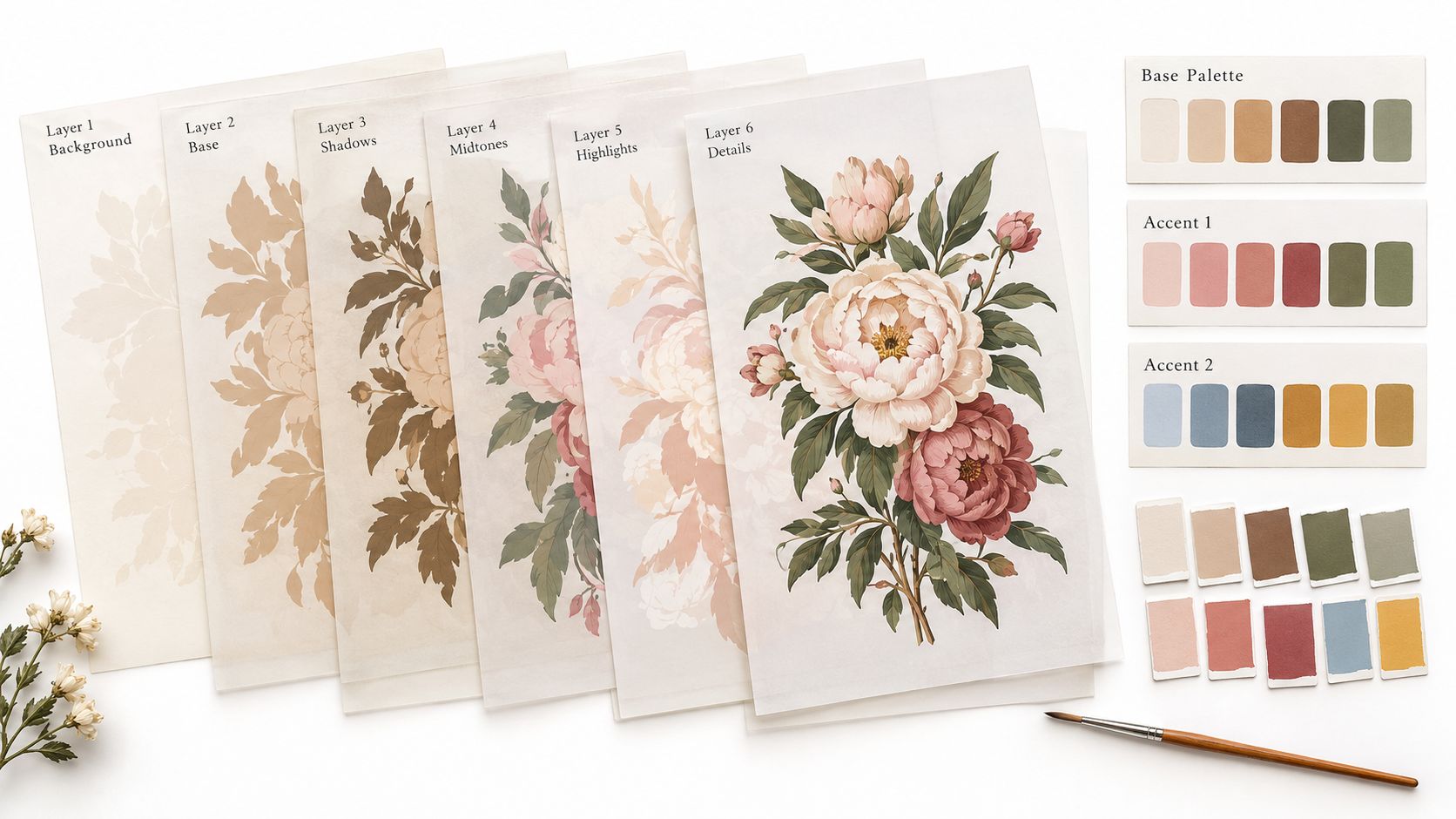
Start with a master file in which the artwork's color areas are easy to distinguish. Separate the major shapes and details into editable layers or defined color groups, then build alternate palettes from that organized structure. You might keep the same leaf and flower colors while shifting the background, or create a warmer and a cooler version for different product lines.
Make color decisions with the material in mind
The substrate changes how the final design looks and feels. Fabric texture can soften an edge; a coated surface may show a sharper result. Print method matters as well: dye-sublimation, pigment printing, and reactive printing have different material compatibility and can produce different color and hand-feel results. Don't assume a preview alone predicts the finished surface.
Ask the supplier which separations and print method the job requires. Spot-color separations define specific inks separately, while simulated-process printing builds a wider range of colors through a combination of printed components. The best choice depends on the factory's equipment, the artwork, and the target material.
Name colorways so the design team and supplier can distinguish them without guesswork. Include a consistent pattern identifier, colorway name, and version in the file name, then save the color references alongside the artwork. Keep a swatch library for the project so later revisions don't drift from the approved palette.
For fabric projects, fastness testing gives color discussions a practical endpoint. On Pins & Needles Quilting Co.’s guide to color-fastness testing is useful background for understanding why a promising color match still needs to be evaluated for product use. Approve appearance and durability on the intended substrate, not just on a monitor. That's the difference between a colorway that looks right in a presentation and one a supplier can reproduce with confidence.
File Formats and Asset Preparation
A production folder can contain different file types without contradiction. Each format solves a different problem: raster artwork preserves pixel-based detail and painterly effects, vector artwork keeps clean shapes scalable, and a repeat tile defines the production unit that will cover the material.
Use raster files for watercolor textures, soft shading, or detailed imagery that depends on pixels. Use vector files for crisp geometry, flat motifs, and artwork that needs to scale without becoming visibly jagged. The repeat tile, whether stored in a raster or vector format, tells the printer how the design should recur.
Package the file for the next person
Resolution describes how much image detail is available for a printed area. A 300 dpi tiled TIFF can be a practical production deliverable when the supplier requests a high-resolution raster file, while an sRGB preview can help teams review the design on screen and a CMYK production file may be requested for a print workflow. These files aren't interchangeable: the supplier should confirm the required format, color profile, and production setup before final export.
Bleed is artwork extended past a trim edge so small cutting shifts don't leave an unwanted blank line. Overprint settings affect how overlapping colors are printed, so don't change them casually to fix a preview issue. Ask the printer how it handles these settings and follow its specifications.
Use a layered master file, a clearly named production tile, and a separate preview. Keep color swatches and a short specification note with the files. A file naming convention might combine the design name, repeat type, colorway, and revision, making it easier to identify the approved version than a label such as “final-new.”
For a practical example of why output requirements vary by product, review these bass drum head artwork specs. The surface and production method determine what the supplier needs. A useful handoff also belongs beside the product's technical details, which is why a design-to-tech-pack workflow can help keep artwork instructions connected to the rest of the manufacturing information.
Engineering Patterns for the Factory
Pattern geometry is an engineering decision as much as an aesthetic one. The size of a repeat, the number of colors, and the direction of motifs can affect how the work is printed, placed, and tested. A designer who waits until sampling to discuss those choices may be asking the factory to solve constraints that belong in the design brief.
Digital textile printing illustrates the trade-offs. Production digital textile printers were introduced at ITMA in Birmingham in 2003. In 2021, digital printing still accounted for fewer than 10% of the textile-printing industry, even though it had been commercially available for 18 years. That same industry report estimated the global printed-textiles market at USD 146.5 billion and projected a compound annual growth rate of 8.9% from 2018 through 2025. Digital printing had reached more than 3 billion square meters of output, with analysts predicting approximately 14% annual production growth, according to the industry report on digital textile printing. These figures describe a hybrid industry, not a wholesale replacement of conventional methods.
Choose the process with the pattern
Rotary screen printing can suit longer production runs and established color setups; digital printing can support shorter runs and broader variation without a new physical screen for every variation. Sublimation is a distinct process with its own material and application requirements, so don't treat it as a universal alternative for every fabric or design.
| Process | Typical MOQ | Color Count | Pattern Constraint |
|---|---|---|---|
| Rotary screen | Confirm with supplier; setup economics may favor larger runs | Depends on screens and setup | Registration and screen setup constrain detail and variation |
| Digital | Confirm with supplier; may suit shorter runs | Supports broader color variation | File, fabric, and printer capability determine the result |
| Sublimation | Confirm with supplier | Depends on equipment and artwork | Substrate compatibility and process affect color and hand-feel |
Don't write a minimum order quantity or fixed color limit into a specification without a supplier quote. Instead, ask for the factory's process limits and make the pattern decisions against them. A custom fabric printing guide can help you frame the production questions to ask before approving a method.
Specify the measurable details
Rotary screen printing can consume roughly 50–60 liters of water per linear meter, compared with approximately 14–20 liters for digital printing, a difference of nearly 70% less for digital, according to research on printing technology and pattern production. The same research reports that combinations of digital printing, water-based inks, multidirectional repeats, and brick-rapport layouts can reduce water consumption and textile waste by as much as 95% in some scenarios. Those findings don't make digital printing automatically more sustainable: material choice, pretreatment, inks, curing, production volume, and wastewater handling all matter.
Lock down repeat size, motif direction, color count, registration tolerance, substrate, and durability targets before sampling. For durability, name the relevant tests: ISO 105-C06 rates washing fastness on a 1–5 scale, ISO 105-B02 rates light fastness on a 1–8 scale, and ISO 105-X12 evaluates rubbing or crocking resistance, as outlined in this textile-printing guide. The factory can then approve the pattern and the process together instead of treating appearance as the only pass condition. A design-for-manufacturing workflow supports that kind of early coordination.
Production-Readiness Checklist for Pattern Assets
Before a pattern leaves the studio, check it as both a composition and a production instruction. A tile can be visually balanced and still need adjustment for the actual material, printer, or finished product.
Use this checklist to catch avoidable gaps:
- Validate the repeat: Inspect the tile at scale and check every edge. Review a larger repeat preview to catch stripes, awkward gaps, or unwanted clusters.
- Confirm product behavior: View the pattern on the intended substrate and consider fabric width, grain direction, seams, or placement boundaries.
- Specify registration: Ask the supplier for its tolerance and record the accepted target rather than leaving alignment to interpretation.
- Name materials and process: State the substrate, print method, ink or color requirements, and any material compatibility constraints.
- Set durability criteria: Identify the relevant washing, light, and rubbing tests, and write down the acceptance thresholds agreed with the supplier.
- Package the assets: Include the approved artwork, repeat dimensions, color references, print-ready export, preview, and version identifier.
A specification sheet might read: “Artwork version: approved revision. Repeat dimensions: as shown in production tile. Color references: attached swatches. Print method: supplier-confirmed process. Substrate: named material and finish. Registration tolerance: agreed supplier target. Acceptance: agreed results for washing, light, and crocking tests.” Replace general phrases with actual project values before production.
That sheet should travel with the artwork in the tech pack and supplier handoff. A tech-pack checklist for pre-send review can help ensure the pattern file sits alongside the product details the factory needs. Approve the appearance and measured durability on the final substrate, because the same artwork can behave differently when its material or process changes.
Rights, Reuse, and the Long Life of a Pattern
A pattern's useful life depends not only on how well it prints, but also on what the agreement allows people to do with it. A license may set boundaries around product category, territory, duration, and exclusivity. The artist may retain ownership while a manufacturer receives permission to produce goods, so buying a file doesn't automatically answer whether every product use is permitted.
That distinction matters when a design moves from apparel to home goods, or when a brand adapts a motif for a new product. A license for one category may not cover another. A non-exclusive design may also be available to other clients, which can create a conflict with a brand's expectations. Licensing terms can vary, so record the specific permissions and restrictions in a rights matrix rather than relying on informal assumptions.
| Rights question | What to record |
|---|---|
| Category | Which products may use the pattern |
| Territory | Where the product may be sold |
| Duration | When permission starts and ends |
| Exclusivity | Whether others can license the design |
| Adaptations | Which edits or derivatives are allowed |
| Provenance | Contributors, source artwork, and AI-assisted elements |
Keep this rights record beside the production checklist. For patterns with multiple contributors or AI-assisted elements, document sources, agreements, versions, and permitted adaptations before the artwork enters the supplier workflow. A design that's ready to print still needs to be cleared for the product and market.
Morris's Strawberry Thief offers a reminder of what a durable visual language can become. The design has remained in use for 135 years, as the Cleveland Museum of Art's account notes. Contemporary teams can't rely on artistic appeal alone to create that kind of longevity. They need a pattern that's technically adaptable and supported by clear rights.
Genpire helps product teams turn prompts, sketches, and references into product concepts, technical specifications, and production assets, keeping design decisions connected to manufacturing handoffs. If you're building a pattern-led product and want a more joined-up workflow from concept through factory preparation, visit Genpire.