A finished dress drawing still fails as a dress design template if a factory cannot grade it, sew it, or check it. The useful file is a version-controlled measurement specification. It links the sketch to factory instructions, and it keeps body measurements apart from garment measurements.
That split is easy to blur and expensive to get wrong. The reference system below defines each term the first time it appears, shows where beginners usually mix the two number sets, and treats every figure as either a cited historical fact or a worked example you replace with your own population table before anyone cuts cloth.
Table of Contents
- What a Dress Design Template Contains
- Women's Dress Size Chart in Centimeters and Inches
- Body Measurements Versus Garment Specifications
- Ease, Seam Allowances and Grading Rules
- Adapting the Template for Petite, Tall, Fuller and Regional Sizing
- File Types and What Each Export Holds
- How to Build a Dress Template in an AI Workspace
- Factory Handoff Checklist and Sampling Verdict
What a Dress Design Template Contains
A dress design template is a structured specification. It holds a silhouette, its measurements, construction notes, and grading logic. It is not an outline on its own.
The modern form comes from the industrialization of home sewing. Ebenezer Butterick introduced graded tissue-paper patterns in 1863, first for men's and boys' clothing, then for women's garments in 1866. The innovation wasn't the paper. It was multiple, proportionally graded sizes from one base design, so a wearer could reproduce a silhouette without drafting every piece. His early women's range reportedly offered 13 sizes for dresses, coats, and blouses, plus 5 sizes for skirts, as recorded in the history of patterns and pattern making. By 1873, The Delineator paired those patterns with fashion journalism, so a seasonal idea traveled with construction steps instead of staying with a local dressmaker.
Seven parts, and who owns each
| Component | What it records | Example | Used by |
|---|---|---|---|
| Silhouette views | Outline, drape, and proportion in front, back, and side views | A-line midi dress in three views | Designer, buyer |
| Body-size designation | Size range, plus primary and secondary body dimensions as ranges | Bust as the primary range, waist and hip as secondary ranges | Technical designer, sourcing |
| Garment specifications | Finished measurements, ease, and length per point | Finished bust and hem length listed apart from the size label | Pattern maker, factory |
| Construction callouts | Seams, stitch types, hem finish, and closures | French seam at the side seam, with a 2.5 cm hem | Sewing room |
| Component breakdown | Bodice, skirt, lining, trims, and labels as separate parts | Lining cut from a separate block | Costing, sourcing |
| Grade rules | Increment per size for each measurement point | +4 cm bust per size | Grader |
| Tolerance and sample check | Accepted variance per point, and the inspection method | +/-1 cm on bust | QC |
Read the table as an inventory, not as a style guide. Silhouette views lock proportion so a buyer and a designer argue about the same dress. Body-size designation names who the size is for. Garment specifications say what the finished cloth must measure. Construction, components, grade rules, and tolerance turn that intent into work a sewing room, a grader, and QC can repeat.
A file missing the first three components is a sketch, not a specification. Designers and buyers can approve a view. They cannot approve a size, a seam, or a tolerance that was never written down.
Women's Dress Size Chart in Centimeters and Inches
| Size | Bust | Waist | Hip |
|---|---|---|---|
| 6 | Set from the target population table | Set from the target population table | Set from the target population table |
| 8 | Set from the target population table | Set from the target population table | Set from the target population table |
| 10 | 91-94 cm (36-37 in) | Set from the target population table | Set from the target population table |
| 12 | 96-99 cm (38-39 in) | Set from the target population table | Set from the target population table |
These bands are a body-size designation: they describe the wearer population the pattern was drafted for. Fill waist, hip, height, and the remaining sizes from the measurement table for the market you sell in. The two bust bands shown are reference examples, so replace this starter before production. A label that looks familiar in one country can describe a different body in another.
Keep this chart under change control beside the sketch and garment specifications. When a band changes, the revision should be traceable from artwork to grading rule to factory instruction.
How to read one row
A row is a band, not a single body. Size 10 means a bust circumference somewhere from 91 cm to 94 cm. It does not mean the dress's finished bust is 91 cm, and it does not mean every size 10 wearer measures 94 cm at the waist or hip. Those secondary dimensions get their own columns once the population is defined. Height works the same way. Leave it unmarked until you know whether the table is for a regular, petite, or tall cohort.
Work a measurement that falls in a gap. A bust of 95 cm sits above the size 10 band and below the size 12 band. It does not belong to both. You choose which band governs, write the choice on the template, and give the reason. Maybe this style runs close through the bust, so 95 cm moves up to size 12. Maybe the dress carries enough ease that size 10 still governs and the extra centimeter is absorbed in the garment specification. The wrong move is to average the two sizes into a silent 95 cm label that nobody else can reconstruct.
Practical rule: If a body measurement falls between bands, pick one governing size, record it, and say why. Don't invent a size that isn't in the table.
Why a fixed chart never proved fit
Early size systems were built from surveys, then revised when real populations refused to stay inside one proportion. The named U.S. attempt is the National Bureau of Standards system CS215-58, issued in 1958 as Body Measurements for the Sizing of Women's Patterns and Apparel. It sorted women across four categories and nine body types, using height and lower-body dimensions as well as bust. The wider history of U.S. standard clothing size reads as revision after revision, so treat any inherited chart as evidence about one population only.
That is why this chart is a starting point. A template can lock silhouette, seams, and grade logic. Fit still depends on the population, the body-shape assumption, and the market. Standardized bands improve repeatability. They still need validation where you sell.
Body Measurements Versus Garment Specifications
A dress template holds two sets of numbers that borrow the same units, and the most common file error is letting them merge. Body measurements describe the wearer. Garment specifications describe the cloth. The template works like a version-controlled spec: the body block is the source, the garment block is the release built on top of it, and nobody edits the source to match the release.
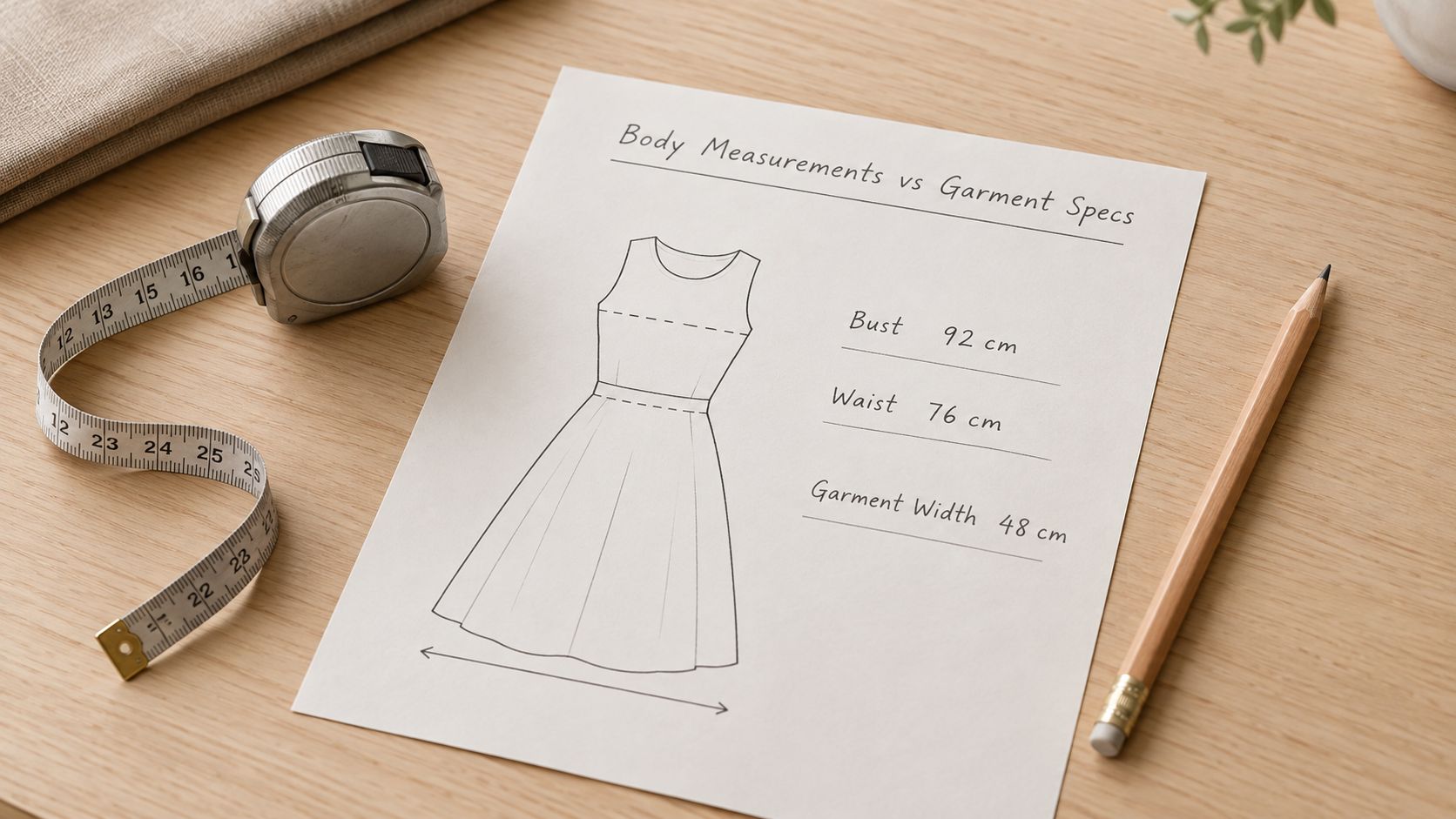
ISO 8559-2 defines clothing size designation from the intended wearer's primary dimension and optional secondary dimensions, written as minimum-maximum ranges. It bases sizing on body measurements, a rule stated in the ISO size-designation standard. A size 10 label describes a person; the garment block that hangs off it describes the dress.
Beginners often ask why both blocks exist when the garment number is the one the factory sews. The answer is grading. Finished dimensions can only be scaled across a size run when the body anchor underneath stays explicit.
What the production file has to hold
A production-ready template needs five blocks, in this order.
- Size range: The sizes you will grade and sell, named in one system.
- Primary body dimension: For many dresses, bust circumference, as a minimum-maximum range.
- Secondary dimensions: Waist, hip, height, and any style-critical body measure, each as its own range.
- Measurement definitions: The landmark, the direction, and whether the value is a full circumference.
- Garment-specification block: Ease, silhouette, and finished dimensions, stored apart from the size label.
Document bust, waist, hip, height, and style-critical dimensions with the same anatomical landmarks, aligned with ISO 8559-1. Ease is the amount added for fit, fabric, and movement. Keep it outside the size label, and set it from fit intent, fabric stretch, garment category, and construction method.
A worked bust, with the ease shown
Take a size 10 body bust of 91-94 cm, using the band from the chart above, and a finished bust of 104 cm on a relaxed bodice. Ease is 104 minus 94 at the top of the band, and 104 minus 91 at the bottom, so 10 to 13 cm. That spread is what a relaxed woven bodice carries at the bust. Write both the body band and the finished 104 cm. A line that reads only "size 10, bust 104 cm" forces a grader in another market to guess which number is the body and which is the dress.
ISO notes that designers and manufacturers choose garment measurements for wear position, style, cut, and fashion. Record each of those choices with a reason. "Relaxed bodice, worn over a light layer, non-stretch woven" is a reason. "Looks right" is not.
Use the same landmarks every time. The bust point is the fullest part of the bust. The natural waist is the narrowest part of the torso, which sits above the waistband of most fashion skirts and trousers. The fullest hip is the widest lower-body circumference, and it may sit below the hip bone. With those points named, the file converts into a factory measurement chart without anyone re-measuring a body. That separation is what a usable spec sheet for fashion designers has to protect when the sketch moves into sampling.
Ease, Seam Allowances and Grading Rules
Ease ranges overlap, and that overlap is deliberate. A relaxed shirt dress can hold the bust fairly close while everything below the armhole hangs loose, so its bust ease can sit inside the semi-fitted band. Read the ranges below as working values for the template. The knit cells for relaxed and oversized fits stay untested until you measure the actual fabric.
| Fit intent | Woven bust ease | Knit bust ease | Typical dress |
|---|---|---|---|
| Fitted, close to body | 2-4 cm | 0-2 cm | Sheath, bodycon |
| Semi-fitted | 4-6 cm | 2-4 cm | Waist-shaped day dress |
| Relaxed | 4-10 cm | Test on the actual knit | Shirt dress, tunic dress |
| Oversized | 10 cm or more | Test on the actual knit | Oversized daywear |
The relaxed bodice worked through in the previous section lands at 4 to 7 cm of bust ease, which is why the relaxed row starts low and runs wide. A fitted woven sheath might carry 2-4 cm of bust ease. The same "fitted" word on a stable knit might carry 0-2 cm, because the cloth already moves. Don't copy a woven ease onto a knit and call the fit unchanged.
Seam allowance, then the grade step
Seam allowance is the extra cloth beyond the stitch line. Use 1 cm on a standard seam, 1.5 cm on a heavy or lined seam, and 2.5 to 4 cm on a hem, depending on whether the hem is a narrow turn or a deep finish. Write the allowance on the construction callout. If it lives only in someone's head, the finished length changes the moment a new factory sews the style.
Grading spreads that base spec across the size run, and the interval comes straight off the chart. The size 10 bust band runs 91-94 cm and the size 12 band runs 96-99 cm, so each edge of the band moves 5 cm across two sizes: about 2.5 cm per size. Hold ease constant and the garment grades by that same step. The 98 cm relaxed bodice becomes roughly 103 cm at size 12, which keeps its ease at 4 to 7 cm against the new body band.
A patternmaker can still choose a different garment step, for instance to give larger sizes extra ease. Whatever you choose, record the per-size increment at each point of measure as a declared rule, and apply it after ease is set so the grade moves the garment spec while body and cloth numbers stay separate.
Fabric, and the table method behind the numbers
ISO 8559-3 sets principles for body-measurement tables, including intervals and population groups, so ready-to-wear sizing rests on a declared method. Identify the target population, such as women in one regional cohort. Then name the base size, the graded sizes, the interval logic, and the tolerance policy. Each point of measure needs a location, a direction, and a condition. Say whether the value is a full circumference, a half measurement, or a flat measurement.
For the factory, add the grade-rule reference, how seam allowance is treated, a shrinkage assumption, fabric stretch direction, and the sample tolerance QC will use. ASTM's apparel-sizing terminology standard gives a shared vocabulary for those body dimensions, and ASTM publishes separate tables for different groups, which is why a declared population makes a template easier to hand between brands and suppliers. The terminology lives in the ASTM apparel sizing standard.
State stretch direction, stretch recovery, and shrinkage. A knit specified at 20 percent stretch, as one example, can move the finished bust by several centimeters. Recovery is whether the cloth returns after it stretches. Shrinkage is how much it loses after the wash or heat process you specify.
On a stretch fabric, record a relaxed-state measurement and a stretched-state measurement, and say which one the factory must check.
If the spec is silent, one plant measures the dress flat on the table and another stretches it to "the right look." Both can claim they followed the file.
Adapting the Template for Petite, Tall, Fuller and Regional Sizing
The base chart doesn't hold length changes, proportion changes, or a second country's size words. Each variant below gets its own assumption list, so the grader and QC know which population the numbers describe.
Length for petite and tall. Change bodice length and hem position. Leave the bust, waist, and hip bands as they are, unless a new population table says those circumferences change too. Give petite and tall their own rows. A taller hem is not a bigger size, and folding it into the regular row hides the grade.
Fuller bust or fuller hip. Record the added circumference, the dart or panel that absorbs it, and the grade rule that carries the addition through the range. A one-size dart change that isn't graded will fit the base and miss the ends of the run. Write the panel as a component, not as a note in the margin.
Regional size labels. Put the market's size-label system beside the body bands. The same word or number can mean different measurements in different markets, so the label is a translation, not the measurement. Convert centimeters and inches with one rounding rule, such as rounding to the nearest half centimeter, and use that rule everywhere. Two rounding habits in one file produce two specs.
Stretch recovery on the variant. When a knit adjustment is part of the petite, tall, or fuller version, keep a relaxed measurement and a stretched measurement, and state which one the factory checks. A shorter bodice on a stretchy cloth can look correct on a dress form and grow once it's worn.
Accessibility as a point of measure. If reach, a closure, or seated wear matters for the style, record it as a measurement point with a stated condition. "Opens with one hand at the side seam" is checkable. "Easy to wear" is not. The condition might be seated, one arm raised, or a stated closure height. QC then inspects that point the same way they inspect a hem.
Don't grade a variant until its assumption list names the population, the length rule, and the measurement condition. Otherwise the row looks complete and describes nobody in particular.
File Types and What Each Export Holds
Keep one layered source file, then export three formats. SVG carries pattern geometry. PDF carries shared flats and sign-off. Excel carries the numbers. Genpire exports those three, so the handoff doesn't need a separate conversion step before a supplier opens the pack.
What each format keeps, and what it drops
SVG keeps vector lines that scale cleanly and import into CAD. It doesn't carry your measurement chart, your ease, or your tolerance. A clean outline can still be the wrong size. PDF sets a print scale, which makes it the right file for a buyer signing a flat or a supplier marking a sample. It is a poor place to edit, because a changed number on a PDF doesn't flow back into the grade. Excel holds the measurement chart, the grade increments, and the tolerances, and it recalculates when one body value changes. It has no silhouette. Sending only the spreadsheet leaves the factory guessing which line is the side seam.
Many pattern systems import DXF. Confirm that your pattern software accepts the DXF you plan to send before you promise it. A file type your grader can't open is not a backup. It's a stall.
The layered source is where revisions stay honest. Flats, artwork, and line types live there, whether you work in Illustrator or in the design workspace. Line types matter. A stitch line, a cut line, and a fold line that share one stroke weight will be misread the moment someone traces the export.
Teams usually get one edge case wrong. A supplier returns an annotated PDF with a longer hem or a moved dart. Reconcile those notes into the source file, then re-export SVG, PDF, and Excel from that source. Don't save the annotated PDF as a new "final" beside the old workbook. Two finals is version drift, and the next sample will mix them.
Name every export with the style code, the version number, the date, and the size set. DR-441_v3_2026-04-02_sizes6-12.pdf tells a factory which dress, which revision, and which bodies. final_dress_new.pdf does not. Match that name across the SVG and the workbook so a comment on one file points at the others.
How to Build a Dress Template in an AI Workspace
Treat this build like writing a spec sheet, not making a drawing. The generated views are the cover page; the measurement blocks underneath are what a factory reads. Follow the same order every time, and type every number yourself, because generated output is a starting picture rather than a size chart.
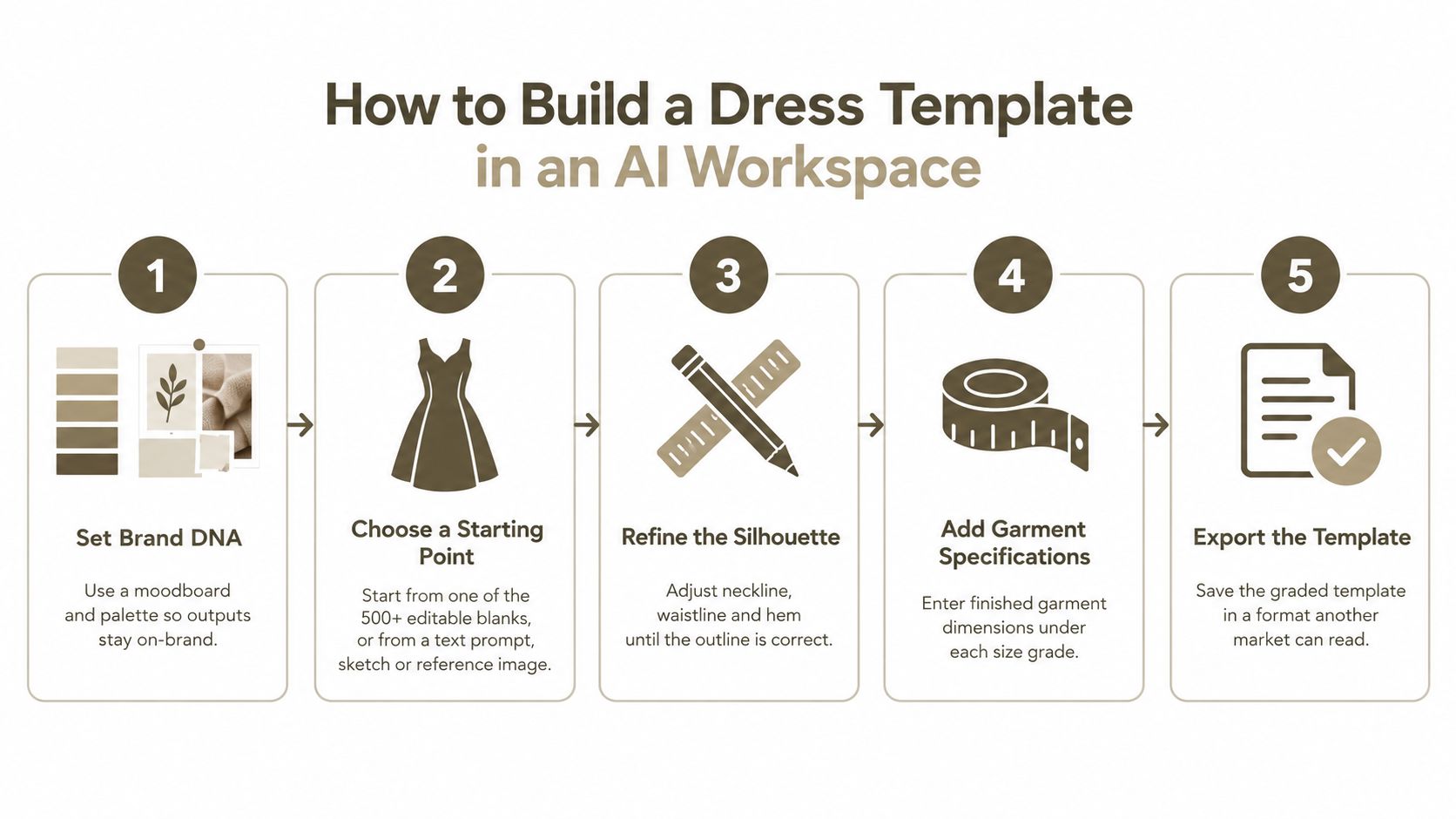
Set Brand DNA with a moodboard and palette. Do this before any dress is generated. A stored palette and reference set hold later outputs to the same visual rules, so a neckline change doesn't subtly restyle the brand. The common slip is skipping this step and then correcting brand drift one sketch at a time.
Pick a base silhouette. Start from an editable base blank, a text prompt, a sketch, or a reference image. Choosing the base first keeps the tool from inventing a new category when you only wanted a hem change. A reference photo of a fitted dress still has to be checked against your size chart before you accept its proportions.
Generate front, back, and side views. Multi-view output catches a neckline or a vent that the front view hid. Approve the set together. Signing off on the front alone is how side-seam and closure problems reach the sample.
Edit in the AI Editor, and override lines by hand. Adjust silhouette, neckline, length, and details there. Use manual override wherever an exact line position matters, since a generated curve is not a pattern line. The walkthrough below shows the editing pass; it covers line work only, so return to the measurement blocks afterward.
Enter body size and garment measurements in separate blocks. Follow the split from earlier in this article: the body block holds ranges for the wearer, and the garment block holds finished measurements, ease, and length. Mixing the two here recreates the unreadable size label you just removed. If you want the wider sequence from prompt to spec, the AI fashion design workflow lays out that path while keeping these two blocks apart.
Add construction and components in the Agentic Tech Pack workspace. Call out seams, stitch types, hems, closures, and lining, then list bodice, skirt, lining, trims, and labels as parts. Costing and the sewing room read this list. A lining that exists only in the sketch will be omitted or guessed.
Set ease, grade increments, and tolerance on every point. A point without a grade rule stops at the base size. A point without a tolerance cannot fail an inspection, which means it cannot pass one either. Leave knit ease blank where you haven't tested the fabric.
Save one version and export. One version number goes on the source file and on the SVG, PDF, and Excel exports. Virtual Try-On Studio shows the dress on a figure for a proportion read. Treat that image as a visual check only, because a structured bodice, a wrap, or an unknown knit still has to prove itself on a sample.
Factory Handoff Checklist and Sampling Verdict
Fit is the reason shoppers most often give for sending apparel back, and items that fail to match their online description run close behind. Both problems trace to the same root: a value that existed in someone's head but never made it into the file. A template that stops at the sketch leaves exactly those gaps. Body-versus-garment values, grade rules, ease, allowances, tolerances, and a sample check have to be written down before the file leaves your team.
A second mismatch sits behind the first. Fashion companies have adopted AI and digital product creation quickly, and reporting on sewn-product development describes that investment running ahead of the attention paid to product quality and fit. A generated view still does not validate a dress across bodies, sizes, and cloth. The checklist does. The sketch states what the dress should look like. The checklist is the version-controlled spec that states what it must measure.
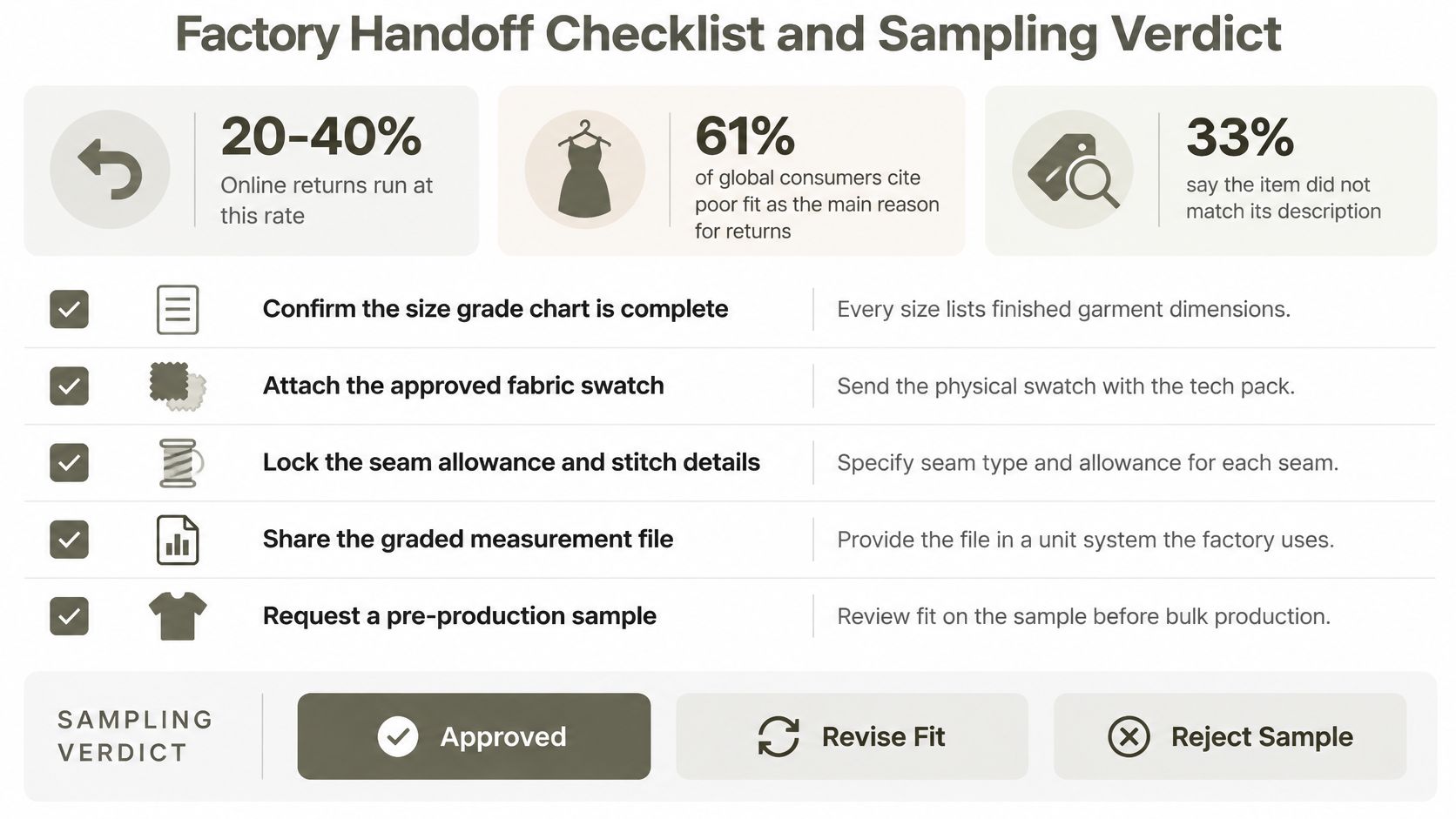
Nine checks before anyone cuts a sample
- Name, direction, and condition. Every point says where it is measured, in which direction, and whether the value is full circumference, half, or flat.
- Body and garment values stay apart. The size label is a body range. Finished measurements sit in their own block.
- Ease is stated per fabric. Woven and knit aren't given the same bust ease unless you tested them and wrote the result.
- Seams, hems, and stitches are called out. Allowance and stitch type sit on the construction notes, not in an email.
- Grade rules cover every size you will sell. A rule on the base size only is an unfinished grade.
- Shrinkage and stretch direction are recorded. Include recovery, and say whether QC checks the relaxed or the stretched state.
- Each point has a tolerance. Use the lookup below, and tighten it where the style is fitted or the edge is a neckline or armhole.
- Supplier view-only seats are shared. Partners read the current file instead of a forwarded copy.
- The version number matches every export. Style code, version, date, and size set agree on the source, the PDF, the SVG, and the workbook.
One clarification before the table, because beginners confuse these two terms. Ease is the room you design in on purpose. Tolerance is the error you permit the factory by accident. They are different numbers and they live on different lines of the spec.
| Measurement point | Typical tolerance | Note |
|---|---|---|
| Bust, waist, hip (finished) | +/-1 cm | Tighten on fitted styles |
| Neckline and armhole | Tighter than +/-1 cm | Shape errors show quickly on the sample |
| Overall length, shoulder point to hem | +/-1 cm | Measure in the flat, relaxed state |
| Hem width | +/-1 cm | Widen only in the stretch direction on knits |
About +/-1 cm is the working limit for most finished points. Fitted styles, necklines, and armholes need a tighter limit because a small shape error reads as a bad pattern, not as ordinary cloth movement. On a stretch fabric, widen tolerance only in the stretch direction, and write that exception on the point. Widening every point "because it's a knit" hides real misses.
Resolve factory comments in the unified file, not in a side thread. A note that stays in email never updates the grade. The same discipline is what a tech pack checklist before you send is meant to catch while the file is still cheap to fix.
When a physical sample is actually earned
Send for a physical sample only after the nine checks are complete, and only after you have graded the base up to the largest size and down to the smallest and tested each on a fit model or a dress form. Virtual visualization isn't enough for a structured bodice, a wrap, or a fabric whose stretch you haven't measured.
Don't request the sample to discover the spec. Request it to test a spec you could already defend.
Three verdicts follow, and only one of them releases the style.
Ready. The checklist is complete and the chart matches the declared population. Send the sample. Upload the spec to the Tech Pack workspace and share view-only supplier seats before the request goes out, so comments land on this version.
Revise. Two or more points fail tolerance on the first fit. Change the pattern, re-grade the affected points, and update the version number. Don't argue the tolerance after the sample is on the table.
Hold. The target population is still undefined, or waist, hip, and height are blank. Don't release. A sample sewn to an unfinished chart only proves that unfinished chart.
Genpire turns a dress sketch, prompt, or reference into multi-view concepts and a factory-ready spec, with body measurements and garment measurements kept in separate blocks. You can set construction, components, ease, and tolerances, then export SVG, PDF, and Excel for the handoff described above. Visit Genpire to build the template as a specification your grader and your factory can both read.