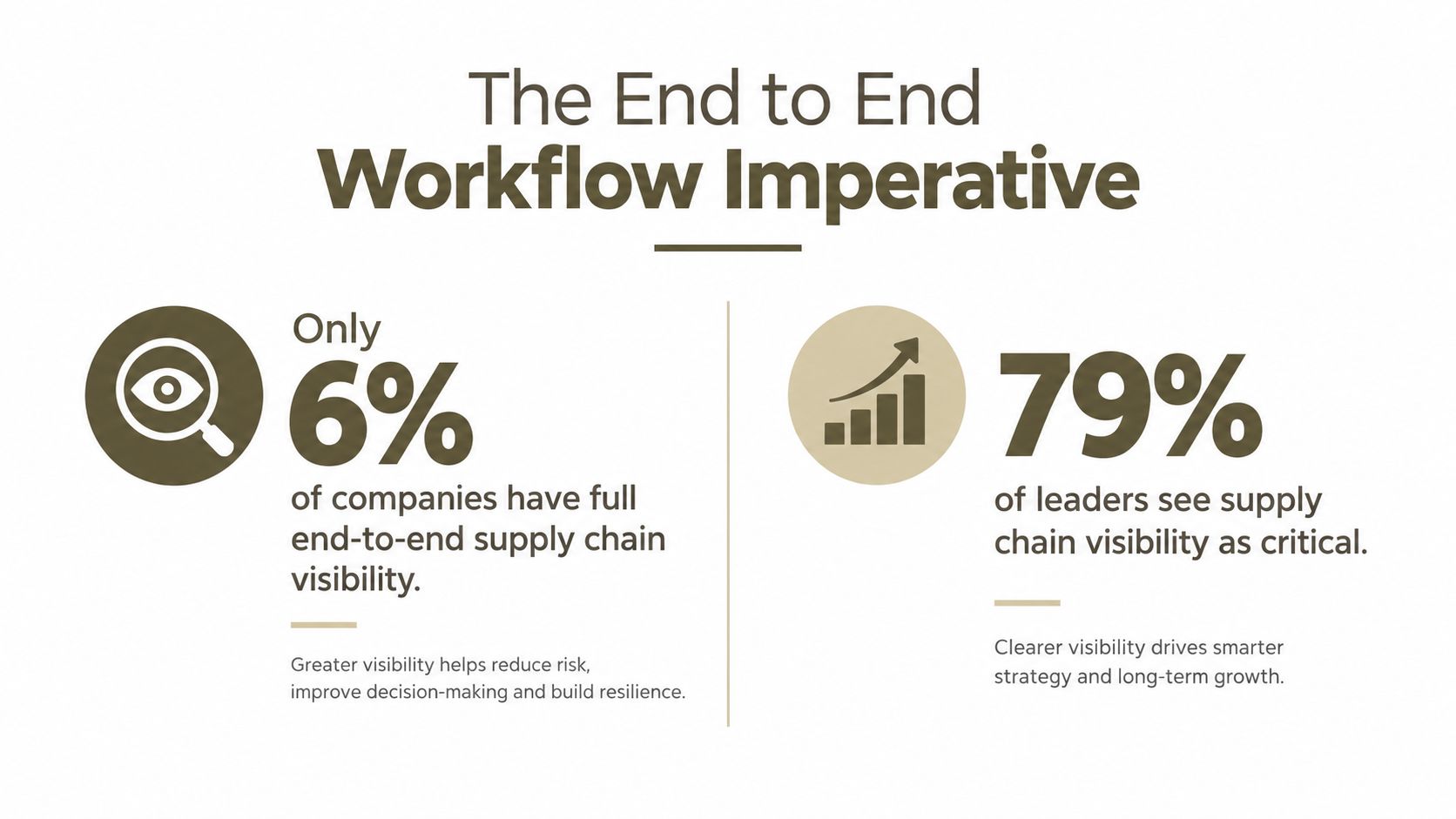
Organizations using end-to-end visibility solutions saw a 35% improvement in on-time in-full performance, while only 6% of companies can currently see their full supply chain end to end. An end-to-end workflow closes that gap by connecting creative decisions, specifications, suppliers, approvals, and production in one governed flow.
For product teams, the problem rarely begins at the factory. It begins when a strong concept leaves the designer's workspace and gets translated through disconnected files, email threads, spreadsheets, sampling notes, and supplier questions. Each handoff creates another opportunity for the original intent to weaken.
A unified workflow treats the product as a continuous information system. The sketch, material decision, construction detail, approval, sample comment, and production export remain connected. That continuity gives designers more control without forcing them to become production planners, and it gives factories clearer instructions without requiring them to reconstruct the product from scattered attachments.
Table of Contents
- The End to End Workflow Imperative
- Phases of Product Development Workflows
- Common Bottlenecks That Slow Production
- How Integrated Platforms Transform Cycles
- Building Your Unified Workflow System
- The Business Case for Modern Workflows
- Getting Started with Your New Workflow
The End to End Workflow Imperative
A traditional development process often looks efficient from inside each department. The designer finishes a concept, the technical designer creates specifications, sourcing requests quotations, and the factory receives a production package. The trouble starts between those activities. A file gets renamed, a measurement changes in an email, a supplier asks a question in a separate thread, and the team loses certainty about which decision is current.
That pattern creates the same visibility gap found in global supply chains. The design team can see the concept. Sourcing can see the request for quotation. The factory can see the latest file it received. Few people can see the entire chain of decisions and dependencies at once.
Research summarized by GITNUX on supply-chain visibility reports that only 6% of companies have full end-to-end supply-chain visibility, even though 79% of executives rank it as a top priority. The same source reports a 35% improvement in on-time in-full performance among organizations using end-to-end visibility solutions. Those findings matter beyond logistics. Product development has its own supply chain, moving from intent to interpretation, from interpretation to specification, and from specification to physical output.
Where creative intent gets lost
Consider a product designer who changes a sleeve shape after reviewing a rendered concept. The visual looks right, but the technical package still contains the previous measurement. A sourcing manager sends the older package to a factory because it sits in a familiar folder. The factory samples from incomplete information, and the designer later rejects the sample for failing to match the approved silhouette.
No individual has necessarily made a careless decision. The system allowed multiple truths to exist at the same time.
Practical rule: If a decision can change the physical product, it should update the same record that controls the next production action.
This is why teams should think beyond individual automation tasks. Resources explaining how to cut costs with workflow automation are useful when they connect automation to operational ownership, not just faster task completion. A faster isolated task can still create downstream work if it produces an untracked version or leaves the next team without context.
McKinsey previously reported that the average supply chain had reached only 43% digitization, while supply-chain functions received attention in just 2% of executives' digital strategies, as summarized by PwC's operations survey. The lesson for product organizations is direct. Buying another tool for one stage won't create end-to-end control unless the tool shares data, ownership, status, and approval logic with the stages around it.
Phases of Product Development Workflows
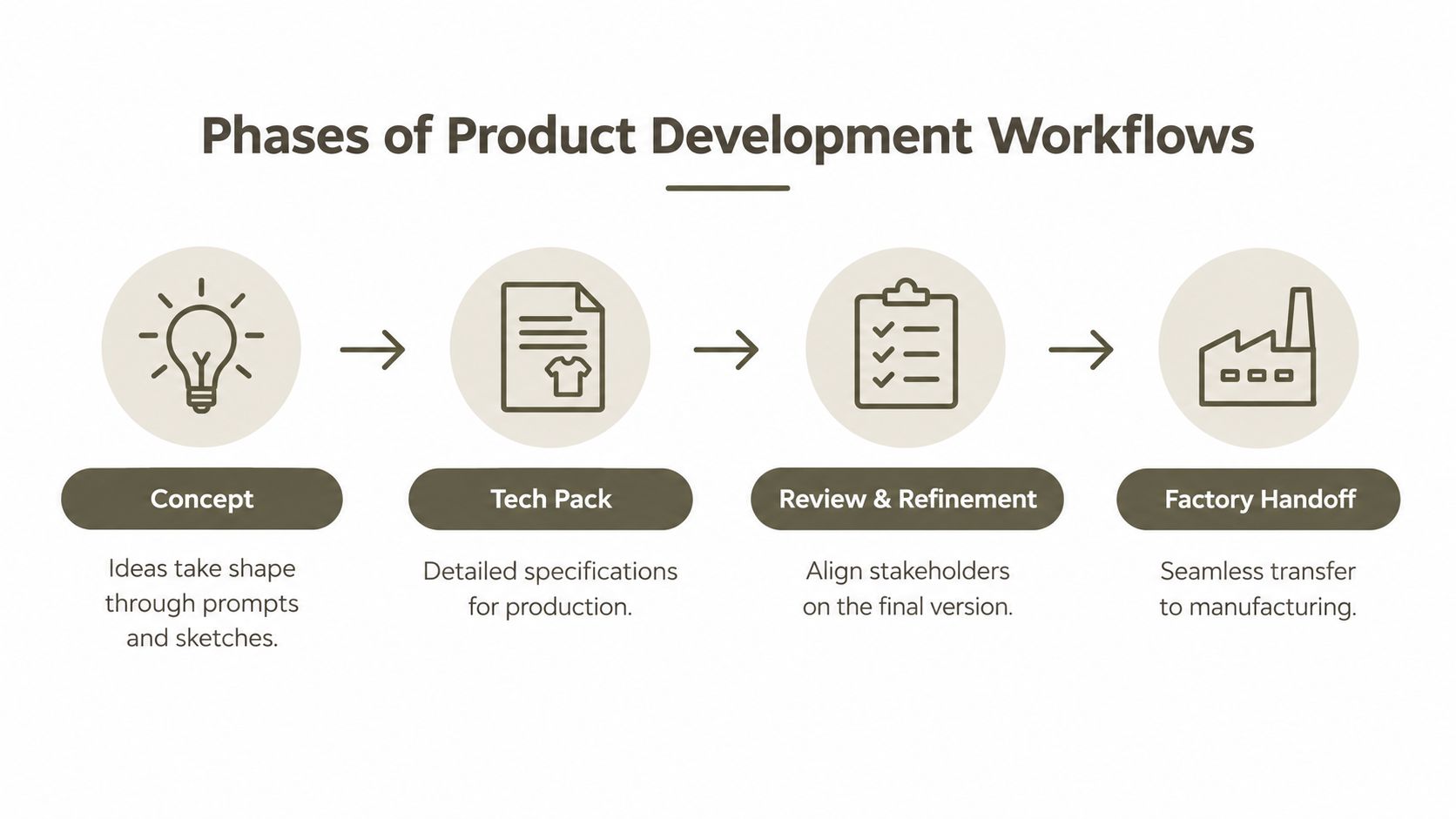
An effective product development workflow follows the product's actual journey. It starts with an expression of intent and ends with information a factory can execute. The names of the stages vary by category, but the information requirements remain consistent.
Concepting
The concept stage turns a market idea, prompt, sketch, or reference image into a product direction. Designers establish silhouette, proportions, materials, color intent, and the details that communicate the product's identity. A useful workflow preserves those inputs rather than treating the first image as the only artifact.
The output should include enough visual information for later decisions. Multi-view imagery, technical sketches, material notes, and a record of approved changes help the technical team understand what the designer meant, not merely what one image happened to show.
Tech pack creation
A tech pack translates visual intent into production language. It should define construction, components, measurements, materials, labeling, finishes, and any tolerances or quality requirements relevant to the product.
Ownership often sits with a technical designer, but the workflow must allow the original designer, sourcing team, and manufacturing partner to comment on the same specification. NIST's digital-thread research evaluated model-based and drawing-based workflows across manufacturing and inspection tasks, including product definition, production requirements, feature decomposition, inspection planning, data collection, and product tracking. The study's focus on cycle time, cost, and quality shows why a tech pack isn't just a document. It's part of an operational thread that continues into manufacturing and inspection. The findings are summarized through this guide to digital product development.
Sampling and review
Sampling tests whether the specification produces the intended physical result. The most valuable sample review does not merely record “approved” or “change this.” It ties each comment to a location, component, image, measurement, or construction instruction.
That structure prevents vague feedback from becoming another email exchange. A reviewer should be able to identify what changed, who approved it, and which downstream files inherit the change.
RFQ and factory handoff
An RFQ needs more than a product image and a target price. Manufacturers need the relevant construction details, component breakdowns, quantities, packaging requirements, and timing assumptions. A factory handoff is complete when the receiving team can price, plan, sample, and produce without rebuilding the product definition.
For teams formalizing this connection, a design-to-production workflow provides a useful reference point for linking creative development with production requirements.
The handoff should also preserve unresolved questions. Hiding uncertainty makes a package look complete while pushing risk into production. A visible exception list is more useful than a polished folder that leaves the factory guessing.
Common Bottlenecks That Slow Production
The familiar bottlenecks in product development are usually information problems disguised as workload problems. Teams often respond by asking people to move faster, work longer, or check more carefully. That approach may help temporarily, but it doesn't remove the structural causes of delay.

Version drift
Version control breaks when files carry more authority than the workflow itself. A designer may approve a revised colorway in a presentation, while the spreadsheet, PDF, and supplier attachment still describe the previous version. Teams then spend time comparing documents instead of developing the product.
The fix isn't a stricter naming convention. Names help people identify files, but they don't define which file is authoritative or show which decisions changed. A unified record should preserve revision history, approval status, comments, and linked production outputs.
Email as an operating system
Email is useful for notification. It's poor at maintaining a product's full context. A message may contain a decision, but the decision becomes difficult to find when it sits beside unrelated questions, forwarded attachments, and replies addressed to different stakeholders.
This creates hidden work. Someone has to read the thread, interpret the latest instruction, update another document, and tell the next team what changed. That labor rarely appears in a project plan, yet it determines how quickly a product moves.
Incomplete specifications
A factory can work from an incomplete tech pack, but it must fill the gaps through assumptions or clarification requests. Those assumptions may concern construction, material behavior, component sourcing, tolerances, or the relationship between a visual detail and a technical instruction.
Incomplete specifications also make quality review harder. If the team hasn't defined the intended result clearly, disagreement at inspection can become a debate about taste rather than a decision against an agreed requirement.
Capacity constrained design teams
Limited design capacity creates a damaging choice between output volume and product quality. Designers spend time recreating views, formatting documents, searching for old components, and answering questions that a connected system could resolve. That leaves less time for concept development and meaningful refinement.
A stronger production workflow gives teams a place to coordinate production planning while keeping design decisions connected to the plan. Automation helps most when it removes coordination overhead without removing the human review that protects product quality.
How Integrated Platforms Transform Cycles
The meaningful comparison isn't between manual work and AI in the abstract. It's between a chain of disconnected activities and a continuous workflow where each output becomes usable input for the next decision.
In a fragmented process, a designer creates a concept in one application, a technical designer rebuilds it in another, sourcing creates an RFQ from a separate file, and the factory receives a package that may not reflect the latest review. Each translation adds time and introduces interpretation risk.
An integrated platform changes the sequence. The designer creates a concept, generates supporting views, records brand and material decisions, develops the technical package, gathers feedback, and exports production assets from a shared product record. The team still needs expertise and approval. It spends less time reconstructing context.
What creates cycle compression
AI can accelerate the early creative stages by generating multiple views from prompts, sketches, or reference images. The value isn't the number of images produced. The value comes from giving the team a consistent base for comparing silhouettes, materials, colors, and construction decisions.
A brand-specific system can also retain aesthetic rules, palettes, moodboards, and recurring product characteristics. That reduces the need to restate the brand direction in every iteration, while manual controls remain important for correcting details that automated generation gets wrong.
The next gain comes from the technical workspace. An agentic tech pack environment can organize construction details and component breakdowns while allowing a technical designer to review and override outputs. Factory-ready exports in formats such as PDF, SVG, or Excel make the information usable downstream, but only if the exports remain tied to the approved version.
What doesn't work
AI-generated visuals alone don't solve a manufacturing bottleneck. A beautiful render without measurements, construction logic, component information, or revision control just creates a more attractive handoff problem.
Nor does connecting tools through superficial integrations guarantee continuity. If each system has its own product identifier, approval state, and version history, the team may still reconcile conflicting records manually.
The test of an integrated platform is not whether it generates content quickly. It's whether a change made by one person remains visible and actionable for everyone affected by it.
Teams evaluating the approach can use this AI product development workflow guide to compare concept generation, specification development, review, and production handoff as one operating process.
Building Your Unified Workflow System
A unified workflow needs more than a central application. It needs a shared definition of what the product is, who can change it, which changes require approval, and how approved information reaches suppliers and production teams.
Start with the product record. It should connect the creative brief, reference assets, generated views, technical details, components, sample comments, RFQ materials, and approved exports. Don't allow the team to treat a shared drive as the system of record unless it can also show relationships, status, ownership, and revision history.
Design the workflow around decisions
Map the decisions that can alter production:
- Visual decisions: Capture changes to silhouette, color, material, finish, and details alongside the affected product view.
- Technical decisions: Connect construction instructions, measurements, components, and tolerances to the version they describe.
- Commercial decisions: Keep RFQ assumptions, supplier questions, quantities, and timing visible to the people who depend on them.
- Approval decisions: Record who approved a change, what they approved, and whether the decision updates the production package.
This structure helps teams find the actual bottleneck. A project may appear delayed in sourcing when the actual issue is an unresolved material choice. Another may appear stuck in technical design when the factory is waiting for a decision that remains buried in email.
Choose practical capabilities
Look for prompt-based creation, brand-specific generation, virtual sampling, technical specification support, supplier collaboration, and production-ready exports. The system should support designers who don't use CAD every day, while still giving technical users enough control to correct, refine, and validate details.
Integrations matter, but avoid buying connectivity before defining ownership. A poorly governed integration can move incorrect information faster. For general task coordination around approvals, dependencies, and owners, teams can also try Pebb for task management, provided task status remains connected to the product record rather than becoming another isolated checklist.
Plan for adoption
Small teams may begin with one product category and a shared approval model. Larger organizations need role permissions, supplier access controls, auditability, and clear rules for when a product moves from creative exploration into controlled production development.
The best system makes the correct behavior easier than the old behavior. If updating the approved product record takes more effort than attaching a file to email, people will return to email.
The Business Case for Modern Workflows
The financial case for an end-to-end workflow doesn't rest on reducing headcount. It rests on removing the rework created when people lack reliable information.
A missing construction detail can trigger a clarification cycle. A stale measurement can create a failed sample. An unresolved supplier question can delay a purchase order. Each event consumes design, technical, sourcing, factory, and management attention. The cost is distributed across teams, so no single department may see the full impact.
Manufacturing automation benchmarks make the operational effect concrete. One set of workflows reported purchase-order creation falling from 2.5 hours to 12 minutes, quality-inspection documentation from 45 minutes to 8 minutes, and schedule updates from more than 3 hours per day to 15 minutes, as documented in this manufacturing workflow automation benchmark. The same source reports an average implementation payback of 7 weeks, with the largest gains attributed to eliminating rework and delays rather than labor savings.
Where the return appears
The first return often comes from fewer clarification loops. When a factory receives complete, current information, internal teams spend less time answering questions that should have been resolved in the specification.
The second comes from design capacity. Designers can explore more directions without spending every available hour on repetitive views, document formatting, and manual file preparation. That doesn't mean replacing judgment. It means reserving judgment for the decisions that require it.
The third comes from responsiveness. A unified workflow lets a team move from a validated concept to a supplier conversation without rebuilding the product package from scratch. That can help brands respond to market signals while the opportunity is still relevant.
The trade-off
Implementation has a real cost. Teams must agree on naming, permissions, approval rules, data ownership, and supplier access. They must also decide which work remains human-reviewed and which steps can run automatically.
The alternative is not free. Fragmented work creates an orchestration burden that often falls on IT and operations. A 2025 benchmark found that 71% of enterprise decision-makers lacked an end-to-end automation platform, while 70% of enterprise automation demand still fell on IT teams. The report identifies security and compliance, legacy integration, scalability, and expertise shortages as major blockers in Jitterbit's automation benchmark report.
A unified workflow earns its place when it reduces that coordination burden without hiding risk.
Getting Started with Your New Workflow
Begin with an audit, not a platform demo. Follow one product from initial brief to factory handoff and record every file, decision, approval, question, and repeated data entry. Mark where ownership changes and where teams wait for clarification.
Then select a narrow pilot. Choose a product with enough complexity to expose handoff problems, but not so much organizational risk that every stakeholder avoids experimentation. Define success in operational terms, such as fewer duplicate files, clearer approval status, faster response to supplier questions, or less manual preparation for the next stage.
Use the pilot to test five conditions:
- Single-source control: Can the team identify the current approved product definition without asking around?
- Revision visibility: Can users see what changed and which outputs need updating?
- Supplier usability: Can an external partner access the information needed without receiving an uncontrolled folder of attachments?
- Human review: Can designers and technical specialists override AI-generated content before it reaches production?
- Data protection: Does the platform state how customer designs are stored, accessed, and used?
Avoid measuring only the speed of concept generation. A faster first stage can make the overall process slower if the technical package still requires manual reconstruction. Measure the complete path from concept through review, RFQ, sampling, and handoff.
Finally, document the operating rules while the pilot is fresh. Decide who owns the product record, who approves technical changes, how exceptions are escalated, and when a version becomes production-controlled. That governance is what turns a collection of useful tools into an end-to-end workflow.
Genpire offers an AI-driven workspace that connects product concepts, technical specifications, supplier collaboration, sampling, and factory-ready exports across consumer-goods categories. Visit Genpire to assess whether its unified workflow can replace your fragmented handoffs with a clearer path from creative intent to production.