The usual advice on ERP vs PLM is to buy both because they're complementary. That's incomplete. A consumer-goods team can own both systems and still send a factory the wrong specification, approve a sample against an outdated component list, or purchase materials for a superseded design. The more useful question is where an approved product definition becomes an executable purchasing and production record, and who controls that transition.
Table of Contents
- ERP and PLM Solve Different Problems
- ERP vs PLM at a Glance
- Which System Owns Each Product Data Object
- How the Released BOM Moves From Design to Purchase
- Where ERP and PLM Integration Projects Stall
- Choosing an ERP and PLM Stack by Company Stage
- Confirm the Minimum Product Data Before Choosing
ERP and PLM Solve Different Problems
The assumption that ERP and PLM are interchangeable breaks when someone changes the product after commercial planning has begun. A purchasing system needs a dependable order record. A designer needs to revise a material, construction detail, or assembly without silently changing what purchasing has authorized.
Their origins explain the distinction. ERP grew from material requirements planning and MRP II during the 1980s, then expanded into finance, purchasing, logistics, and other enterprise functions during the 1990s, according to the Arsandis PLM and ERP white paper. PLM addresses the engineering-data problem: keeping product structures, technical files, specifications, and revisions under control.
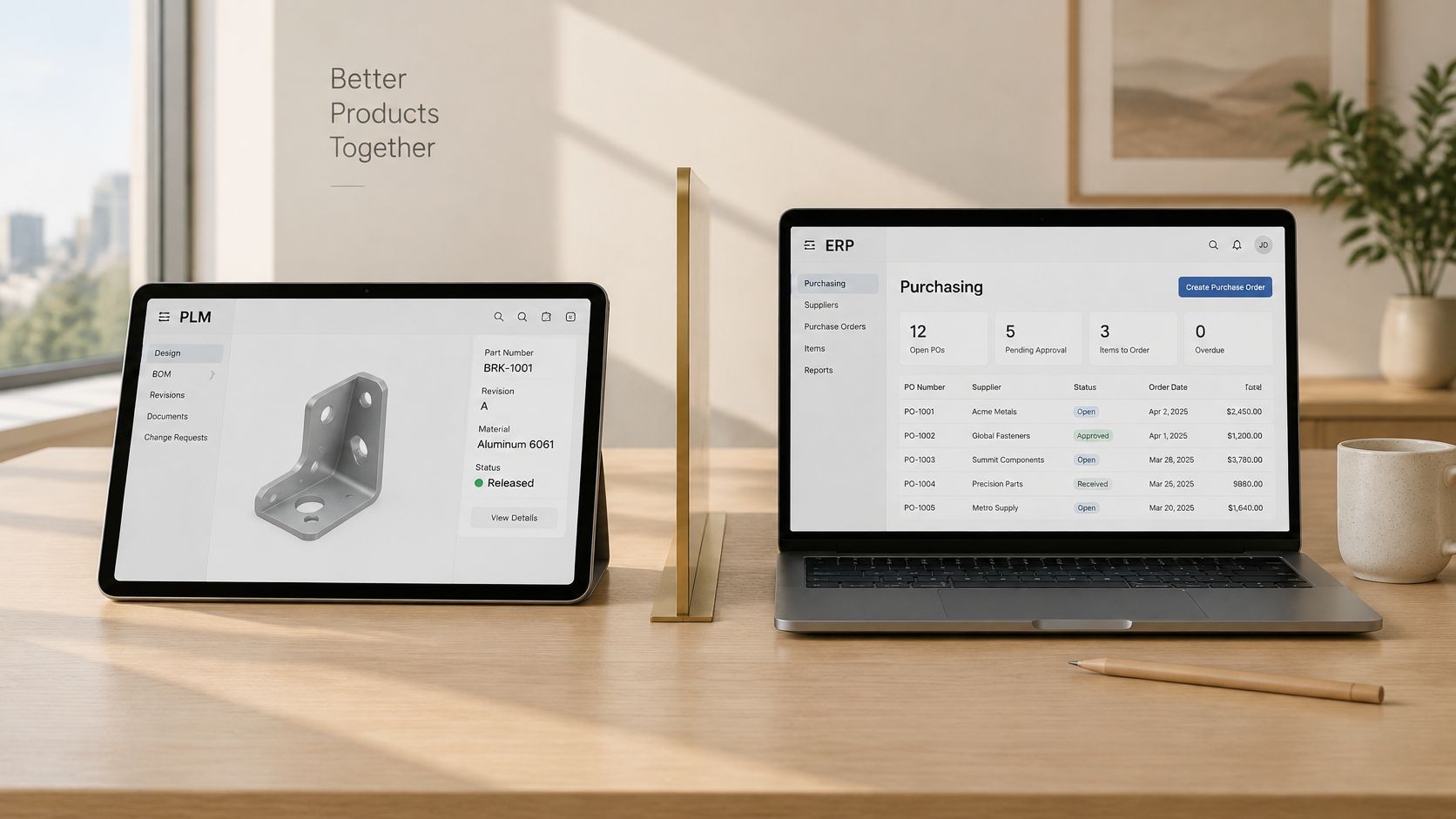
For a consumer-goods company, ERP governs operational execution, while PLM governs product definition. Neither category, by itself, guarantees continuity between a designer's approval and a buyer's purchase order.
That doesn't mean every company must immediately purchase a full enterprise stack. A small label may need disciplined specifications and order tracking before it needs formal engineering-change management. A manufacturer with complex assemblies may need controlled change before it needs another design tool.
Decision rule: Define the boundary between product approval and commercial execution before choosing the software.
Compare systems by their records, ownership rules, and release behavior, not by overlapping feature labels. The decisive requirement is whether the team can identify exactly what the factory is authorized to make.
ERP vs PLM at a Glance
| Dimension | ERP | PLM |
|---|---|---|
| Core question | What can we plan, buy, make, and ship profitably? | What exactly is the product, and which version is approved? |
| System of record for | Business execution: planning, procurement, inventory, costing, fulfillment, finance | Product definition: requirements, CAD and technical documents, configurations, compliance, revision history |
| Core data | Quantities, prices, dates, suppliers, inventory balances | Parts, assemblies, BOM structures, specifications, drawings, change orders |
| Handling of change | Changes flow into orders, stock levels, and costs | Engineering change orders move through controlled approval and release |
| Typical day-to-day users | Finance, purchasing, production planners, warehouse teams | Designers, technical designers, engineers, quality and compliance teams |
The distinction is between defining an authorized product and executing business transactions against it. Aptean's PLM vs ERP comparison places requirements, technical documentation, configurations, and revision history in PLM, while assigning procurement, production planning, inventory, costing, fulfillment, and finance to ERP.
Read the table as a division of accountability, not a prohibition on shared information. A planner may need to view a drawing, and a designer may need to understand material availability. Visibility across systems doesn't require both applications to become authoritative editors of the same field.
The operational boundary
PLM should govern the approved product structure and release state. ERP should consume the released bill of materials, or BOM, together with the production information needed to plan purchases, capacity, work orders, and inventory.
For example, approving a different zipper establishes what a bag should contain. Determining whether existing zipper stock can be consumed, whether open orders need amendment, and how the replacement affects valuation requires operational decisions. Those decisions are related, but they aren't interchangeable.
What goes wrong with substitution
- ERP used as PLM: A component description may be updated without preserving the supplier review, sample decision, or technical approval that justified the change. The item record exists, but the reasoning and revision trail are weak.
- PLM used as ERP: A complete specification doesn't establish inventory valuation, run material requirements planning, issue purchase orders, or fulfill customer orders. Product completeness isn't operational completeness.
The practical selection test is therefore not whether a vendor offers a BOM screen. Ask whether its records support the decisions your team must authorize, audit, and reverse. A shared label can conceal very different controls.
Which System Owns Each Product Data Object
The difficult question is where product data should change form, not which application should contain every product-related field. Tech-Clarity's ERP and PLM integration analysis identifies the difficulty of passing manufacturing information between tools and the importance manufacturers place on connecting engineering and manufacturing applications.
The following ownership map is a recommended operating model for a consumer-goods workflow. It assigns a master to each object without assuming that every implementation uses identical software modules.
| Data object | PLM owns | ERP owns | Handoff rule |
|---|---|---|---|
| Engineering BOM (EBOM) | Master product structure and approved revision | Consumes a released copy only | Transmit released revisions, never working drafts |
| Manufacturing BOM (MBOM) | Definition derived from the released EBOM, with manufacturing approval | Uses the released structure for purchasing and work orders | Preserve component IDs, quantities, and units of measure |
| Component and material IDs | Master identifier and specification in this operating model | Mirrors the identifier | Never create another ID for the same component |
| Supplier specifications | Specification and tech pack revision | Supplier record and purchase terms | Link each purchase order to a specification revision |
| Color and material variants | Approved variant structure and status | SKUs and inventory per variant | Map each sellable approved variant to its SKU before ordering |
| Purchase cost and valuation | Component references, not authoritative purchase prices | Costing, valuation, and margin | Roll costs up in ERP from the released BOM |
| Effectivity dates | Approved product-change effectivity | Receipt and production scheduling against that effectivity | Release effectivity before an order references it |
Separate engineering intent from manufacturing use
The EBOM describes the engineered product. Manufacturing engineers or production specialists translate that structure into an MBOM that reflects how the factory will procure and assemble it. Name the manufacturing approver explicitly, even if both structures live in PLM.
Component identity must survive that translation. If a lining material receives a new identifier merely because purchasing imports it into ERP, the team loses a dependable way to reconcile specifications, orders, and stock. Where an existing ERP already masters item numbers, retain that authority rather than introducing a competing identifier registry.
Supplier records need a similar distinction. Technical teams own the required material properties and approved specification; purchasing owns commercial terms. An approved supplier relationship doesn't mean every specification revision has automatically been accepted by that supplier.
Define the change boundary at field level
For variants, distinguish a design option from an orderable item. A proposed color belongs in development; an approved sellable configuration needs an explicit SKU mapping before commercial use.
For effectivity, design approval and operational implementation must agree. A target date is insufficient if purchasing has already placed orders against the previous revision. Record the applicable lot, order, or production boundary when a calendar date alone would be ambiguous.
Every controlled object needs an authoritative owner, a stable identifier, a release state, a revision, and an exception path.
The unresolved question should become an assigned task: when a design changes after a request for quotation, or RFQ, who approves each affected field, and who determines whether existing quotations and orders remain valid?
How the Released BOM Moves From Design to Purchase
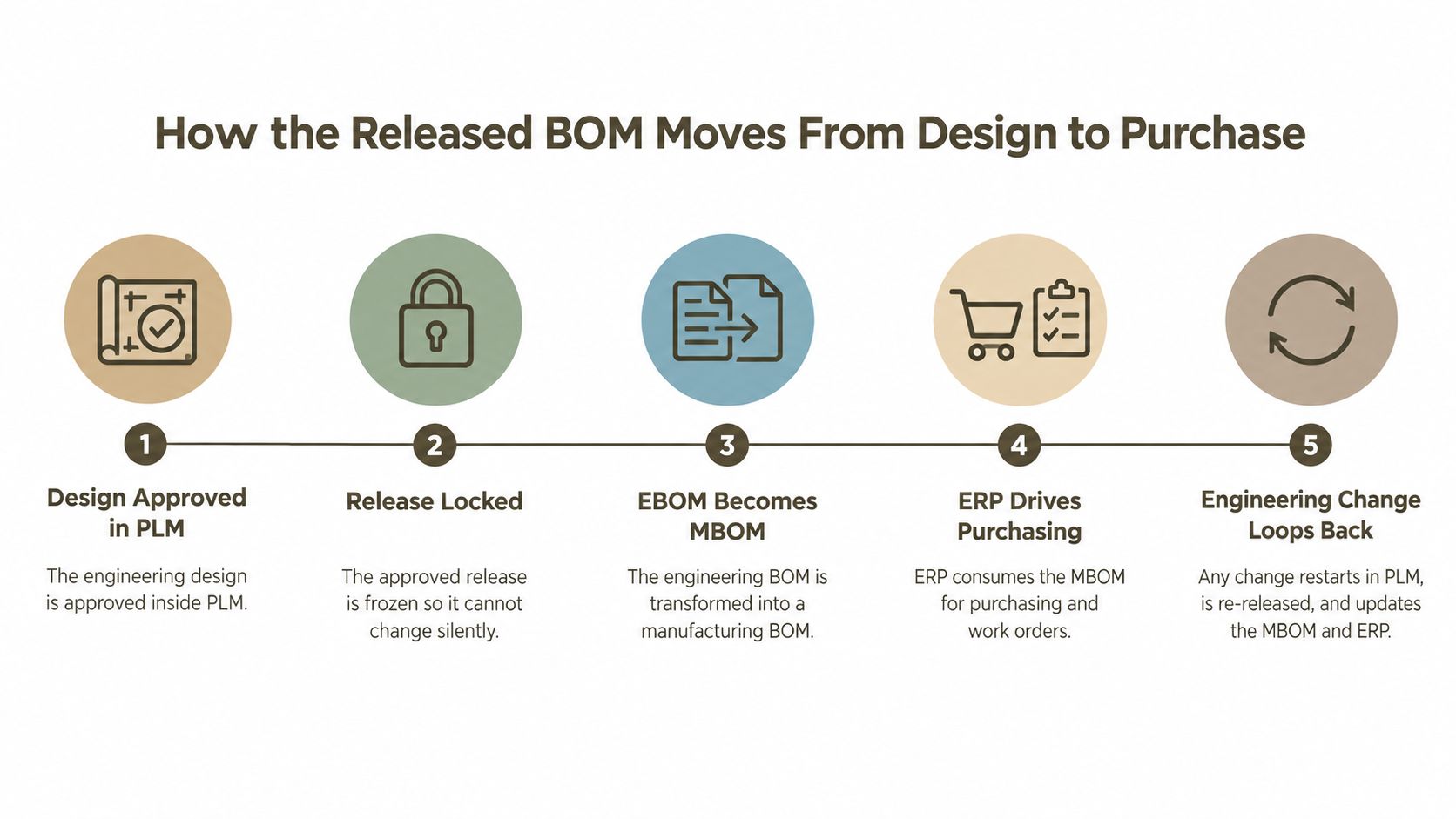
Consider a bag whose lining changes after the factory has quoted it. The designer updates the sample specification, but purchasing still holds the original quotation. A successful handoff must connect the technical approval to the commercial consequence, not merely deliver another attachment.
Move an approved release, not a loose file
- Approve the design in PLM. The technical owner confirms the lining specification and sample decision. A factory comment alone shouldn't authorize a material substitution.
- Lock the release. Preserve the approved specification and its approval record. Subsequent edits create a controlled revision rather than overwriting the quoted baseline.
- Transform the EBOM into the MBOM. Manufacturing confirms component quantities, consumption units, approved alternates, and production-specific additions. The replacement lining retains its traceable relationship to the product revision.
- Release the manufacturing record to ERP. Purchasing receives the approved structure and determines whether the supplier must requote or amend an order. Planners assess the applicable production boundary.
- Route later changes through a logged request. The request identifies affected specifications, quotations, stock, and orders. Technical approval doesn't authorize purchasing to ignore existing commitments without review.
A spreadsheet can carry this information, but a file export alone doesn't enforce its meaning. The release package needs component attributes, quantities, alternates, change status, approval metadata, and effectivity, with a receiving-system acknowledgment or an exception record.
For related implementation context, the production-planning workflow provides a useful starting point for connecting product preparation to downstream planning. If the proposed change also involves a different production method, American Additive Manufacturing's resource on rethinking production with 3D printing offers additional context for that manufacturing discussion; it doesn't replace product-release approval.
Measure the handoff rather than promising savings
A CIMdata integration report cited a 75% reduction in the time, cost, and errors associated with re-keying data between PLM and ERP and a 75% reduction in BOM-error cost when BOMs were created once and managed consistently across both systems. These are reported integration outcomes, not guaranteed savings for a consumer brand.
Baseline duplicate-entry time, BOM discrepancy rate, engineering-change latency, and inventory obsolescence before implementation. Define the start and end of each measurement so that faster data transfer isn't mistaken for faster approval, and a corrected import isn't mistaken for a prevented purchasing error.
Where ERP and PLM Integration Projects Stall
In 2025, 52% of surveyed North American manufacturers planned to implement emerging technologies or data solutions, while 49% reported partly or completely manual inventory-management processes, according to Aptean's manufacturing technology trends analysis. Those findings describe investment intentions alongside existing manual work, not proof that purchasing more software resolves that work.
Buying both systems doesn't automatically create product-to-production continuity. Feature breadth is a poor substitute for deciding who handles a rejected import, an unrecognized component, or a late supplier substitution.
Budget for the work outside the connector
The integration scope should include the decisions people make when normal processing fails. A connector can transmit a missing unit of measure just as efficiently as a valid one unless someone defines validation and rejection rules.
- Data cleanup: Reconcile duplicate materials, inconsistent descriptions, obsolete revisions, and supplier naming before migration. Otherwise, the team automates ambiguity.
- Exception handling: Assign responsibility for failed transfers and establish whether purchasing must stop, use an approved fallback, or request clarification.
- Training: Teach designers what release means and teach planners how to distinguish a pending engineering proposal from an authorized manufacturing change.
- Security review: Determine who may view, export, approve, or amend sensitive specifications, including external factory users.
MA Hydraulics Ltd's practical workflow for system integration is useful supplementary context when discussing connected systems with operational stakeholders. Treat that discussion as process design: document inputs, outputs, responsibilities, and failure responses before debating interface technology.
Test the smallest reliable workflow
Consider a small accessories brand using outsourced factories. Its immediate difficulty may be that the designer, sourcing manager, and factory each hold a different sample specification. Adding an enterprise module won't resolve that disagreement unless someone establishes which record governs the next action.
Trace a product through concept, specification, sourcing, sampling, and production. At each transition, identify the record the recipient needs, the person authorized to approve it, and the evidence that the recipient accepted it.
Keep exploratory work flexible. Make commitments controlled.
Moodboards, rejected concepts, and exploratory sketches can remain outside ERP. The buyer needs the approved procurement definition, not every visual that informed it.
A broader supply-chain management workflow can help frame the downstream responsibilities, but the implementation test should stay concrete: can purchasing identify the approved specification, can the factory confirm receipt, and can the team explain what happens when either disagrees? If not, the missing capability is governance across the handoff, not necessarily another module.
Choosing an ERP and PLM Stack by Company Stage
| Company stage | Main pain | Stack that fits | Where a product-definition workspace fits |
|---|---|---|---|
| Solo founder or small label with few SKUs | Concepts and tech packs scattered across agency files | Standalone product-definition workspace with controlled spreadsheets for orders | Concept development, tech packs, and supplier sampling |
| Growing brand with outsourced factories | Revisions drift between email, spreadsheets, and factory files | Product-definition workspace plus ERP when purchasing and inventory require stronger control | Shared specifications and governed exports |
| Mid-size manufacturer with in-house engineering | Engineering changes stall production | Full PLM integrated with ERP through a managed BOM | Upstream concepting and supplier specifications; PLM and ERP remain authoritative |
| Enterprise with multiple plants and formal change boards | Compliance, multi-site costing, and planning | Enterprise PLM and ERP, often connected to manufacturing execution systems | Design-stage front end, not the enterprise system of record |
Treat these stages as operating situations, not SKU thresholds. A compact assortment with complex assemblies, regulated materials, and many suppliers may require stronger control than a larger assortment of simple products.
Match the stack to the decision burden
A solo founder can start with a standalone workspace if it preserves approved specifications, organizes supplier feedback, and produces a dependable manufacturing package. The founder still needs order discipline, but formal engineering-change boards may add administration without addressing the immediate problem.
For a growing outsourced brand, look for the point where purchasing and inventory decisions can no longer be managed reliably alongside development files. That's a reason to strengthen execution systems, not to move every sketch into ERP. Require a repeatable export and acceptance process before attempting broad automation.
An in-house manufacturer faces a different burden. Engineering changes may affect tooling, assembly instructions, purchased components, and work already underway. Formal PLM becomes more appropriate when the team needs impact analysis and controlled approval across those relationships.
At enterprise scale, evaluate plant-specific manufacturing definitions, access controls, audit requirements, and change authority. A visually capable front end can support development, but it shouldn't bypass the records that authorize production.
Place the upstream workspace honestly
A product-definition workspace can turn prompts, sketches, and references into multi-view concepts, construction details, component breakdowns, tech packs, and supplier-facing assets. Excel, PDF, and SVG exports can support downstream transfer, provided the receiving team maps them to controlled records.
Those capabilities don't establish ERP costing, inventory valuation, fulfillment, or enterprise change-board authority. Evaluate the workspace on the quality and controllability of its outputs, not on whether its marketing language spans the entire lifecycle.
For intellectual property, verify the contractual policy governing customer designs, training use, retention, access, and exports. A stated policy that customer designs aren't used to train models is relevant, but procurement should confirm how that commitment applies to its account and external collaborators.
Use a sample product to test the boundary. Ask the vendor to produce a specification, revise an approved component, export the result, and demonstrate how a factory distinguishes the old package from the new one. That exercise reveals more about stack fit than a feature checklist alone.
Confirm the Minimum Product Data Before Choosing
Choose a product line for a bounded pilot before committing to a stack. The purpose is to test whether people can authorize, transfer, and execute the same product definition without relying on private explanations in email.
Build an executable test
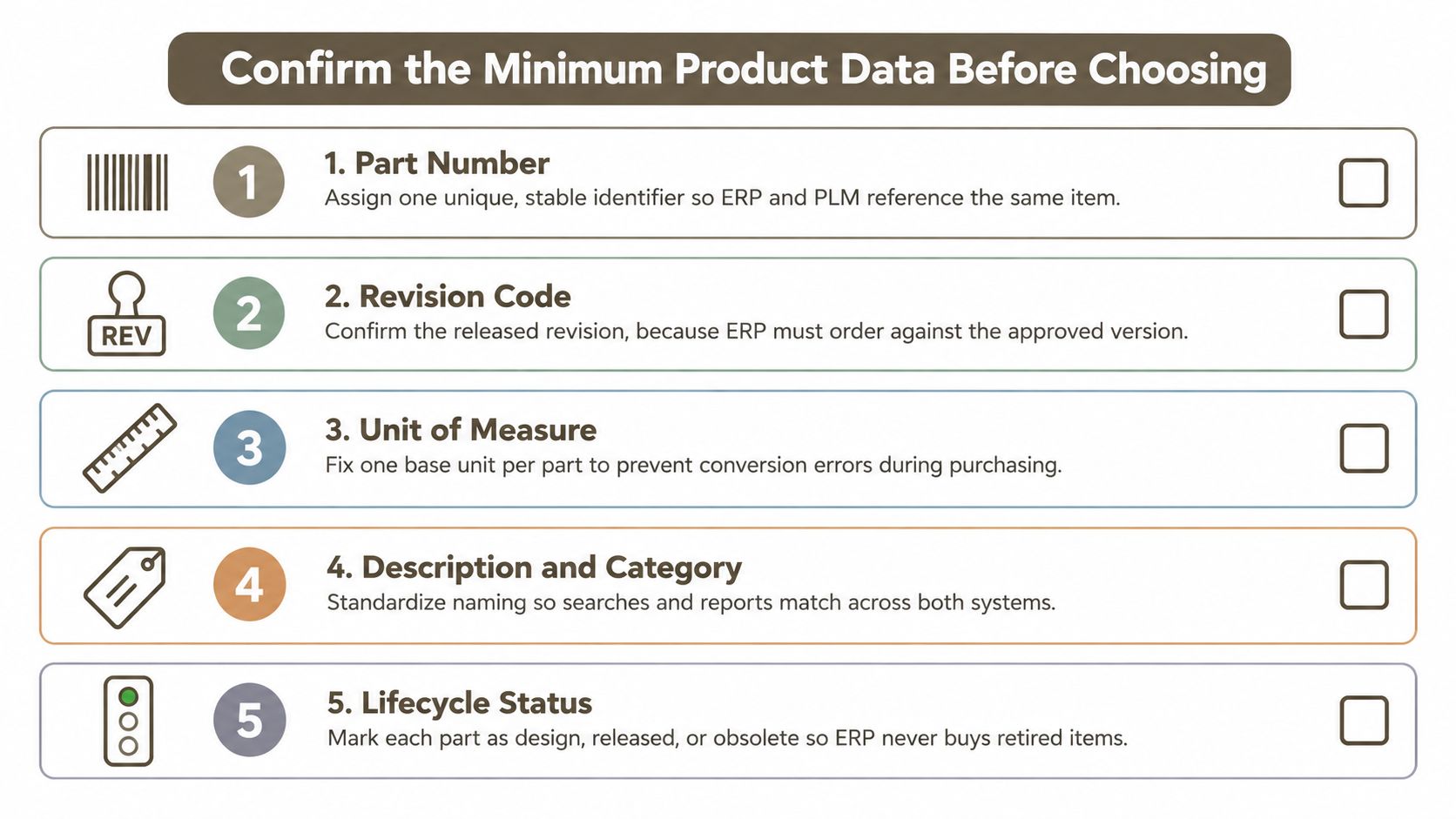
Standardize the minimum product record. Include the style or SKU code, approved revision, component list with stable IDs, quantities, alternates, materials, colors, construction details, approved supplier, units of measure, effectivity, and approval status. Use a tech pack definition and guide to check the supplier-facing package, then confirm that purchasing can consume the relevant fields without interpretation.
Assign field ownership and change authority. Name the person accountable for each field and the approver for changes after RFQ or sampling. Distinguish permission to propose an edit from permission to release it, particularly where technical and commercial decisions require different approvals.
Establish a quotation baseline. Freeze the specification issued for RFQ as an identifiable package, while allowing development to continue through new revisions. Any later change should trigger a logged assessment of quotation validity, sample approval, and purchase-order impact rather than silently replacing the original attachment.
Pilot the complete route through the factory. Run the selected line from approved specification through quotation, sampling, and the purchasing handoff, recording the baseline measures defined for integration. Include an intentional exception, such as a proposed alternate material, so the team tests rejection and reapproval rather than only a successful transfer.
Choose the stack from the observed constraint. If people struggle to create complete specifications, test the upstream workspace and its exports; if they struggle to control engineering changes across factories, scope PLM. If the approved definition is dependable but purchasing, inventory, or financial execution remains unreliable, prioritize ERP and its receiving controls.
Pilot acceptance test: A buyer and a factory representative should independently identify the same approved product revision and explain what happens when it changes.
Name the product line, its accountable data owner, and the first metric to baseline before booking software demonstrations. Give vendors that actual workflow and require them to demonstrate the difficult handoff, not just the polished opening screen.
Genpire offers concept creation, structured tech packs, supplier-facing assets, and exports that can support the product-definition work upstream of ERP. Visit Genpire to test a product from your selected pilot line, then assess whether its specification and export workflow gives purchasing a clear, controlled manufacturing handoff.