A factory can now use AI to inspect more than 10,000 parts per hour, identify defects as small as 50 microns, and respond in less than 100 milliseconds, according to an industrial visual inspection system described by iFactory. Yet the more revealing figure is this: a 2026 global survey found that 72% of manufacturers had adopted AI in some form, while only 10% had deployed it at scale (Parsec).
That gap explains what AI in manufacturing really means today. It isn't a single robot or software feature replacing an entire production team. It's a connected set of tools that reads factory data, spots patterns, predicts problems, supports decisions, and creates product information before a physical item reaches the line.
For design, engineering, and sourcing teams, the important question extends beyond what happens beside a machine. How AI is used in manufacturing increasingly begins upstream, with product concepts, technical specifications, supplier communication, sampling, and production assets. When those inputs are incomplete or inconsistent, factory-floor intelligence can only do so much.
Table of Contents
- Introduction to How AI Is Used in Manufacturing Today
- Understanding How AI Works on the Factory Floor
- Core Applications That Define How AI Is Used in Manufacturing
- Real World Examples and Results From AI in Manufacturing
- How to Scale AI From Pilot to Enterprise Deployment
- Common Challenges and How to Overcome Them
- Next Steps for Design and Sourcing Teams Embracing AI
Introduction to How AI Is Used in Manufacturing Today
AI in manufacturing starts before production. A design team can use a sketch or reference image to create multi-view visuals, draft specifications, and prepare production assets. A planning system can then compare demand with capacity, a maintenance model can flag unusual machine vibration, and a vision system can inspect parts as they pass the line. A worker assistant may retrieve the correct setup instruction at the point of use.
Each tool addresses a specific decision. Together, they connect product information, equipment signals, quality records, and supply-chain data so teams can act earlier and reduce manual handoffs.
The adoption figures show why this subject needs a practical explanation rather than a list of futuristic promises. In the Parsec survey, 72% of 1,200 manufacturing leaders reported some form of AI adoption in 2026, compared with 53% in 2024, while only 10% reported deployment at scale (Parsec's manufacturing adoption analysis). The survey also found that 22% were actively implementing AI, with other organizations still in pilot or early-use stages.
For design and sourcing teams, the upstream connection matters. A product idea can begin as a prompt, sketch, or reference image, then become a technical drawing, component list, measurement set, supplier request, sample comment, and production file. AI can help compress these transitions, much like turning several manual translation steps into a shared working language. That reduces opportunities for missing details, outdated versions, and factory misinterpretation, provided people review the outputs against approved requirements.
Practical rule: Treat AI as a workflow capability, not a standalone feature. Its value comes from connecting reliable inputs to a decision someone must make.
Teams planning broader change can use this practical guide for factory digitisation to examine the systems, processes, and change-management foundations around factory technology. The overview of AI manufacturing trends adds context on how these applications are developing.
This guide covers eight areas: predictive maintenance, visual inspection, quality prediction, digital twins, generative design, supply-chain optimization, robotics, and worker assistance. It follows the full path, from concept creation and technical documentation to production execution and continuous improvement, so readers can see where factory-floor AI fits within the wider concept-to-factory workflow.
Understanding How AI Works on the Factory Floor
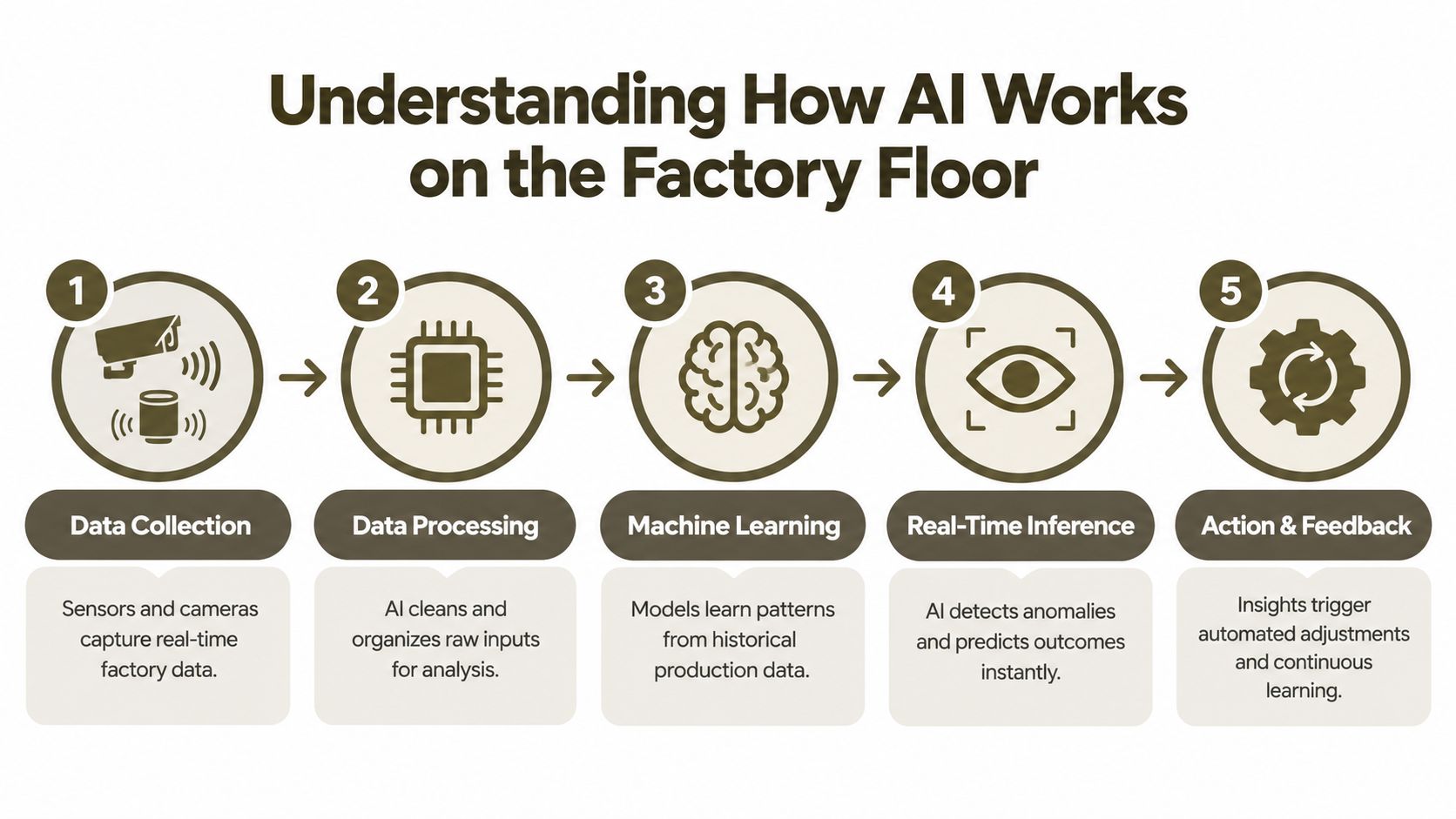
AI on the factory floor follows a practical chain: collect signals, learn patterns, evaluate new conditions, support a decision, then capture the result for improvement.
Start with production data
Machines, cameras, controllers, inspection stations, maintenance systems, MES platforms, and ERP records generate information about temperature, vibration, cycle behavior, material usage, defect images, order status, and previous repairs.
AI cannot interpret every input automatically. Teams must collect relevant records, align timestamps and product identifiers, remove obvious errors, and define acceptable and unacceptable outcomes. The same discipline applies upstream: design files, measurements, tech packs, and production assets need consistent names, versions, and approved references before a model can use them reliably.
Let models learn patterns
Traditional automation follows rules written in advance. AI models learn relationships from historical examples. An experienced operator may recognize that a particular sound, temperature change, and cycle irregularity often come before a tooling problem. A machine-learning model searches for similar relationships across many records, then requires testing against real operating conditions.
Machine learning supports prediction and anomaly detection. Computer vision interprets images or video for inspection, alignment, and measurement. Generative AI creates or transforms content such as technical descriptions, product concepts, work instructions, and production documentation. In a concept-to-factory workflow, this can shorten the handoff from an approved idea to clearer technical assets before production begins.
Turn patterns into decisions
After training, a model evaluates new information, a stage called inference. It may classify an image as acceptable or suspicious, estimate the likelihood of equipment failure, suggest a schedule adjustment, or retrieve an instruction for an operator.
The output may support existing automation rather than control a machine directly. An operator can review a recommendation before changing a setting, while a quality engineer confirms whether a flagged image shows a genuine defect. Human review also helps catch errors caused by incomplete data or a product variation the model has not seen.
Close the feedback loop
AI improves only when the factory records what happened. An operator's confirmation of a defect, rejection of a false alarm, or identification of an unusual material condition gives the system feedback for monitoring and later model updates.
Industry adoption has moved beyond isolated experiments, but many manufacturers still struggle to extend AI across sites and workflows, as the earlier survey findings indicate. A successful demonstration proves that a model can work in one setting. A dependable production capability also requires clean inputs, defined ownership, review procedures, and feedback that continues after deployment.
Core Applications That Define How AI Is Used in Manufacturing
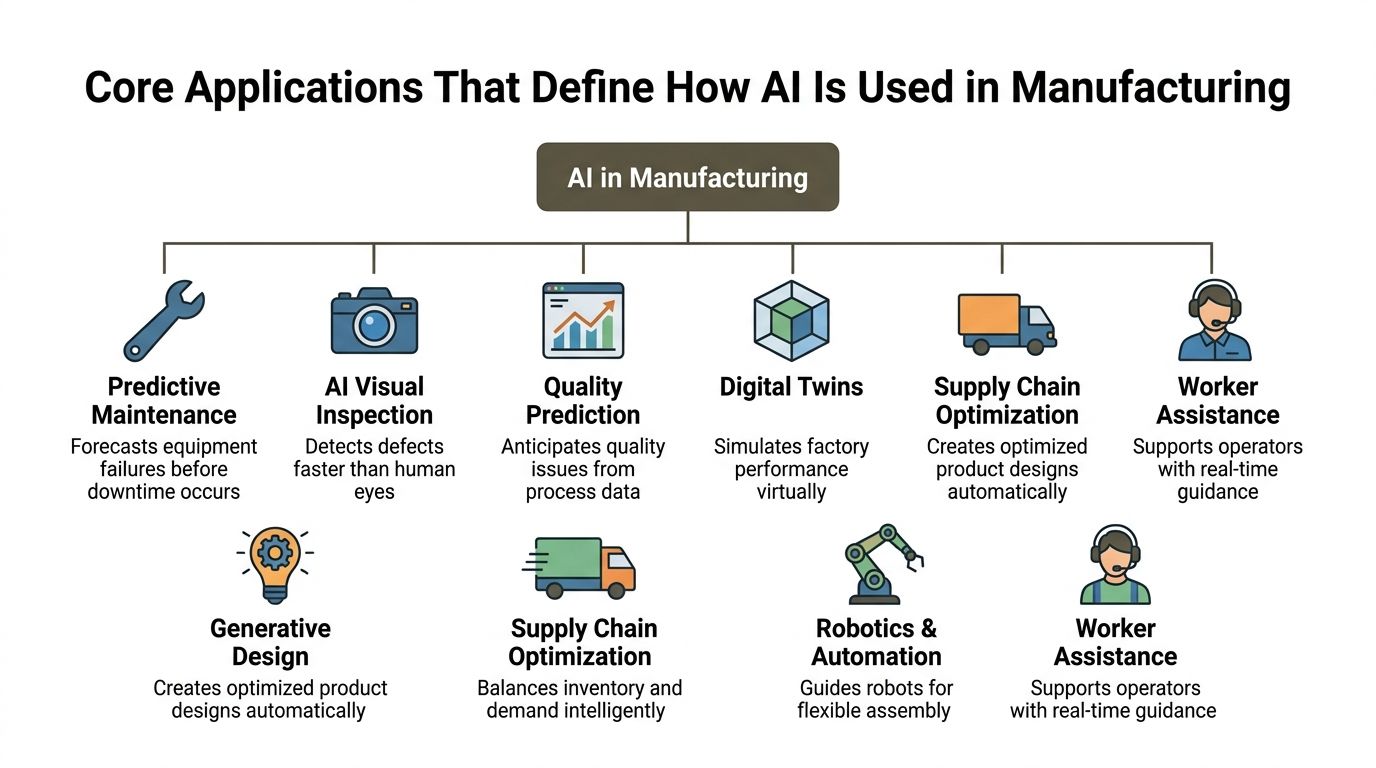
AI addresses different factory constraints. Maintenance teams need early warnings, quality teams need consistent inspection, and sourcing teams need clearer material and supplier risk. The common pattern is simple: collect relevant signals, interpret them, and support a decision. These applications also connect to the upstream concept-to-factory workflow, where AI can shorten early design exploration, technical documentation, and asset preparation before production starts.
Equipment and process intelligence
Predictive maintenance examines time-series signals such as vibration, temperature, and cycle patterns for changes linked to possible failure. Teams can then schedule service around the machine's condition instead of following a fixed interval or waiting for a breakdown. A 2026 benchmark review reports 30% to 50% lower unplanned downtime than reactive programs, while mature deployments showed 45% fewer unplanned outages on average (benchmark review).
Quality prediction examines process conditions before a defect appears. It can connect settings, materials, environmental conditions, shift information, and earlier inspection results, helping engineers identify combinations that deserve attention.
A digital twin represents a product, machine, line, or process in software. Teams can compare operating scenarios, test a change virtually, and reduce disruptive physical trials. For design and sourcing groups, the same model-based approach can clarify manufacturability earlier, before a concept becomes a detailed production package.
Product and production execution
Generative design creates product candidates against constraints such as material, performance, weight, cost, and manufacturability. Engineers still assess the results, but AI broadens the alternatives considered during concept development. It can also help turn an approved direction into clearer specifications, technical assets, and handoff material for factories.
Robotics and automation use AI to guide flexible tasks, identify objects, adapt to variation, or support assembly. Fixed automation usually repeats a narrowly defined motion under stable conditions. AI-guided equipment can respond when parts, positions, or work conditions vary.
AI visual inspection uses cameras and computer-vision models to identify defects, classify images, and flag unusual results. It can increase inspection coverage while giving quality specialists a consistent evidence stream for review.
Planning and human support
Supply-chain optimization combines demand, orders, inventory, supplier performance, lead times, logistics, and capacity information. Its recommendations help planners compare allocation and replenishment choices when conditions change, such as a delayed material shipment or a constrained production line.
Worker assistance gives operators and technicians faster access to approved procedures, machine manuals, setup instructions, and maintenance history. The assistant should use controlled company sources, particularly when instructions affect safety or product quality.
| Application | What It Does | Primary Outcome |
|---|---|---|
| Predictive maintenance | Detects equipment changes before failure | Fewer unexpected stoppages |
| Visual inspection | Reviews product images for defects | Earlier, more consistent quality decisions |
| Quality prediction | Connects process conditions with quality results | Reduced risk of recurring defects |
| Digital twins | Tests scenarios in a virtual model | Safer process and product decisions |
| Generative design | Produces options against engineering constraints | More alternatives during development |
| Supply-chain optimization | Compares demand, inventory, and capacity signals | Better production and material planning |
| Robotics and automation | Helps equipment respond to variable inputs | More flexible task execution |
| Worker assistance | Retrieves trusted operational knowledge | Faster troubleshooting and handovers |
Real World Examples and Results From AI in Manufacturing
Factory-floor AI produces its clearest results when it improves a defined decision. The decision may involve releasing a part, scheduling service, or clarifying what a supplier must build. The value comes from making that decision earlier and more consistently.
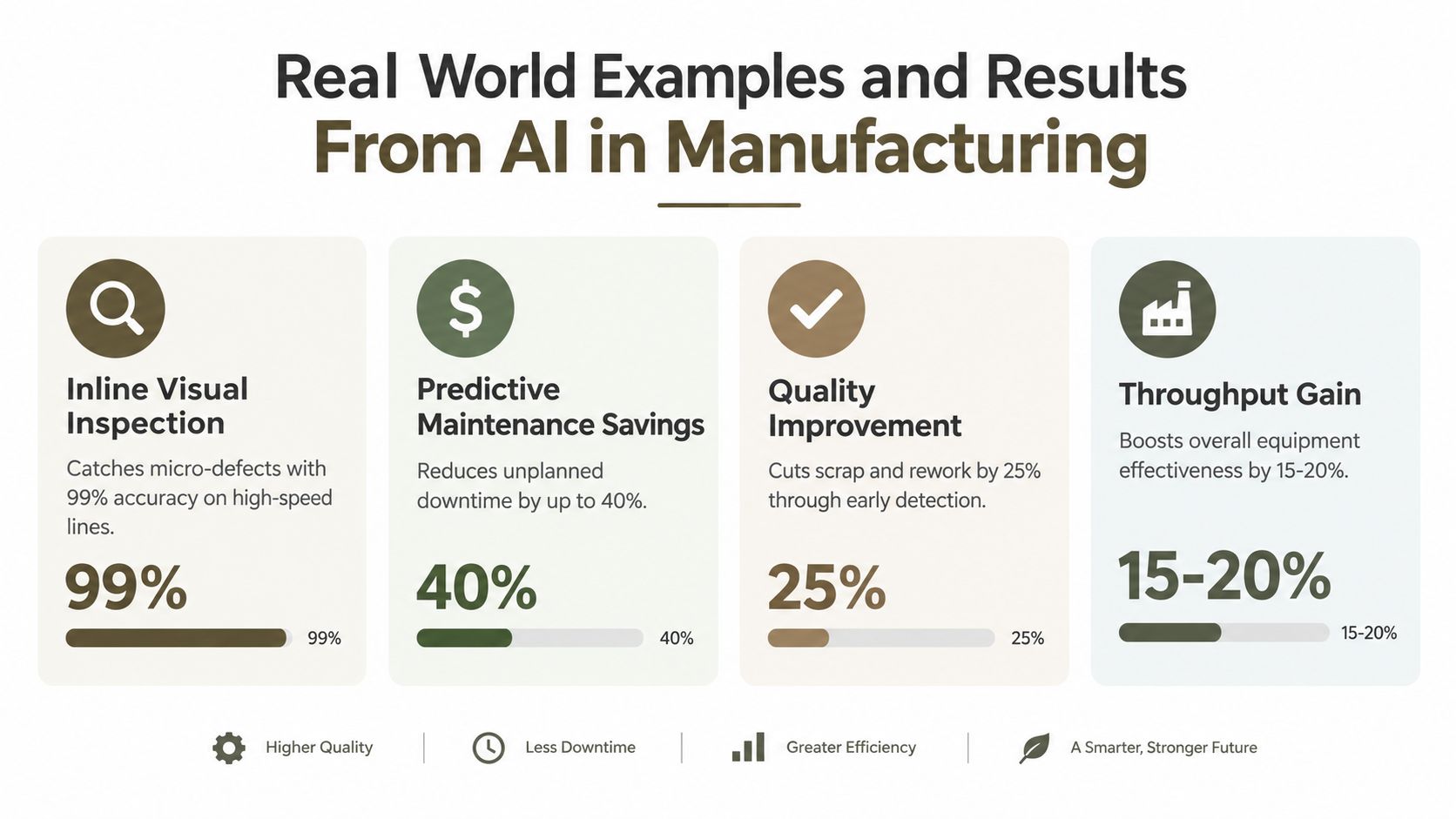
Inline inspection at production speed
One industrial computer-vision system reports inspecting 10,000+ parts per hour, with sub-100 millisecond latency, 99%+ detection accuracy across shifts, and detection of defects down to 50 microns (iFactory's visual inspection example). A defect identified beside the line can be isolated before it reaches assembly, packaging, or shipment.
The same example describes an electronics manufacturer reducing defect escapes from 2.3% to 0.1% and eliminating $1.8 million in annual warranty exposure. The practical lesson is straightforward: inspection affects cost most when it prevents a defect from traveling through later operations.
Maintenance based on condition
Maintenance provides a different comparison. A reactive program waits for failure. An AI-assisted program monitors sensor behavior for drift, giving technicians time to schedule work during a planned production window. The benchmark findings cited earlier report 30% to 50% lower unplanned downtime than reactive maintenance and 45% fewer unplanned outages on average in mature deployments (industrial maintenance benchmark).
These factory examples connect to work that happens before production begins. A design team can turn a rough idea into multiple views, measurements, construction details, and production notes. Sourcing staff can review a clearer specification before requesting samples, reducing ambiguity across emails and disconnected files.
Compressing the concept-to-factory handoff
For consumer goods, manufacturing starts with product definition, not with a machine cycle. A designer may need a visual concept, technical sketch, material references, color options, component details, and a factory-ready tech pack. AI can help produce and revise these assets, while people verify measurements, construction, tolerances, materials, and production feasibility.
Virtual product validation extends this workflow by letting teams review product variants digitally before sampling. Earlier review can expose design or specification problems while changes remain easier to make, particularly when designers, sourcing teams, and suppliers must comment on one shared product definition.
The strongest results connect AI output to an accountable factory action. A quality engineer releases or holds a part. A maintenance planner schedules service. A sourcing team confirms what a supplier must produce. That connection turns AI from an isolated tool into a shorter path from concept, to tech pack, to manufacturable product.
How to Scale AI From Pilot to Enterprise Deployment
A pilot can succeed because a small team controls the data, knows the equipment, and provides manual support. Enterprise deployment introduces different conditions: multiple plants, inconsistent naming, legacy machines, varied work practices, different product mixes, and employees who need to trust the output.
The Deloitte survey captures this tension. 84% of manufacturers already generate measurable value from AI, yet only 20% of use cases are scaled (Deloitte's manufacturing AI research). The problem isn't finding an interesting use case. It's building the operating model that lets the use case survive outside its original environment.
Pilot validation versus production readiness
A useful pilot has a narrow scope and a visible baseline. For example, one line may use visual inspection for one product family, or one asset group may provide data for a maintenance model. The team should define who reviews alerts, what happens when the model is unavailable, and which result justifies expansion.
Scaling requires more than copying the model. Teams need consistent product IDs, equipment names, defect labels, timestamps, user permissions, and data ownership. They also need monitoring so performance changes become visible when tooling, materials, suppliers, or operating conditions change.
Build the integration layer
AI should fit the systems people already use. A maintenance model may need machine data, maintenance history, parts information, and work-order workflows. A quality model may need images, inspection results, lot records, and corrective-action documentation. A concept-to-factory workflow may need to connect product visuals, technical specifications, RFQs, samples, supplier comments, and approved production files.
A practical rollout sequence looks like this:
- Choose one operational constraint. Start with a problem that has an owner and a clear decision.
- Map the data path. Document where inputs originate, how they're labeled, and where outputs must go.
- Define human control. Decide which recommendations require review and which actions can be automated.
- Standardize the workflow. Use shared templates, naming rules, approval states, and version history.
- Replicate selectively. Expand only after the process, data, training, and governance work in real conditions.
Scaling principle: Standardize the surrounding workflow before assuming the model itself is the reusable asset.
For design and sourcing teams, an idea-to-factory roadmap can help organize the upstream dependencies that determine whether AI-generated product information reaches production without losing context.
Common Challenges and How to Overcome Them
The low historical adoption rate shows that interest alone hasn't solved the hard parts. A 2024 Smart Manufacturing Adoption Study reported that 8% of respondents were using AI in manufacturing, only 2 percentage points higher than the prior year. The same source estimates the global AI-in-manufacturing market at $34.2 billion in 2025, with a projection of $155 billion by 2030 (manufacturing AI statistics). Those figures describe a market moving quickly, but they don't remove implementation risk.
Fragmented workflows create unreliable inputs
A model can't repair a process where the approved measurement set sits in one file, construction comments live in email, and the supplier works from an outdated export. Design and sourcing teams should define one product record, keep comments attached to that record, and make approval status visible.
For consumer goods, factory misreads often begin with incomplete tech packs. AI-generated visuals can look convincing while still omitting seam construction, component details, tolerances, materials, or measurement logic. Teams must treat visual output as a starting point and validate every production-critical field before release.
Legacy equipment limits useful data
Older machines may lack modern sensors or clean interfaces. A staged approach can begin with available controller data, manual logs, or added sensors on the assets most relevant to the chosen problem. Data quality also depends on consistent labels. “Downtime,” “minor stop,” and “maintenance” need agreed definitions before teams compare results.
People need control, context, and training
Operators know exceptions that historical records may not capture. Maintenance specialists understand which signal changes matter, and quality engineers distinguish a cosmetic variation from a functional defect. Include those people in model testing, alert design, and fallback procedures.
Safety requires additional restraint. An AI assistant can retrieve an approved instruction, but teams shouldn't accept generated guidance blindly for safety-critical activity. Access controls, review steps, audit records, and clear accountability should match the potential consequence of an incorrect recommendation.
Visual production still needs brand discipline
AI can accelerate product imagery and marketing assets, but uncontrolled generation creates inconsistent colors, proportions, materials, and brand cues. Design teams should store brand references, define reusable product foundations, and require human review before assets reach customers or suppliers.
The same discipline applies to supplier collaboration. View-only access, structured exports, and a single approved version can reduce accidental edits while keeping external partners aligned. AI won't eliminate coordination work, but it can make the source of truth easier to maintain.
Next Steps for Design and Sourcing Teams Embracing AI
Start with the product information that causes the most delay. If teams repeatedly recreate the same sketches, clarify the same construction details, or answer supplier questions that a complete tech pack should have resolved, that workflow offers a better starting point than a broad promise to “add AI.”
A practical sequence is:
- Select one high-friction workflow. Choose concept development, specification creation, supplier RFQ preparation, sample review, or marketing asset production.
- Define the approved product language. Record brand DNA, palettes, materials, silhouettes, construction preferences, and reusable blanks so new outputs follow known constraints.
- Generate factory-oriented inputs. Request multi-view visuals, technical sketches, measurements, components, and production notes, then have a technical designer validate them.
- Create an approval path. Keep design comments, supplier questions, revisions, and final exports connected to the same product record.
- Expand after the handoff works. Add virtual validation, supplier collaboration, and marketing assets once the core specification workflow is dependable.
The upstream connection is the key insight. Factory AI works best when the factory receives structured, traceable information. A camera model can detect a defect, but it can't correct a vague construction instruction. A planning model can optimize a schedule, but it can't resolve a missing component definition. Design and sourcing teams influence manufacturing performance by improving the quality and continuity of the information that enters production.
Genpire is one option for this concept-to-factory workflow. Its AI-driven operating system turns prompts, sketches, and reference images into multi-view concepts, technical sketches, agentic tech packs, supplier-ready exports, and production assets, while keeping concepting, specifications, RFQ, sampling, and bulk workflows connected. Teams can also use brand-specific guidance, an editable library of blanks, supplier collaboration seats, and exports in SVG, PDF, and Excel formats.
The next move doesn't require a factory-wide transformation. Choose a product category, document the current handoffs, identify the information suppliers repeatedly request, and test whether one connected AI workflow can produce a clearer approved file. Measure the effect in reduced clarification, faster review, cleaner sampling, or fewer version conflicts. Then decide where expansion makes operational sense.
If your team is losing time between concept sketches, tech packs, supplier questions, and production-ready files, visit Genpire to explore an AI-driven workflow for turning product ideas into structured manufacturing and marketing assets. Start with one category or handoff, validate the outputs with your design and sourcing teams, and build from a workflow that people can use every day.