You're halfway through a collection, the concepts look convincing in Figma, and the factory is already asking questions your presentation file can't answer. A strap seems to move between views, hardware changes color from one render to the next, and the supplier's latest PDF has red comments scattered across pages that no longer match the measurements. You don't have a creativity problem. You have a translation problem.
Learning how to design accessories commercially means connecting the brief, the visual concept, the technical specification, and the supplier conversation. AI is useful here, but not because it can produce attractive images on demand. Its practical value comes from keeping those decisions connected, so a change in silhouette, material, or hardware can flow into the files people use to sample and manufacture the product.
Table of Contents
- The Bottleneck in Accessory Design Today
- Writing a Design Brief That Drives Better AI Output
- Turning Prompts and Sketches Into Multi-View Concepts
- Building a Factory-Ready Tech Pack From the Same File
- Sampling Faster With Virtual Try-On and Digital Prototypes
- Handing Off to Suppliers Without Losing the Details
- Your First Week Running the AI Accessory Workflow
The Bottleneck in Accessory Design Today
A senior designer reviews twelve handbag concepts mid-season. The collection is styled in Figma, the launch calendar is fixed, and a supplier in Guangzhou has returned a third revision PDF covered in red annotations. One page shows a longer strap, another uses a different zipper, while the measurement table still describes the earlier shape.
The factory is working from information that has been separated, retyped, renamed, and emailed between several people. Each handoff permits a new interpretation. The designer sees a visual correction, the technical designer sees a measurement change, and the supplier receives a file that may not show either decision clearly.
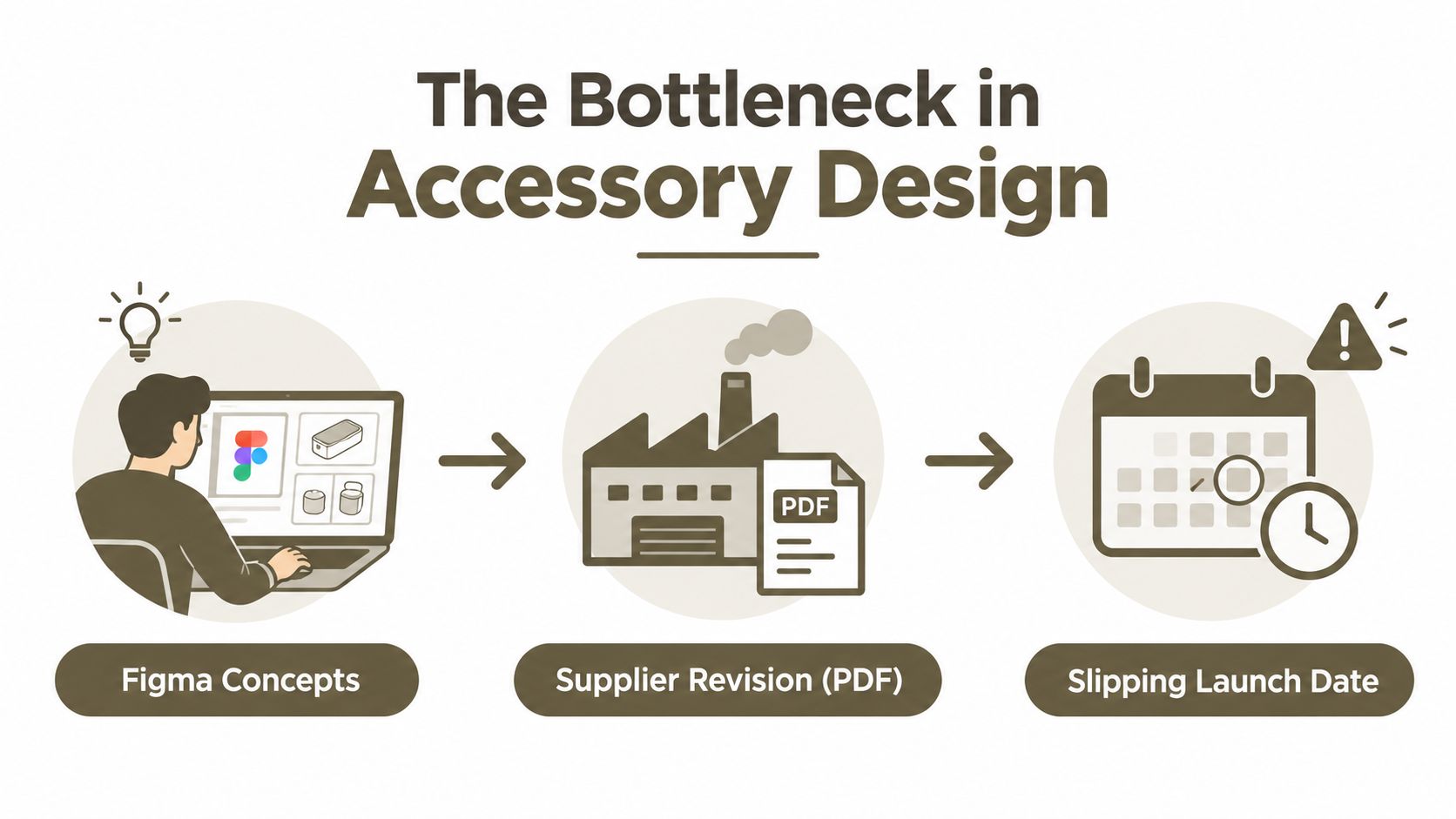
Where rework starts
The late sample is only the visible delay. Earlier breakdowns create the work behind it:
- Sampling corrections: An unclear instruction can force the factory to revise patterns, components, or construction.
- Color drift: A digital render, material callout, and physical swatch may describe different finishes.
- Repeated data entry: Someone retypes dimensions, materials, and hardware into another tech pack.
- Lost context: A supplier comment remains in an email thread instead of beside the relevant BOM row or stitch note.
- Decision fatigue: The team reconciles files instead of deciding whether the product works.
Accessory design combines aesthetic judgment with industrial discipline. The history of named, seasonal fashion design is often traced to Charles Frederick Worth's Paris collections in the 1850s, a shift associated with branded and calendar-driven product creation, as described in this history of the fashion accessories market. Bags, jewelry, belts, scarves, and footwear still require creative direction to stay connected to repeatable production.
Practical rule: If a supplier must infer which file is authoritative, the workflow has already created a manufacturing risk.
A design-for-manufacturing workflow keeps the concept, tech-pack fields, and supplier review in one connected workspace. A sketch edit, material change, or measurement revision should remain attached to the same source file. The factory needs the current decision, not a chain of superseded PDFs.
AI earns its place by connecting those decisions. It does not replace pattern knowledge or supplier judgment. Use one living product file as the source for prompts that generate views, specifications, review notes, and production assets. That connection lets concepting, technical documentation, and supplier handoff follow the same product logic instead of becoming separate reconstruction tasks.
Writing a Design Brief That Drives Better AI Output
AI output becomes generic when the brief is generic. “Modern everyday bag for women” leaves too many decisions open, so the model fills the gaps with familiar luxury cues, unsuitable materials, and proportions that may not fit the intended price tier.
Write the brief as the input layer for every later prompt. The same fields should guide concept generation, technical documentation, and supplier communication.
The six fields to define first
Target customer and occasion
State who carries the product and where.
Prompt fragment:Customer: urban commuter who carries a phone, compact wallet, keys, and sunglasses. Occasion: weekday travel and informal evening use.Category and silhouette family
Name the product type and its structural behavior.
Prompt fragment:Category: structured crossbody. Silhouette: compact rectangular body with a softly rounded base and adjustable strap.Price tier and margin ceiling
A commercial limit should influence materials, hardware, construction, and complexity.
Prompt fragment:Price tier: $80-$120 wholesale. Avoid construction details that require extensive hand finishing or proprietary tooling.Primary materials and hardware
Be explicit about substrate, lining, finish, and metal tone.
Prompt fragment:Materials: recycled nylon with a clean woven face. Hardware: matte black zamac. Lining: lightweight woven polyester.Seasonality and color story
Give the model a controlled palette rather than asking for “trend colors.”
Prompt fragment:Season: transitional autumn delivery. Palette: charcoal, muted olive, warm sand, and one controlled accent color.Reference brands and anti-references
References should describe design language, not invite imitation.
Prompt fragment:References: the restrained utility of Away toward the polished simplicity of Cuyana. Avoid monogram luxury cues, visible logos, and excessive ornament.
The price and material fields do more than improve the render. They prevent the model from proposing a leather-look surface when the line is vegan, and they give a technical workspace useful starting values for materials, components, and construction notes. You'll still validate every field, but you won't begin with a fantasy product that collapses during costing.
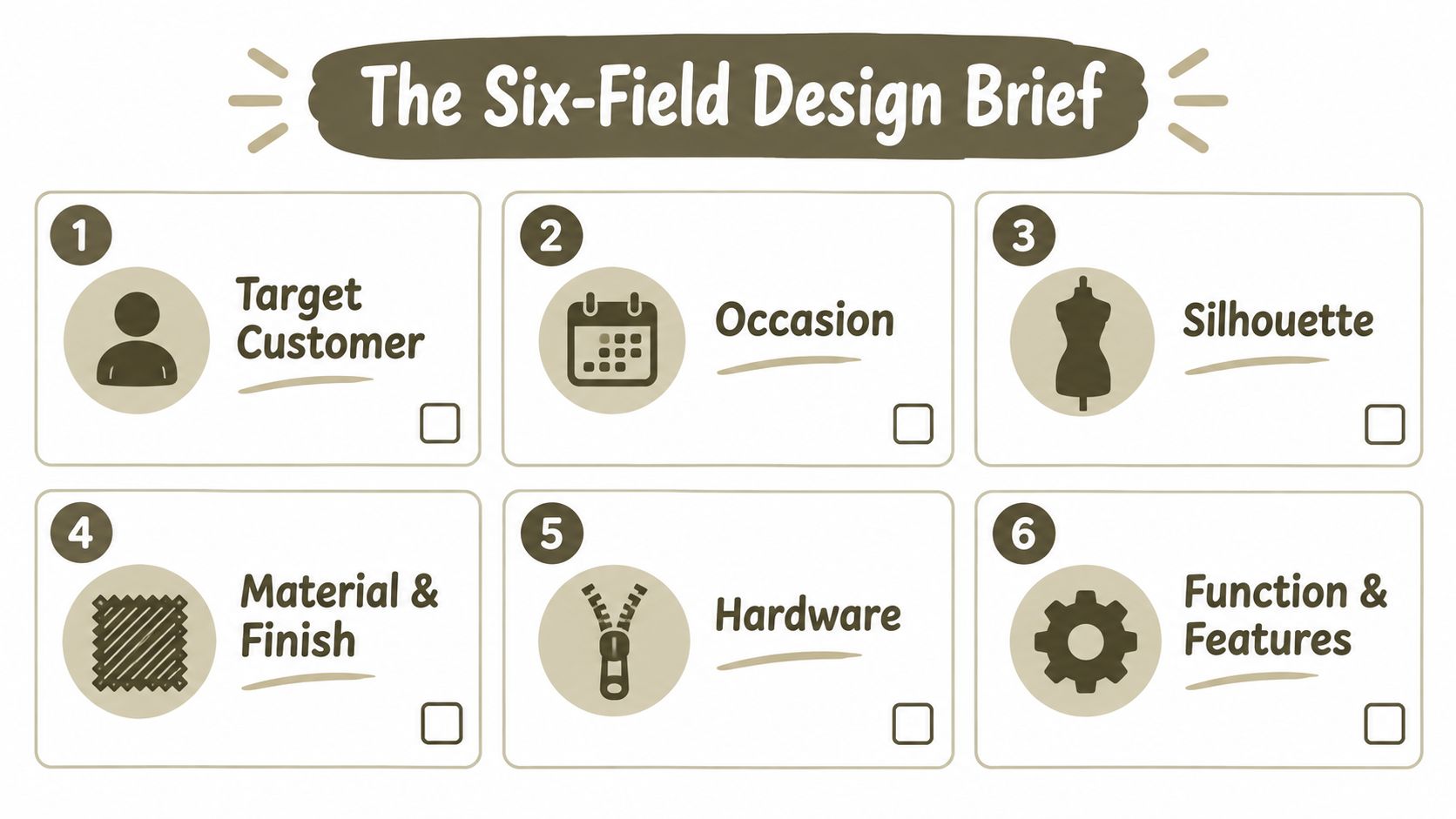
Before generating a concept, answer these five questions:
- What must the customer carry or do with it?
- What visual feature makes the product recognizable without a logo?
- Which material and hardware choices are mandatory?
- What construction choice would break the margin or schedule?
- What should the design explicitly avoid?
You can turn the answers into a reusable prompt using this briefing guide for an AI tech-pack generator. The important point isn't the wording alone. It's the discipline of making every major creative decision inspectable before the first image exists.
Turning Prompts and Sketches Into Multi-View Concepts
Start with an anchor, not a mood board. Upload a rough pencil sketch, a reference photograph, or a simple silhouette into Brand DNA, then tell the model which characteristics must remain fixed and which may change.
For an initial pass, use a prompt with explicit constraints:
Using the attached sketch as the silhouette anchor, produce a four-view set of a structured nylon crossbody in three colorways, matte black hardware, 22cm width, neutral background, consistent lighting, front, three-quarter, back, and side views. Preserve the body proportions and strap attachment locations across every view.
The phrase “silhouette anchor” matters. Without it, an image model may create three attractive but incompatible bags. Lock the body shape, proportion, closure position, and attachment points first. Ask for colorways and finish variations only after the structural direction is credible.
Edit in a controlled sequence
A productive AI editing sequence looks like this:
- Generate the anchor render. Choose the clearest three-quarter view as the visual reference.
- Regenerate the orthographic views. Request front, back, side, and top views from the anchor, not from separate prompts.
- Create controlled variants. Change only one variable at a time, such as color, strap width, or hardware finish.
- Isolate details. Generate close views of the clasp, zipper pull, stitch line, edge treatment, and strap connection.
- Name every approved asset. Use identifiers such as
CB01_Charcoal_Front_v03rather than leaving outputs in a flat mood board. - Flag uncertainty. Mark any interior, attachment, or construction area that still needs human interpretation.
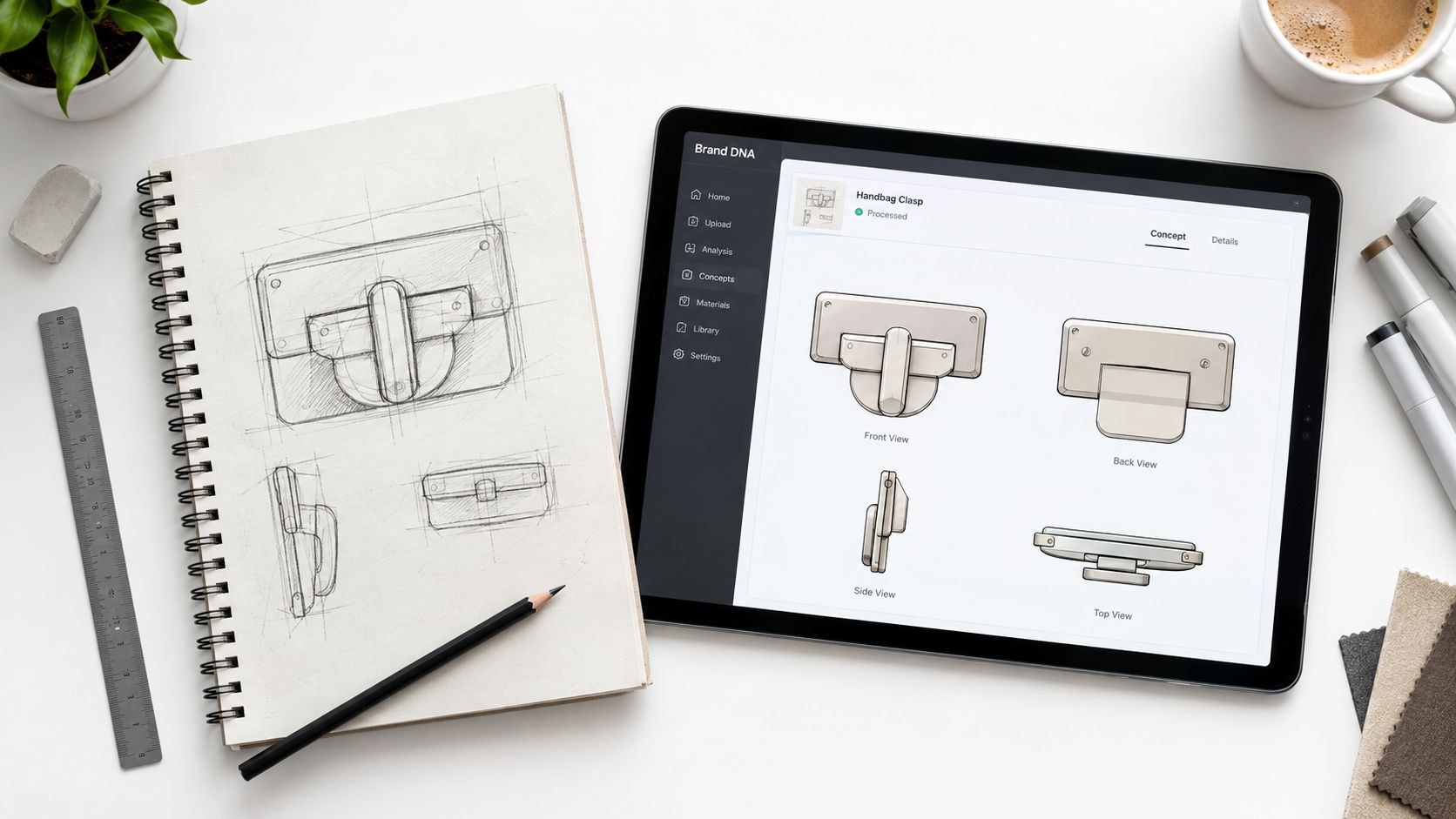
Brand DNA can hold the palette, reference language, and recurring brand signals while an AI Editor handles material, color, silhouette, and detail revisions. A library of editable blanks can also give a junior designer a structurally plausible starting point instead of forcing every concept to begin from a blank canvas.
The limits are important. AI still struggles with strap attachment geometry, hidden reinforcement, lining behavior, zipper paths, and interior construction. A render can show a beautiful clasp floating in a physically impossible position. Treat the output as a presentation and specification source, then test it against pattern knowledge, component availability, and the supplier's construction method. This sketch-to-factory workflow is useful when the same approved concept needs to become a set of views rather than a collection of unrelated images.
Building a Factory-Ready Tech Pack From the Same File
A factory-ready tech pack is the working contract between your design intent and the cutting table. Pretty flats aren't enough. The supplier needs a controlled description of what to cut, join, finish, inspect, pack, and quote.
A practical pack should contain six blocks:
- View set: Front, back, side, and detail flats, with stitch lines, edge treatments, openings, and hardware positions.
- Bill of Materials: Substrate, lining, thread, hardware part numbers, finish color, labels, reinforcement, and packaging components.
- Measurement table: Points of measure, target dimensions, units, and tolerances. Use millimeters where the factory does.
- Construction notes: Stitch type, topstitch distance, fold allowance, seam treatment, edge paint process, reinforcement, and assembly order.
- Packaging specification: Poly bag requirements, hangtag placement, carton details, protective materials, and labeling.
- Quality criteria: Defect definitions, appearance expectations, functional checks, and the agreed inspection standard.
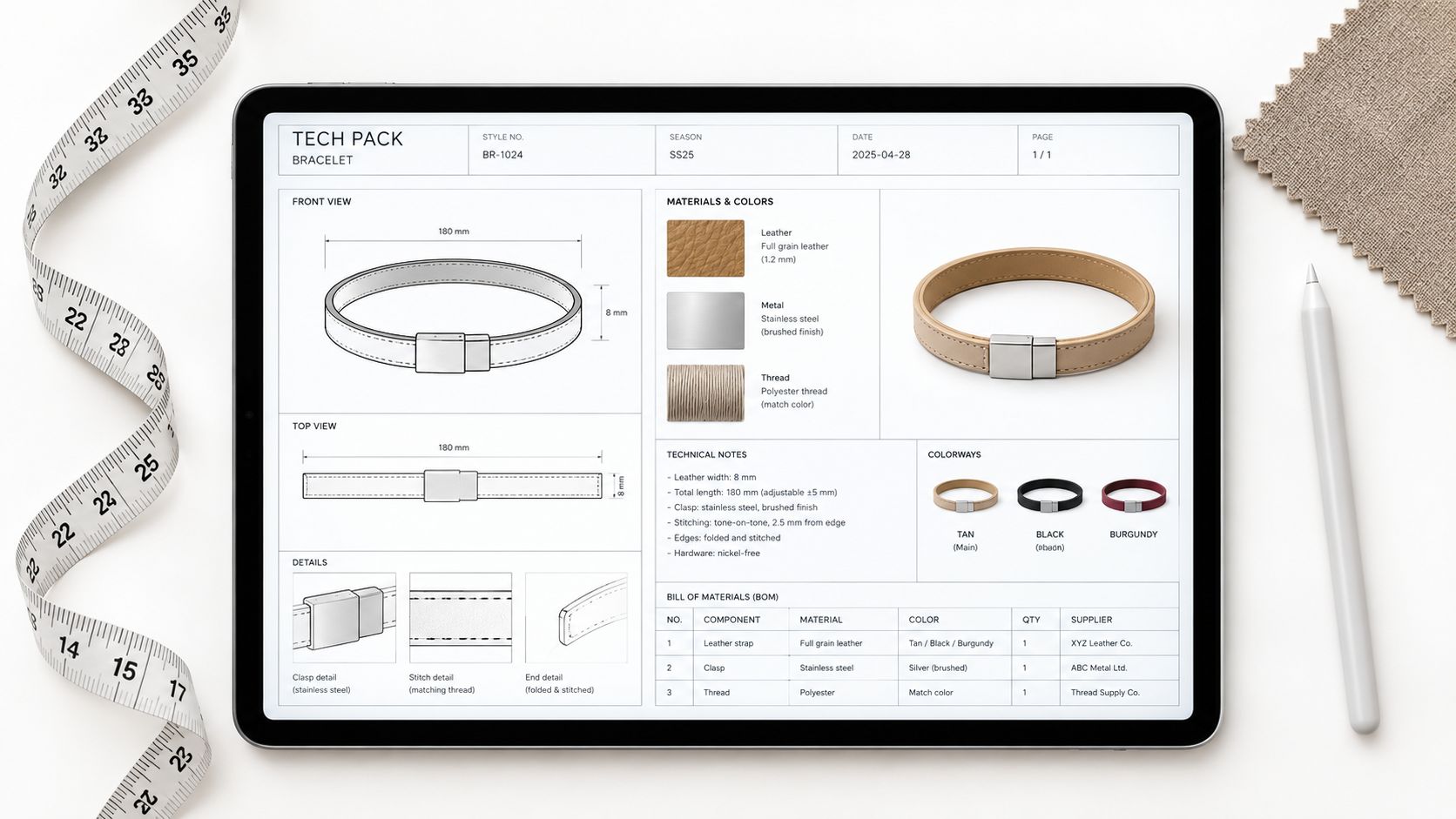
Let the workspace draft, then inspect
An AI workspace can populate the first draft from the approved concept. Material-library selections can feed BOM rows, measurements can inherit from a parametric sketch, and style templates can suggest construction notes for a crescent bag, tote, belt, bracelet, or scarf.
Try a prompt like this:
Generate a tech pack for this crescent bag concept. Include front, back, side, and detail flats. Add measurements at the gusset midpoint, stitch type 301, topstitch placement, edge paint with 3 passes, YKK #5 Excella zipper, lining, reinforcement, packaging fields, and a tolerance of ±2mm on critical dimensions. Mark all inferred values for manual review.
The most valuable behavior is not automatic writing. It's traceability. When a designer changes the zipper or body width in the concept file, the tech pack should expose the affected BOM row, measurement, and callout instead of leaving stale information behind.
Review the parts AI cannot safely infer: tolerance rows and stitch details. Fabric stretch, coating thickness, edge behavior, and machine capability can change the correct specification.
A technical designer should verify every inferred value against the physical material and the factory's process. Then export the approved pack in formats the supplier can use, such as PDF, SVG, or Excel. A tech-pack workspace for accessories can support that connected flow, but no platform removes the need for a real construction review.
The video below provides another visual reference for how technical product information can be organized before supplier review.
Sampling Faster With Virtual Try-On and Digital Prototypes
Traditional sampling often follows a serial path. The team briefs the product, sketches it, requests a hand sample, sends corrections by email, reviews another sample, adjusts fit, and repeats the process until the team can approve production. That loop can consume 4 to 8 weeks and three to five physical samples, according to the workflow assumptions supplied for this comparison.
An AI-assisted loop removes some of the visual uncertainty before the first physical sample. The team creates multi-view concepts, places the product on a model or flat lay, checks dimensions against CAD or a parametric sketch, and sends the supplier a marked-up specification drawing. The supplied comparison estimates 2 to 4 weeks and one to two physical samples for that approach. Those figures are workflow targets, not guarantees. Material complexity, factory capacity, approvals, and shipping still determine the actual schedule.
| Step | Traditional Loop | AI-Assisted Loop |
|---|---|---|
| Brief | Written brief and separate references | Structured brief connected to prompts and assets |
| Concept | Sketches and static presentation views | Anchor render with consistent multi-view generation |
| Proportion check | Often delayed until a sample exists | Virtual try-on or flat-lay scale review before sampling |
| Supplier feedback | Email threads and marked-up PDFs | Comments pinned to views, BOM rows, and callouts |
| Physical validation | Multiple correction samples | Earlier physical sample focused on material and construction |
| Approval | Decisions reconciled across files | Approved concept and tech pack remain connected |
Use digital sampling for proportion, not feel
Render the front view at true scale, then place it on a digital mannequin or a hand image. A shoulder bag may look balanced in isolation but sit too low, crowd the torso, or create an awkward strap angle when worn.
A useful try-on prompt is:
Place this shoulder bag on a 5'7" female mannequin in three-quarter view, soft studio light, neutral background, and show scale relative to the torso. Preserve the bag dimensions, strap drop, closure position, and body proportions.
You can also animate a short loop to inspect strap drop, closure access, and how the bag rotates during movement. The result won't reveal hand feel, leather temper, fabric recovery, lining noise, or zipper sound. Use it to remove visual and dimensional uncertainty, then use the physical sample to validate tactile and mechanical behavior.
For teams extending this logic beyond accessories, real-world AI in production optimization offers useful context on applying AI to operational workflows rather than treating it as a standalone image tool.
Handing Off to Suppliers Without Losing the Details
Email chains fail because they preserve messages better than decisions. A supplier can receive the right PDF and still quote the wrong revision if the file name, attachment, or correction thread is unclear.
Use one live file with role-scoped access. A supplier should be able to inspect the approved views, BOM, measurement table, and open questions without gaining permission to alter internal design decisions.
Four controls belong in the handoff
Version control gives every approved state a named snapshot. Use identifiers such as CB01_v04_SupplierReview and never overwrite a quoted revision without recording the change.
Pinned comments attach questions to the exact location that needs attention. “Please confirm zipper” is weak. “Confirm whether the matte black zipper pull in BOM row H-04 matches the detail view on page two” gives the supplier a resolvable task.
Approval states separate work in progress from production intent. A useful sequence is draft, internal review, supplier review, quoted, and approved. Each state should limit what can be changed and clarify who owns the next action.
Audit history records who changed a measurement, material, or construction note and when. That record matters when a late correction affects cost or fit.
A clean supplier sequence
- Lock the current tech pack and save a named snapshot.
- Invite the factory through a view-only supplier seat.
- Request the quote against the live BOM, not a copied spreadsheet.
- Log questions as comment threads and mark each resolved decision.
- Confirm the supplier is quoting the same revision.
- Export a sign-off PDF only after the live file is approved.
Use AI to prepare the context without asking it to make commercial decisions:
Summarize this tech pack for a Vietnam-based bag factory. List critical tolerances, the requested lead time of 45 days, packaging specifications, required certifications, open questions, and any component that needs supplier confirmation. Do not invent missing information. Label assumptions clearly.
A supplier can move quickly only when the source is trustworthy. Clear permissions, visible changes, and resolved questions reduce the chance that speed creates another round of rework.
Your First Week Running the AI Accessory Workflow
You don't need to rebuild your entire product system before testing this method. Run one accessory through the complete loop, from brief to supplier review, and judge the quality of the connected file rather than the novelty of the render.
Monday
Rewrite one existing brief using the six fields. Spend about an hour defining the customer, occasion, silhouette, price tier, material, hardware, color story, references, and anti-references. Deliverable: one approved prompt-ready brief with no unresolved commercial decisions.
Tuesday
Run three concept prompts against Brand DNA. Keep the silhouette constant while varying one controlled attribute, such as colorway, strap configuration, or closure detail. Spend a focused design session selecting one anchor concept and naming the approved assets.
Wednesday
Build the BOM and measurement table inside the shared workspace. Add the construction notes that require technical judgment, then mark every AI-inferred value for review. Deliverable: a draft pack that a technical designer can audit without opening a separate mood board.
Thursday
Schedule a virtual fit review. Check scale on a mannequin or hand image, inspect strap drop and closure access, and create annotated callouts for the physical sample. Deliverable: a short list of changes, not a new collection of unstructured renders.
Friday
Send the factory a view-only link with three precise comments. Ask for a quote against the live BOM, confirm the revision name, and export a sign-off PDF only after open threads are resolved.
Questions designers ask before starting
What does one design cost in practice?
The software seat is only one part of the calculation. Include concept development, technical review, supplier communication, physical sampling, shipping, and the cost of a late correction. AI can reduce avoidable iteration, but it won't eliminate material testing or skilled review.
Do you still need CAD skills?
Yes, but the required level changes. You need enough CAD literacy to read views, recognize proportion errors, understand measurement points, question impossible geometry, and review technical signals. Prompt-driven tools can lower the barrier to surface modeling, but they shouldn't replace production judgment.
Can fewer physical samples support sustainability claims?
Potentially, if the team documents what changed and why. Reduced sampling may lower physical waste, but it doesn't prove that a product's materials, labor, durability, or end-of-life pathway are sustainable. The stronger practice is to design for verified low-impact inputs, repair, resale, and provenance from the start. Market coverage links sustainability expectations with accessory growth and notes that brands face stronger pressure to disclose provenance and support repair or resale, as outlined in this fashion accessories market overview.
The wider opportunity is substantial. The global fashion accessories market was estimated at USD 798.81 billion in 2024 and is projected to reach USD 1,259.43 billion by 2030, with a CAGR of 8.1% from 2025 to 2030, according to Grand View Research's fashion accessories market analysis. At that scale, improving concept clarity, tech-pack accuracy, and supplier handoff isn't a minor process preference. It's a commercial advantage.
Genpire connects prompts, sketches, Brand DNA, multi-view concepts, technical specifications, virtual try-on, and supplier collaboration in one workflow for consumer goods. Visit Genpire to turn one accessory brief into a reviewable concept and a more complete factory handoff.