A designer approves a concept in one application, the technical designer rebuilds it in a spreadsheet, sourcing sends an RFQ through email, and the factory receives a PDF that no longer matches the latest revision. A supplier asks whether a seam, finish, material, or measurement has changed. The answer sits in a message thread, if anyone can find it. Sampling begins with uncertainty, and the team discovers the mismatch only after time and materials have been spent.
This is the last-mile handoff problem. Product development may look organized at each individual stage, yet the connections between stages remain fragile. Disconnected tools, outdated information, and version conflicts continue to create launch delays and rework for manufacturers, according to recent research on the state of product development.
Integrated product development treats the product as one continuous flow of decisions, specifications, feedback, and approvals. Design, technical development, sourcing, suppliers, quality, and manufacturing work from connected information rather than recreating it at every handoff.
The practical question isn't whether every team should use the same software. It's whether the next person can understand the current product without guessing. This guide follows the path from concept to factory, clarifies who owns each decision, identifies the KPIs that expose hidden waiting time, and gives teams a practical adoption sequence that doesn't require every participant to be a CAD specialist.
Table of Contents
- Introduction Why Product Development Feels So Fragmented
- What Integrated Product Development Really Means
- The Integrated Workflow From Concept to Bulk Production
- Who Does What in an Integrated Team
- How to Measure Success With the Right KPIs
- Practical Steps to Implement an Integrated Workflow
- Putting Integration Into Practice and Next Steps
Introduction Why Product Development Feels So Fragmented
The hidden cost of a normal handoff
A consumer product can begin with a sketch, a reference image, or a short creative brief. The designer develops the look, technical design translates it into construction details, sourcing requests quotes, and a manufacturer interprets the package. On paper, that sequence seems sensible.
The trouble starts when the product changes between those steps. A pocket moves in the concept, but the measurement chart still shows the old position. A trim is replaced, but the supplier receives an earlier bill of materials. A factory flags a construction concern in an email, while the approved specification remains unchanged. Each person may be working carefully, yet the overall system creates version drift.
Traditional sequential development also delays useful feedback. Manufacturing may not review a design until the team has invested in detailed specifications. Sourcing may discover that a preferred material or construction method affects cost only after the sample request has been issued. Quality may identify an inspection requirement after production preparation has already begun.
Practical rule: If a downstream team can only raise a concern after a file is “finished,” the workflow is sequential, even if the team uses modern digital tools.
Integrated product development changes the timing of those conversations. It brings downstream requirements into upstream decisions, keeps activities overlapping where useful, and preserves the context around every revision. The purpose isn't to make everyone perform everyone else's job. It's to make important information available before a late correction becomes expensive.
What this guide makes clear
The most useful way to judge integration is not by counting applications. Judge it by asking where a delay appears and why. Does the team wait for a technical package? Does the supplier misunderstand a construction detail? Does validation uncover a change that never reached the RFQ? Does production start with a specification that has multiple unofficial versions?
You'll learn how to connect:
- Concept intent, including appearance, materials, color, and brand direction.
- Technical definition, including construction, components, measurements, and tolerances.
- Commercial activity, including RFQs, supplier questions, quotes, and negotiation.
- Validation, including sample review, feasibility feedback, and approval decisions.
- Production readiness, including controlled changes, quality requirements, and the final manufacturing package.
The central lesson is simple. Faster concepting won't guarantee a faster launch if supplier coordination, validation, and change control remain disconnected. Integration matters most at the points where meaning can be lost.
What Integrated Product Development Really Means
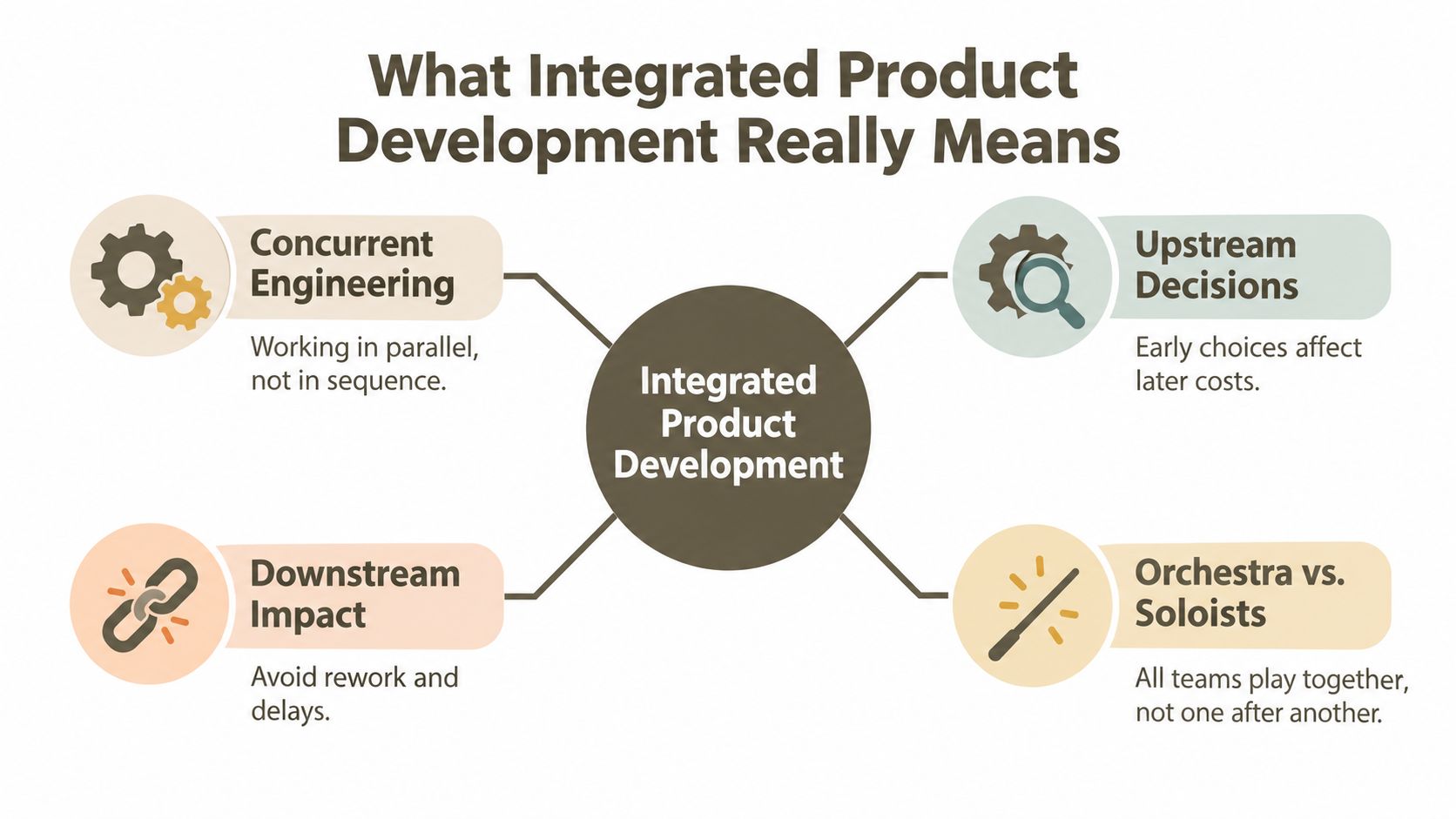
Think of a product team as an orchestra. A violinist, drummer, and brass section can all be excellent musicians, but the performance fails if each follows a different score or enters without hearing the others. Product teams face the same problem when design, sourcing, and manufacturing work in isolation.
Integrated product development means the teams share the score while the product is still changing. Designers define intent, technical specialists make that intent buildable, sourcing tests commercial feasibility, and manufacturers provide practical feedback. They don't wait for one department to finish everything before the next department begins.
From sequence to concurrency
The approach is closely tied to concurrent engineering. The term wasn't widely adopted until the 1980s, although its core ideas, including cross-functional teams, overlapping activities, and manufacturing involvement in design, existed earlier. A widely cited 1996 review describes concurrent development as a process in which upstream decisions account for downstream and external requirements, supported by activity overlap, small-batch information transfer, and cross-functional teams. The history and definition are documented in this review of concurrent engineering and integrated product development.
In the defense and manufacturing sectors, DARPA formalized this shift through product-development improvement work in the early 1980s, followed by a five-year concurrent-engineering initiative. The important change was cultural as much as technical. Teams moved away from “throw-it-over-the-wall” development, where one group completed work and passed it onward, toward integrated product-and-process design.
More than PLM software
PLM can provide a foundation for product records, approvals, bills of materials, and change histories. But PLM alone isn't the whole operating model. A team can install a PLM system and still preserve disconnected reviews, unclear ownership, and supplier communication through scattered attachments.
Integration requires three conditions:
- Shared meaning, so the visual concept, technical specification, and production requirement describe the same product.
- Overlapping participation, so manufacturing and sourcing can influence decisions before validation or production.
- Authoritative information, so the team knows which record contains the approved version.
This third condition is often called a digital thread. It connects lifecycle phases through trusted sources such as requirements, system architecture, technical data packages, and 3D CAD models. NIST-related research reports that replacing paper-based flows with a digital thread across distributed supply chains can reduce cycle time by 75% and save manufacturers about $30 billion annually, as summarized in this digital-thread research paper.
The digital thread isn't a storage location. It's the relationship between decisions. When a material changes, the team should be able to identify the affected specification, quote, sample, inspection point, and production instruction.
The Integrated Workflow From Concept to Bulk Production
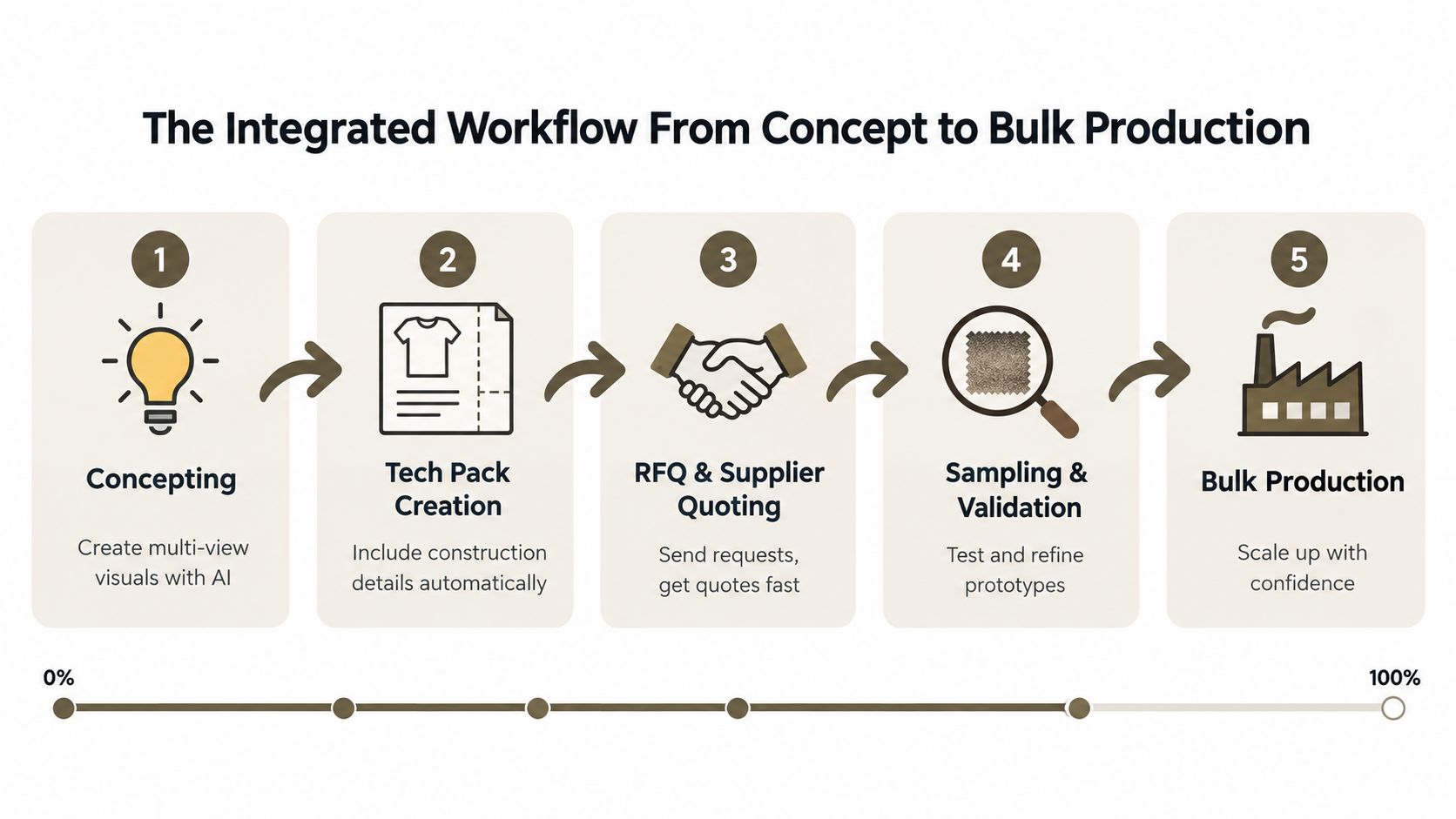
An integrated workflow keeps the product record alive as the product moves forward. The file isn't a static handoff. It becomes a shared working surface where teams add information, resolve questions, and approve changes.
The five connected stages
Concepting establishes the product direction. Multi-view visuals help the team discuss front, back, side, proportion, color, material, and detail rather than relying on one attractive image. Prompt-based creation, reference inputs, a Brand DNA library, and an AI Editor can help a non-CAD user explore alternatives while keeping the discussion anchored to a defined aesthetic.
Tech pack creation translates intent into buildable information. The package needs construction details, component breakdowns, measurements, materials, artwork, labeling, and any relevant finishing instructions. An agentic workspace can generate a structured starting point, but a technical specialist still needs to review ambiguous or safety-critical details. The aim is to prevent the factory from inferring information that the product team should have stated.
RFQ and supplier quoting uses the same technical record. Instead of rebuilding the request from a separate spreadsheet, sourcing sends the current specification and collects supplier questions against the relevant product context. Teams handling jewelry or other detail-sensitive products can also use this quality jewelry logistics explained resource to strengthen their understanding of supply-chain coordination.
Sampling and validation turns assumptions into evidence. The supplier can comment on feasibility, the team can compare the sample with the approved visual and specification, and changes can be recorded where the decision belongs. Integration prevents a common failure: the sample review produces a change, but the RFQ, tech pack, and production record stay unchanged.
Bulk production should begin from a controlled, approved package. Quality checks, component details, supplier responses, and accepted revisions remain connected, giving the factory a clearer basis for execution. The workflow described in design to production planning reflects this concept-to-factory continuity.
A unified file reduces the need to search through email attachments and private notes. Exports to SVG, PDF, and Excel keep information usable downstream, while factory comments preserve the reasoning behind changes.
The key control point is the last mile. Integration has done its job when the supplier can see what changed, why it changed, and which version governs production without asking the team to reconstruct the history.
Who Does What in an Integrated Team
Integration doesn't eliminate specialist responsibility. It makes responsibility visible while giving specialists access to the information they need. The designer still owns the creative direction, the technical designer still protects buildability, sourcing still manages the commercial process, and manufacturing still tests feasibility. The difference is that these decisions meet in one workspace instead of colliding through forwarded files.
The role shift
In a fragmented workflow, each role protects its own document. Design may own a presentation file, technical design may own a specification spreadsheet, sourcing may own an RFQ tracker, and manufacturing may keep comments in email or messaging software. That structure creates hidden dependencies. A change can be correct in one document and absent from another.
An integrated workflow assigns ownership to decisions while allowing shared review:
| Role | Fragmented Workflow | Integrated Workflow |
|---|---|---|
| Design | Owns the concept file and sends approved visuals onward | Owns concept intent, Brand DNA, visual references, and creative approvals in the shared product record |
| Technical design | Rebuilds the concept into separate construction documents | Owns construction, measurements, component breakdowns, and technical review connected to the concept |
| Sourcing | Recreates specifications for RFQs and tracks supplier replies separately | Owns RFQ setup, supplier access, quote comparison, and commercial decisions against the current record |
| Manufacturing | Receives a final package and raises feasibility issues late | Reviews feasibility during development and records factory comments against the relevant detail |
Accountability without isolation
The most effective teams define a decision owner and a review group for each major product attribute. For example, design can own color direction, technical design can own seam construction, sourcing can own supplier selection, and manufacturing can approve a production method. Everyone can comment, but not everyone has the same authority to release a change.
That distinction prevents two opposite problems. Without shared review, teams miss downstream risks. Without clear ownership, every change becomes a debate with no release decision.
Shared access doesn't mean shared authority. It means the right people can see and challenge a decision before it becomes a factory problem.
Supplier collaboration deserves particular care. External partners need enough access to review specifications, ask questions, and respond to RFQs, but they don't necessarily need permission to alter approved product data. Free, view-only supplier seats can support visibility while keeping internal ownership and change control intact. For internal teams, pooled credits and role-based permissions can make participation easier to scale without giving every user the same editing rights.
The test is practical: ask each role where it records a concern, who resolves it, and how the final decision reaches production. If the answer depends on a personal inbox, the team still has a handoff gap.
How to Measure Success With the Right KPIs
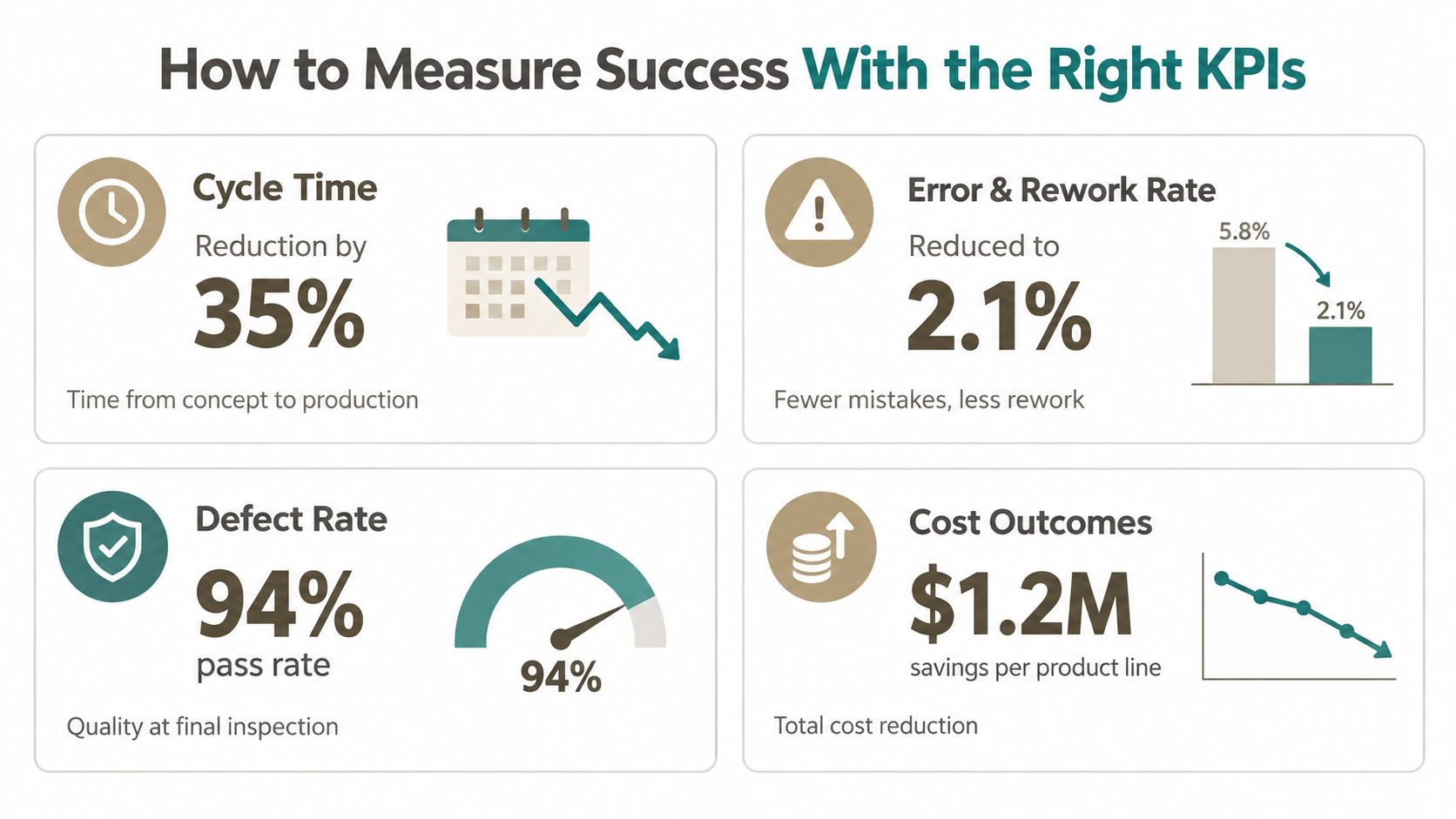
Integration should produce evidence in the operating metrics, not just a more modern-looking workspace. The most useful measures follow the product across the full path from concept to production and expose waiting, rework, defects, and cost rather than celebrating design activity alone.
Cycle time and time to market
Measure calendar time from the agreed concept start to production-ready release, then separately measure the time spent waiting for reviews, clarifications, quotes, approvals, and sample decisions. APQC defines time to market as the calendar days required to design, test market, and manufacture or deliver products. Its definition is useful because it includes the full launch process, not only the period when designers are actively working.
A lean and concurrent manufacturing study reported a 63% quality improvement, a 45% reduction in product development cost, and a 36% reduction in manufacturing cost compared with conventional firms, alongside shorter development times and higher development frequency. These findings are reported in the study of lean manufacturing and concurrent approaches.
Don't use cycle time as a single number with no diagnosis. A shorter design phase can hide a longer supplier clarification phase. Track each stage and each handoff so the team knows where integration is working.
Error and rework rates
Count errors that force a specification correction, sample revision, supplier clarification, or manufacturing adjustment. Record the source, such as a missing measurement, conflicting material description, outdated artwork, or an unapproved change.
A good dashboard distinguishes prevented errors from errors discovered late. If the team catches an ambiguity during technical review, that still consumes attention, but it costs less than discovering it after sampling or tooling. The trend should show fewer repeated errors and less duplicated document work.
Defect rate
Defect rate measures what reaches inspection or production review incorrectly. It may include construction failures, material substitutions, dimensional problems, finishing issues, or visual defects. Pair the rate with defect categories, because a stable overall rate can conceal a serious recurring issue in one component or process.
The goal isn't merely to push defects toward the factory. It's to move detection earlier, when the team can still change the product without disrupting production.
Cost outcomes
Track product development cost, manufacturing cost, sample and rework cost, expedited freight, scrap, and the internal time required to reconcile versions. Integrated development can reduce cost by avoiding repeated translation between formats, but the finance view should show where the saving occurs.
PLM research has found positive effects on cycle time, time to market, defect rate, and cost outcomes. In one cited agile-PLM comparison, average time to market fell from 120 days to 85 days, a 29.17% reduction, while rework costs dropped by 60%, according to this study of agile methodologies in product lifecycle management.
Use these benchmarks as context, not as promises. Your baseline, product category, supplier network, and quality requirements will shape the result.
Practical Steps to Implement an Integrated Workflow
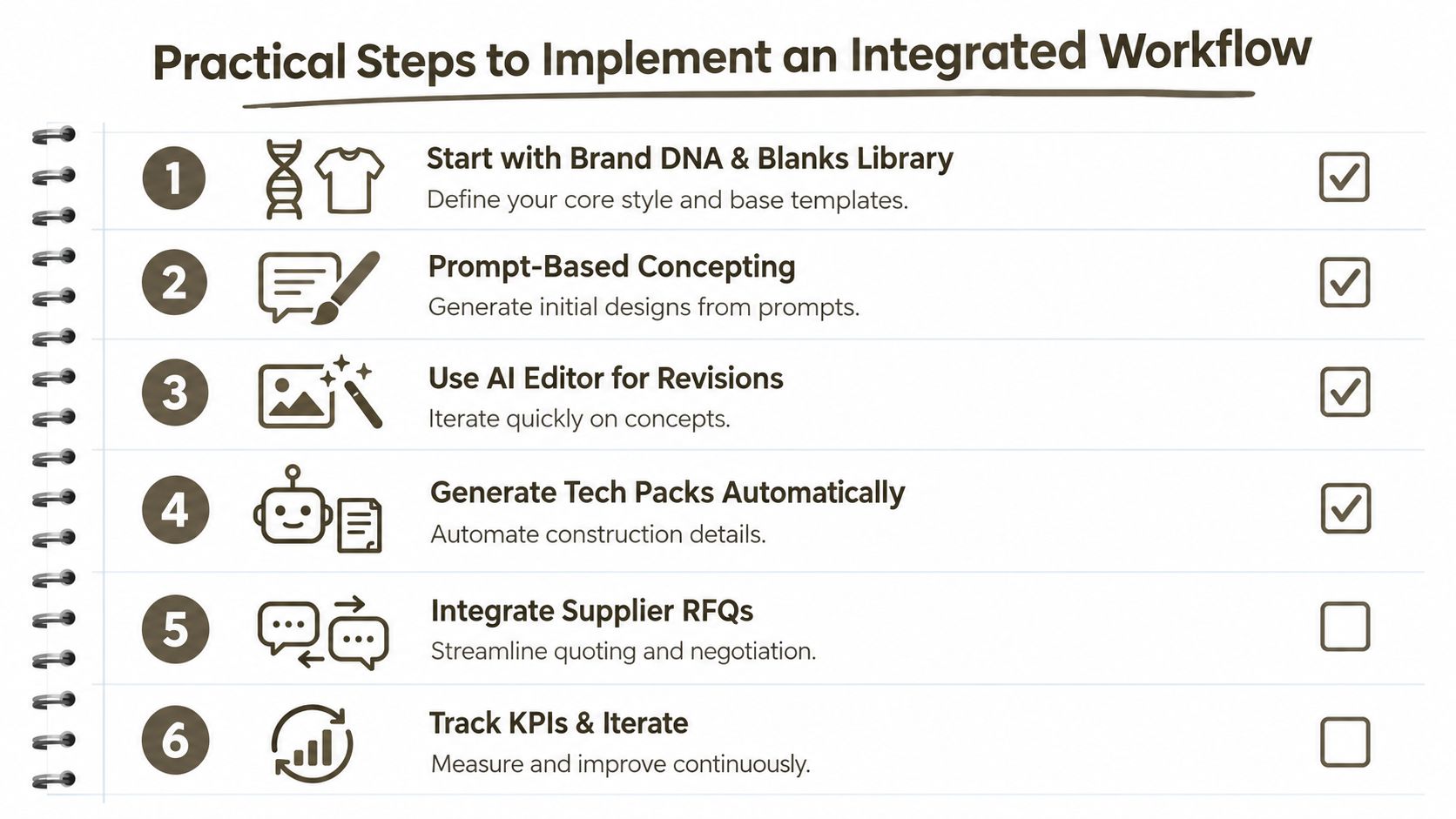
Start with the information that shouldn't change from product to product. A Brand DNA library can hold approved palettes, silhouettes, materials, finishes, references, and tone. A blanks library can provide reusable base templates. Together, they reduce repeated setup and give concepting a controlled starting point.
Build the workflow in an intentional order
Define the source of truth. Choose where the approved concept, technical specification, supplier questions, sample feedback, and release decision live. Write the rule clearly. A file shared in several places isn't a source of truth unless one record controls the release.
Create concepts from structured inputs. Use prompts, sketches, and reference images to explore product directions. Multi-view outputs help technical and sourcing participants identify proportion, material, and construction questions before the package is generated.
Revise with controlled context. An AI Editor can support changes to silhouette, material, color, and details. Keep the original intent visible, record the requested change, and require a human approval before the revision becomes the new baseline.
Generate the technical package. Produce construction information, component breakdowns, measurements, and relevant artwork from the approved concept. Export to SVG, PDF, and Excel when suppliers or internal systems require those formats, but keep the structured master record connected to the exports.
Invite suppliers early enough to contribute. Give suppliers the access needed to review requirements, comment on feasibility, and respond to RFQs. Free view-only seats can help external partners work from the current information without allowing uncontrolled edits.
Lock change control before production. Define who can request a change, who reviews its impact, and who releases the revised package. Link each change to affected components, costs, samples, inspection criteria, and production instructions.
Prevent the common adoption traps
The first trap is automating a weak specification. If a tech pack omits construction details, automation can reproduce the omission faster. The second is treating supplier collaboration as a final approval step. Manufacturing feedback has more value before the team commits to a difficult process or material.
Data protection and connector requirements also deserve review before rollout. Confirm how designs are stored, who can access them, how external users are permissioned, and whether exports remain usable in the systems your factories already operate.
Teams without CAD expertise can begin with a narrow product family, reusable blanks, guided prompts, and a technical review checklist. The target isn't to remove specialists. It's to let specialists spend more time on judgment and less time rebuilding information that already exists.
Putting Integration Into Practice and Next Steps
The right starting point is the stage where delays first become visible. If samples are rejected because factory instructions are incomplete, prioritize the concept-to-tech-pack connection. If quotes arrive late or suppliers ask the same questions repeatedly, prioritize the RFQ workspace and technical context. If pilot builds expose changes that nobody recorded, prioritize validation and change control.
Digital investment alone doesn't guarantee faster launches. Recent reporting on Indian automotive programs found average launch delays of 9 to 15 months despite significant digital investment, with 34% to 47% of program delays surfacing only after tooled-up and pilot builds began, according to this report on vehicle launch delays and downstream program risk. Separate manufacturing research published in 2026 found that 97% of companies reported delays or failure when bringing products from prototype to production, reinforcing the importance of scaling, validation, and supplier coordination rather than concept speed alone.
Use a simple readiness check:
- Can every stakeholder identify the current approved specification?
- Can a supplier comment on the exact detail that concerns them?
- Can the team trace a sample change to its production instruction?
- Can the dashboard show waiting time, rework, defects, and cost?
- Can external partners collaborate without gaining unnecessary edit access?
If the answer is no, integrate that connection first. A unified workspace such as Genpire can connect prompt-based concepting, multi-view visuals, factory-ready tech packs, RFQ activity, supplier collaboration, sampling, and production assets for consumer-goods teams. The operating principle matters more than the tool name: preserve product context from the first idea through the final factory decision.
Genpire helps consumer-goods teams turn prompts, sketches, and references into multi-view concepts, structured tech packs, RFQ materials, and production-ready exports in one connected workflow. Visit Genpire to evaluate whether its shared product workspace can reduce last-mile handoff errors in your next development cycle.