You spent weeks on the range. The samples came back right, the fit is where you want it, and a retailer finally asks the question you've been waiting for. Can you send the line sheet?
So you attach the PDF you built out of the lookbook, the one with the moody photography and the paragraph about the mill. Two days later the buyer replies with seven questions. What's the minimum on the navy? Is that price in euros? Does 14 October mean it ships or it arrives? Can you send this as a spreadsheet so I can quote it against another vendor?
Not one of those questions is about the product. They're all about the document. A line sheet that answers them before they're asked turns into a purchase order. One that doesn't turns into a week of email, and the buyer moves to a supplier whose paperwork was easier to work with.
The difference is format, not design. What follows takes the record apart field by field and shows what each one has to contain, why a buyer needs it, and how the same core data restructures itself by category, minimum order scope and export format.
Table of Contents
- Core Line Sheet Fields at a Glance
- How to Lay Out a Line Sheet Buyers Can Scan
- Pricing, MOQ and Delivery Rules That Prevent Misorders
- Seasonal Timing, Order Deadlines and Status Tracking
- Category Variants for Apparel, Hard Goods and Jewelry
- Keeping Buyer Data Separate From Factory Specs
- Export Formats and Version Control Compared
- Confirm the Sheet With a Pre-Send Pass
Core Line Sheet Fields at a Glance
A line sheet is a wholesale ordering document that turns a product collection into a buyer-ready, operational format, with one clearly identifiable entry per style. Each entry pairs a product image with the style name or SKU, colorways, available sizes, wholesale price, suggested retail price, minimum order quantity and delivery information, as the Brandboom guide to line sheets sets out.
The structure came out of fashion wholesale, where a retailer comparing forty styles needed a way to judge availability, variants and pricing without emailing the supplier about each one. The format standardizes a transaction. Put the product identifier, the commercial terms and the ordering constraints beside each item, and the sales rep, the buyer, the factory and the warehouse all read the same page and reach the same conclusion.
The two levels every field sits on
Every field belongs to one of two levels. A per-style row describes a single item and belongs next to that item's image. A document-level field applies to the whole collection and belongs in a header block at the top of the sheet, so it isn't repeated down forty rows and doesn't drift out of sync.
| Field | Level | What to Include |
|---|---|---|
| Style number and SKU | Per style | Exact match to purchase orders and invoices |
| Product name | Per style | Plain name buyers can search and quote |
| Product image | Per style | One consistent angle on a neutral background |
| Colorways | Per style | Color names or swatches beside each SKU |
| Size range | Per style | Sizing system used by the buyer (US, EU or UK) |
| Material composition | Per style | Fiber or material content checked against the spec |
| Wholesale price | Per style | Currency stated next to the figure |
| Suggested retail price (MSRP/RRP) | Per style | Shown beside the wholesale price |
| Minimum order quantity | Per style | Scope stated: style, color, pack or total order |
| Reorder minimum | Per style | Separate figure from the opening-order minimum |
| Case pack | Per style | Units per inner pack and units per carton |
| Delivery window | Per style | Start and end ship dates, not one undated promise |
| Collection or season | Document | Groups styles and sets the buying period |
| Order and cancel dates | Document | Last date to place an order and last date to cancel |
| Payment and shipping terms | Document | Terms of sale and who pays freight |
| Return policy | Document | Return window, conditions and who pays return freight |
| Ordering and contact instructions | Document | How and where buyers place orders |
Start with the identifier
The style number is the field everything else hangs from, and it has to match the purchase order and the invoice character for character, including leading zeros and any size suffix. A style listed as AW-014 on the sheet and invoiced as AW14 creates a reconciliation problem that lands on someone's desk three weeks after the goods ship, usually with a chargeback attached.
Everything in that table works beyond apparel. Accessories, footwear, jewelry, home goods, toys and electronics all fit the same frame, which is why a brand selling candles and tote bags can run one template with two specification blocks rather than maintaining two unrelated documents.
Practical rule: a buyer should be able to place an order from the sheet alone without opening another file, and a warehouse should be able to pick it without calling the sales rep.
Before you send anything, print a draft and run it against the table. Mark every field that is missing, every field where the answer is vague ("various" is not a size range), and every field labelled differently in two places. Fix those before you fix the photography.
How to Lay Out a Line Sheet Buyers Can Scan
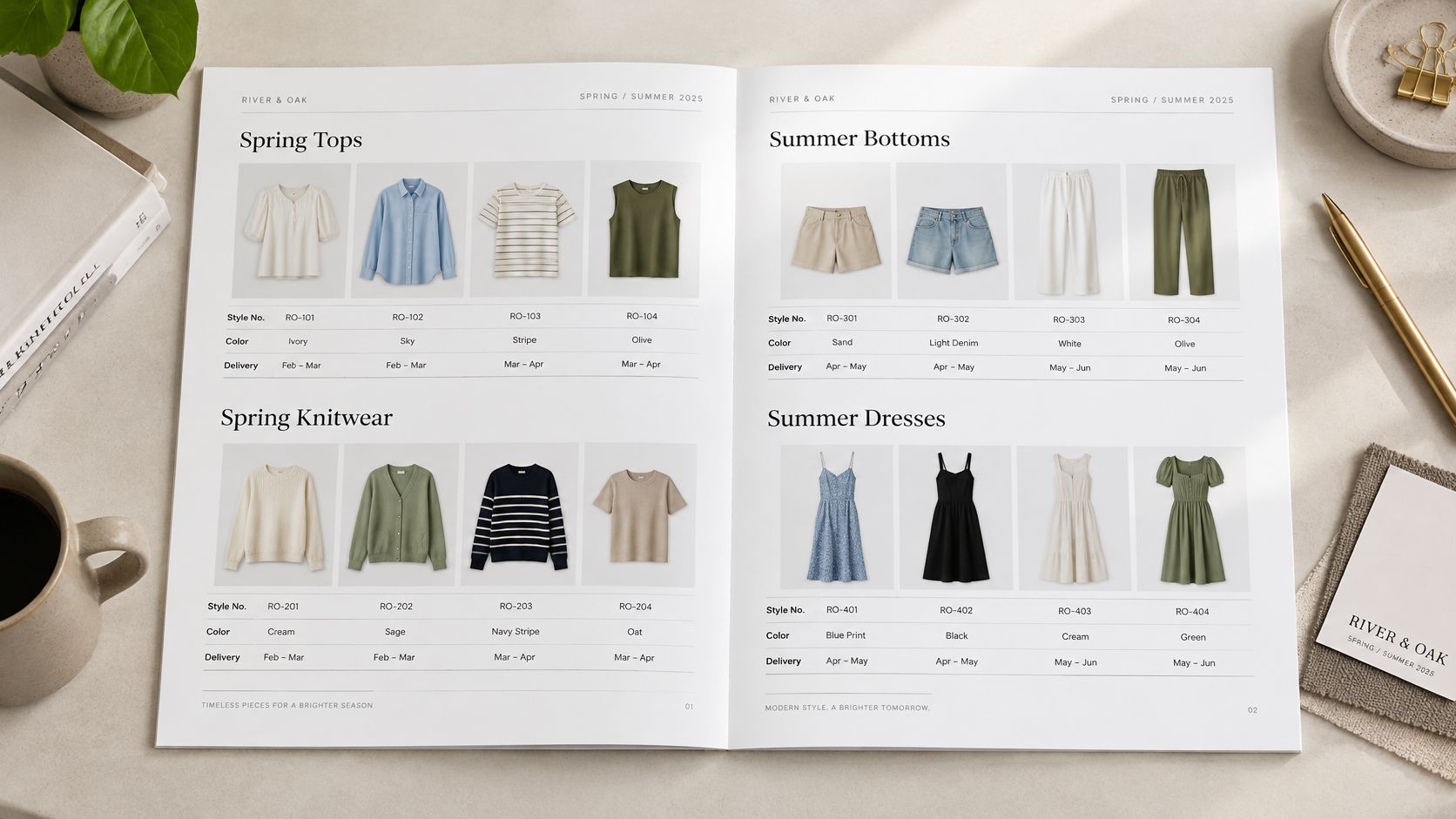
Layout decides whether a buyer finds a number in two seconds or gives up and quotes somebody else. A well-built page looks like this before we take the rules apart.
Group by what ships together
Sort styles by category, season or delivery window, and give each group a heading that tells the buyer what the group has in common. If the grouping is a delivery window, put the dates in the heading itself, because a buyer planning a floor set works backwards from a date, not from a category name.
Fix the image rules once
Same dimensions on every photo. Neutral background. One consistent angle, ideally front-facing on a flat or a clean product shot. Show the item as it ships rather than an editorial scene, because a buyer judging construction can't assess a stitch line through a styled shoulder.
Beside each SKU, run a swatch row with color names, and keep the names identical on every row. If the same fabric appears as "Ecru" on page three and "Natural" on page seven, the buyer orders both and you ship a duplicate.
Then put the numbers where the eyes already are. Wholesale price, MSRP, MOQ, size run and delivery window go directly beside the product, never in a footer the buyer has to hunt for.
Say a spring drop carries 24 styles split across three delivery windows. Group them into three sections of eight and set a grid of four to six styles per page. Below that, the images shrink past the point where anyone can judge fit, and the page stops doing its job.
Critical information embedded only inside an image can't be read by a buyer's spreadsheet or a supplier's system. Text stays text.
Lay out your draft with those three rules in place, then test it cold: pick any style at random and try to find its price, its MOQ and its ship date without turning a page.
Pricing, MOQ and Delivery Rules That Prevent Misorders
Wholesale price and suggested retail price sit side by side, because the gap between them is the buyer's margin and it's the first thing they calculate. Put the currency next to every figure, not once in the header, and note plainly whether those numbers include or exclude duties, VAT or other taxes. A price without a currency code is an unfinished field, not a shortcut.
Minimum order quantities cause more wrong orders than any other line on the sheet, and almost always for one reason: the scope is unstated. An MOQ has to say which of four bases it uses.
- Per style: the minimum applies to the total units of that style, regardless of color mix.
- Per color: each colorway must hit the minimum on its own, so two colors double the order.
- Per pack: the minimum is a number of prepacks or cartons, and the unit count depends on the pack.
- Total order: the minimum applies to the whole purchase order, which lets a buyer spread units across styles.
Then separate the opening-order minimum from the reorder minimum, because a first order and a replenishment carry different risk. A buyer trialling a new vendor wants the smallest commitment that proves sell-through. A buyer restocking a proven style wants speed and a low reorder point, not another negotiation.
The order that goes wrong
Say a style carries an MOQ of 12 per color and the line has two colors. The correct opening order is 24 units. A buyer who reads "MOQ 12" as a total places 12 units, split six and six, and the order fails the minimum on both colors. Now someone re-cut the purchase order, the ship window moves, and the delivery date in the buyer's floor plan is already wrong.
Delivery has the same failure mode. Express it as a start-to-end ship window, not a single undated promise, because one date becomes a dispute the moment a factory slips by a week. A quote of "ships 14 October" has no room in it; "ships 14 to 28 October" does.
For international buyers, state the sizing system explicitly as US, EU or UK, and confirm the fiber or material content against the technical specification and the labeling rules of the destination market before you publish the sheet, as the Omiren line sheet guide advises.
The same scoping discipline travels across categories. Conde Professional's tips for salon buyers show how a professional reads pack size, length and volume before committing, which is the identical judgment your buyer is making from your minimums.
If your opening minimums are still being negotiated with the factory, low-MOQ manufacturing explains how to structure that first run before you commit a number to paper.
Write the MOQ scope and the ship window for every style on the draft, then delete any price that lacks a currency.
Seasonal Timing, Order Deadlines and Status Tracking
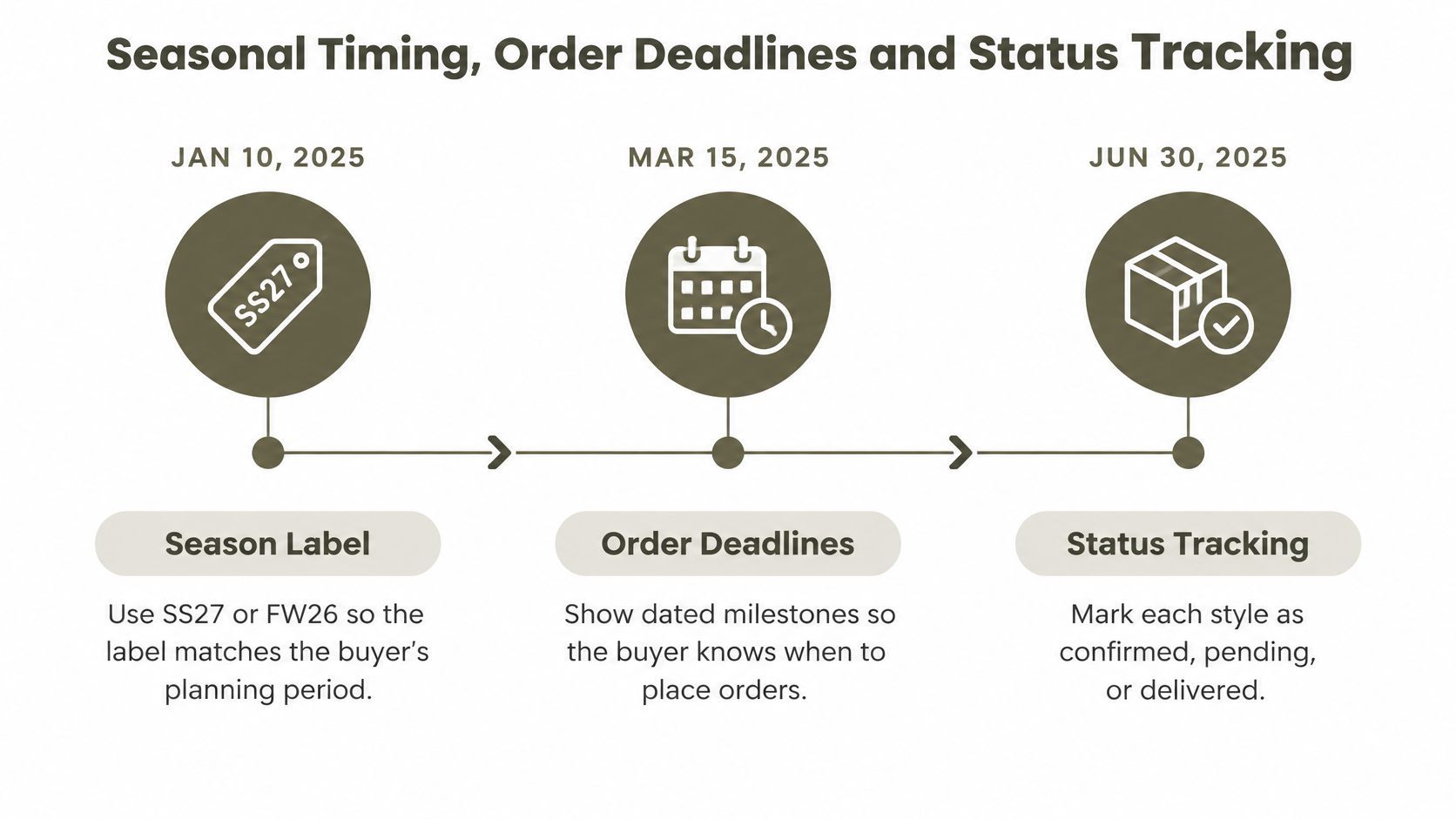
Label the season so the buyer knows instantly which planning period they're looking at. SS27 or FW26, not "spring", because a buyer working three seasons ahead has four springs in their calendar and yours needs to be the one they can place.
A line sheet without dates is a catalogue. A line sheet with dates is a plan, and the buyer needs a sequence in a fixed order: the issue date of the sheet, the order window opening, the order deadline, the cancel deadline, the production start, and the ship window. Put the deadlines on the sheet itself, not in the covering email that gets buried by Tuesday.
Build one dated timeline
Take a sample season. Sheet issued 5 May, orders open 12 May, order deadline 6 June, cancel deadline 20 June, production starts 24 June, ship window 8 to 26 September. A drop calendar built this way lists several collections on one timeline, so a buyer can see where the spring buy overlaps the high-summer replenishment and staff the open-to-buy accordingly.
The cancel date is the one that hurts. If a buyer misses it by four days on a six-style collection, those styles can't be pulled from production without penalty, so the units either land and sit or get discounted on arrival, and the whole season's margin planning shifts because of four days.
Status tracking is the second half of timing, and it splits into two audiences. Internal stages include tech pack drafted, RFQ sent, quote received, sample ordered, sample approved and bulk in production. Those belong on an internal board, alongside quote comparisons the buyer should never see. Buyer-facing information is narrower: confirmed, in production, shipped, with dates attached to each.
Genpire shows real-time project status at exactly that granularity: tech pack drafted, RFQ sent, quote received, sample ordered, sample approved, bulk in production and shipped.
Made-to-order products live and die by this discipline, which is why choir robes from Clerkmans are ordered against a delivery date rather than pulled off a shelf.
Build the dated timeline for your next season, print the deadlines on the sheet, and decide which status stages the buyer is allowed to see. Then leave the rest off the page.
Category Variants for Apparel, Hard Goods and Jewelry
The mistake most templates make is treating one field list as universal. A size run is the centre of the page for apparel; for a table lamp it's meaningless, while dimensions, carton size and electrical certification decide whether the order happens at all. The Sizemarker wholesale line sheet guide makes the case for a stable core schema plus category-specific specification blocks, and that's the right architecture.
So build it in two layers. The core schema never changes: product ID, image, variants, price, minimums, availability and ordering terms. Underneath, a specification block carries what buyers in that category check first, and it differs by row.
| Category | Specification Block That Leads |
|---|---|
| Apparel | Size run, fiber content, care labeling. Example entry: size run XS to XXL with the buyer's sizing system stated |
| Furniture | Overall dimensions, materials, carton size. Example entry: W 82 x D 78 x H 74 cm, carton 88 x 84 x 80 cm |
| Jewelry | Metal purity, stone specifications, weight. Example entry: 14k yellow gold, 1.9 g per pair |
| Footwear | Size run by system, upper and sole materials, width. Example entry: EU 36 to 46, leather upper, rubber sole, standard width |
| Toys | Age grading, materials, small-parts warnings. Example entry: ages 3 and up, ABS, small-parts warning on the row |
| Electronics | Electrical rating, voltage range, certification marks. Example entry: 100 to 240 V input, certification marks listed |
Why each block leads where it does
Furniture buyers ask for carton dimensions before anything else, because the carton decides freight class, warehouse slotting and whether the piece fits a lift. Skip that line and the quote stops there. Jewelry buyers reverse the priority: metal purity, stone specifications and gram weight per unit drive both the retail price and the insurance value, so a jewelry sheet that leads with photography and buries the gold content reads as amateur.
Electronics buyers want voltage range and certification marks in the first glance, since an uncertified SKU can't be sold in the destination market at all. Toys and children's products need age grading and small-parts warnings on the product row, not in a footer, because the warning is a condition of sale rather than a footnote.
A polished PDF doesn't fix an operational problem if the factory, the distributor and the retailer each read a different meaning into the same field.
Footwear sits between apparel and hard goods: the size run matters, but so do upper and sole materials and whether the last runs narrow or standard, since a width mismatch generates returns that no margin survives.
For a brand selling across several of these categories, the template stays one document. The core rows are identical from page to page, only the specification block swaps. Build the category-specific packs once, and tailored tech pack templates for bags, jewellery and footwear cover how the underlying spec side changes with them.
Keeping Buyer Data Separate From Factory Specs
Two documents, two jobs, and the fastest way to break both is to merge them. The buyer sheet carries commercial and ordering data: SKU, images, colorways, prices, MOQ, delivery window and terms. The factory tech pack carries the make instructions: drawings, dimensions, bill of materials and construction notes, which is exactly what a complete pack for a prototype order includes.
The buyer sheet should link to that pack, not absorb it. A reference number in the row plus a shared file location gives the factory what it needs without putting a bill of materials in front of a retailer who is trying to work out their margin. When you're deciding which details belong on the spec side, spec sheet essentials for fashion designers walks through the field-level split.
Where the two documents must agree
Material composition appears on both, and it has to match exactly. A jacket whose buyer sheet says 80% cotton and whose tech pack says a poly blend creates a labeling problem that surfaces at customs or on the retail hangtag, long after the fiber was bought. Verify the composition once against the technical specification, then propagate the verified string to both documents rather than retyping it into each.
The risk of mixing runs in both directions. Buyers who see manufacturing jargon they can't act on start asking about seam allowances instead of ship dates, and factories who receive a price figure sometimes read it as a construction constraint and downgrade a material to hit a number nobody asked them to hit.
A tech pack describes how to make the thing. A line sheet describes how to buy it. Every field belongs to one or the other.
Trace one SKU through both
Take a single jacket style, JK-208. On the tech pack, the sleeve length appears as a point of measure in centimetres, alongside the shoulder width, the chest and the construction notes for the cuff. On the buyer sheet, the same JK-208 shows a size run of S to XL in the buyer's sizing system, a wholesale price, an MOQ of 12 per color and an October ship window.
Neither document repeats the other's job, and both are findable from the same identifier. Genpire generates packs that carry points of measure such as sleeve length and shoulder width in centimetres, so the number on the spec side is the same number the buyer sees reflected in the size range.
List your fields and assign each one to the buyer sheet or the tech pack, then confirm that every SKU on the sheet resolves to a matching pack reference. Any SKU without one is a style nobody can make.
Export Formats and Version Control Compared
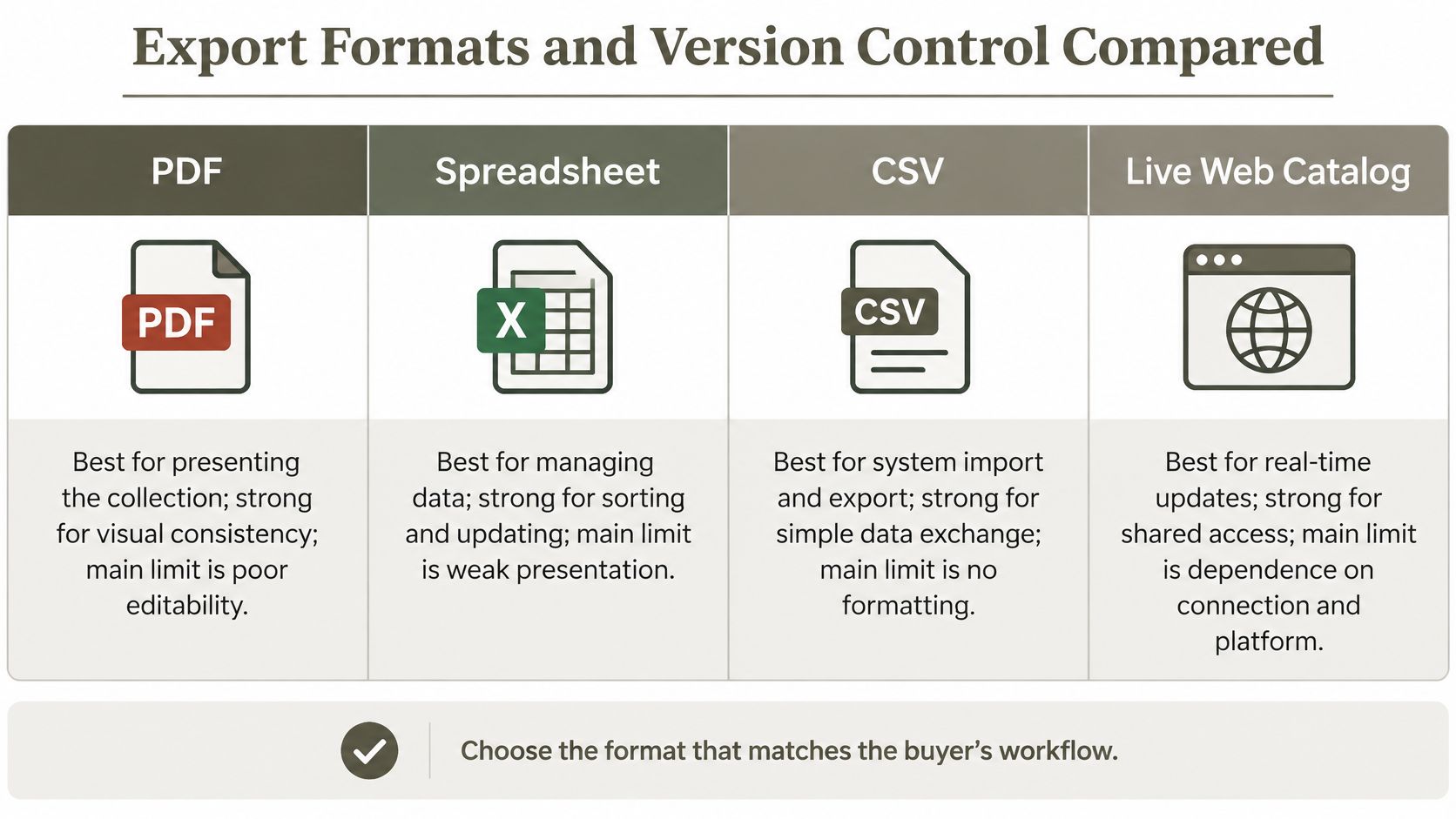
A line sheet leaves your hands in one of four shapes, and each solves a different problem. Pick the format that matches what the recipient needs to do with it, not the one that looks best on your screen.
| Format | Best For | Strength | Limit |
|---|---|---|---|
| Presenting the collection to buyers | Fixed layout, easy to share and print | Hard to update and not always searchable | |
| Spreadsheet (XLSX) | Buyers who filter, sort and quote | Sortable fields and easy edits | Formatting breaks and versions multiply |
| CSV | Retailer or supplier system imports | Machine-readable, no formatting to break | No images and flat data only |
| Live web catalog | Frequent price or stock changes | Always shows the current version | Needs hosting and buyer access |
The source-of-truth problem
A sent document goes stale the moment a price or a stock position changes. That's not a formatting failure, it's a control failure, and most line sheet guidance stops at "make a PDF" without addressing what happens after it's emailed. The Centra analysis of digital wholesale points to the scale of the shift: it cites Gartner's forecast that 80% of B2B buying interactions would be digital by 2025, and reports that 75% of buyers prefer to complete the journey without a sales representative. Both are useful as a reading of the trend rather than a current count.
If buyers are self-serving their own quotes, the document has to carry its own controls. Six fields do most of that work.
- Visible revision date: the date the record changed, not the date the file was created.
- Unique version identifier: a short code such as v3.2, so two buyers comparing notes can confirm they hold the same sheet.
- Currency and tax basis: which currency, and whether duty or VAT sits inside the number.
- Incoterm or shipping responsibility: who books the freight and who pays it.
- Inventory status: in stock, made to order, or sold through, per style.
- Validity period: the date the quoted prices stop being honored.
Make the file readable by a machine
Accessibility and machine-readability are the same requirement wearing two hats. Selectable text in the PDF means a buyer can copy a price instead of retyping it, and meaningful image descriptions mean a screen reader announces the style rather than "image". Consistent SKU naming across PDF, spreadsheet and CSV lets a retailer's system match your rows to their item file without a manual step. Never let a critical figure live only inside a graphic, because a number baked into a JPEG reaches nobody's purchasing system.
Choose one format for humans and one for systems. A PDF for the buyer to read, a CSV for their system to import, both generated from the same controlled record.
Then set the rule for when a new version gets issued. A price change, a pack change or a date change is a new number. A typo fix in a description is not.
Confirm the Sheet With a Pre-Send Pass
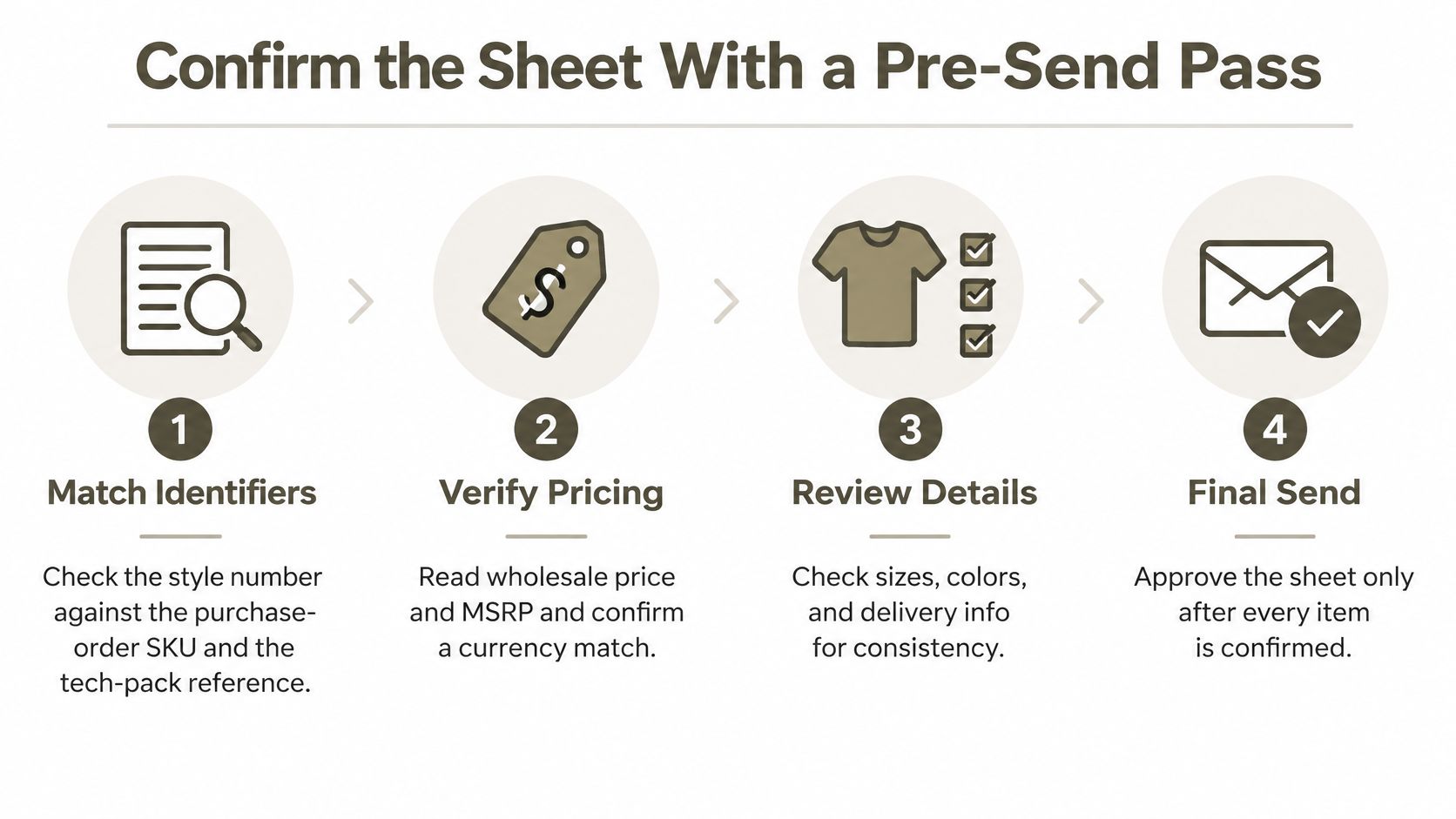
A sheet can look finished and still carry a wrong pack quantity or a missing version code. Run one problem style through this sequence before the buyer send, in this order, and fix every check that fails.
- Match the identifiers. Read the style number on the sheet, the purchase-order SKU and the tech pack reference, and confirm all three agree.
- Read the pricing. Confirm a currency code sits beside both the wholesale price and the MSRP, plus a note on whether tax or duty is inside those figures.
- Test the opening MOQ. Confirm it states per style, per color, per pack or total order, then check the reorder minimum is a visibly different number.
- Check the pack maths. Case pack means units per inner pack and units per carton, and the opening quantity must be a multiple of it. With 12 per color and two colors, the order is 24 units, not 12.
- Read the ship window. Both a start date and an end date, plus the document-level order and cancel deadlines.
- Read the return line. The window, the conditions and who pays the freight.
- Confirm the sizing and content. US, EU or UK stated once, and the fiber content matching the technical specification exactly.
- Find the controls. Revision date, version identifier and validity period all visible on the page.
- Test the formats. Select a price in the PDF as text, then open the CSV and find the same SKU in a column.
Why the pack and return tests earn their place
Steps four and six catch the errors that survive visual review. A buyer reading "MOQ 12" with no scope will split across colors and fail the minimum on both. A return line that omits who pays return freight gets tested the first time a buyer sends back a damaged carton, and the argument costs more than the goods. It's the same discipline a catering team uses to avoid missed serviceware and cleaning kit in an equipment order, where one missing line on a list turns into a second delivery.
Step nine is the one senders skip. If the price can't be selected as text, it was rasterized into an image, and the buyer will retype it and mistype it. If the CSV doesn't carry the SKU as its own column, no retailer system will import it cleanly.
Fix the failed checks, then issue a new version number only when a price, a pack or a date has changed. Cosmetic edits don't earn a revision.
Every one of these checks reads from the same underlying data: identifiers, measurements, prices, dates and pack rules. When that data lives in one controlled record, a correction made once reaches every field the buyer sees.
Genpire builds that record from a prompt, a sketch or a reference image, then generates factory-ready tech packs with measurements, BOM and construction notes and carries the same SKU through RFQ, sampling and bulk ordering. Tech packs download as PDF, XLS or SVG, so the document the buyer reads and the specification the factory builds from describe the same product. Build your next collection's sheet in Genpire.
Run the nine checks on your highest-risk style today. The style with two colors and a tight ship date will find the error before the buyer does.