You've spent the afternoon generating product concepts. The renders look polished, the silhouettes feel fresh, and the presentation deck is starting to take shape. Then the factory reviews them and asks questions the images can't answer: Where does this seam terminate? What is the actual last shape? Which material supports this fold? Where's the bill of materials?
That gap is where most product design prompts fail. A prompt can produce an attractive image while leaving the product undefined. Factory-ready work requires a connected chain from brand direction to form, materials, construction, views, measurements, and editable specifications.
Table of Contents
- Why Most Product Design Prompts Stop at the Pretty Picture
- The Four Building Blocks of a Product Design Prompt
- From Open Ideation to Refined Concept Prompting
- Five Editable Prompt Templates You Can Use Today
- Grounding Prompts in Brand DNA
- Decision-Ready Prompting Over Output Volume
- A Prompting Checklist and Common Failure Modes
Why Most Product Design Prompts Stop at the Pretty Picture
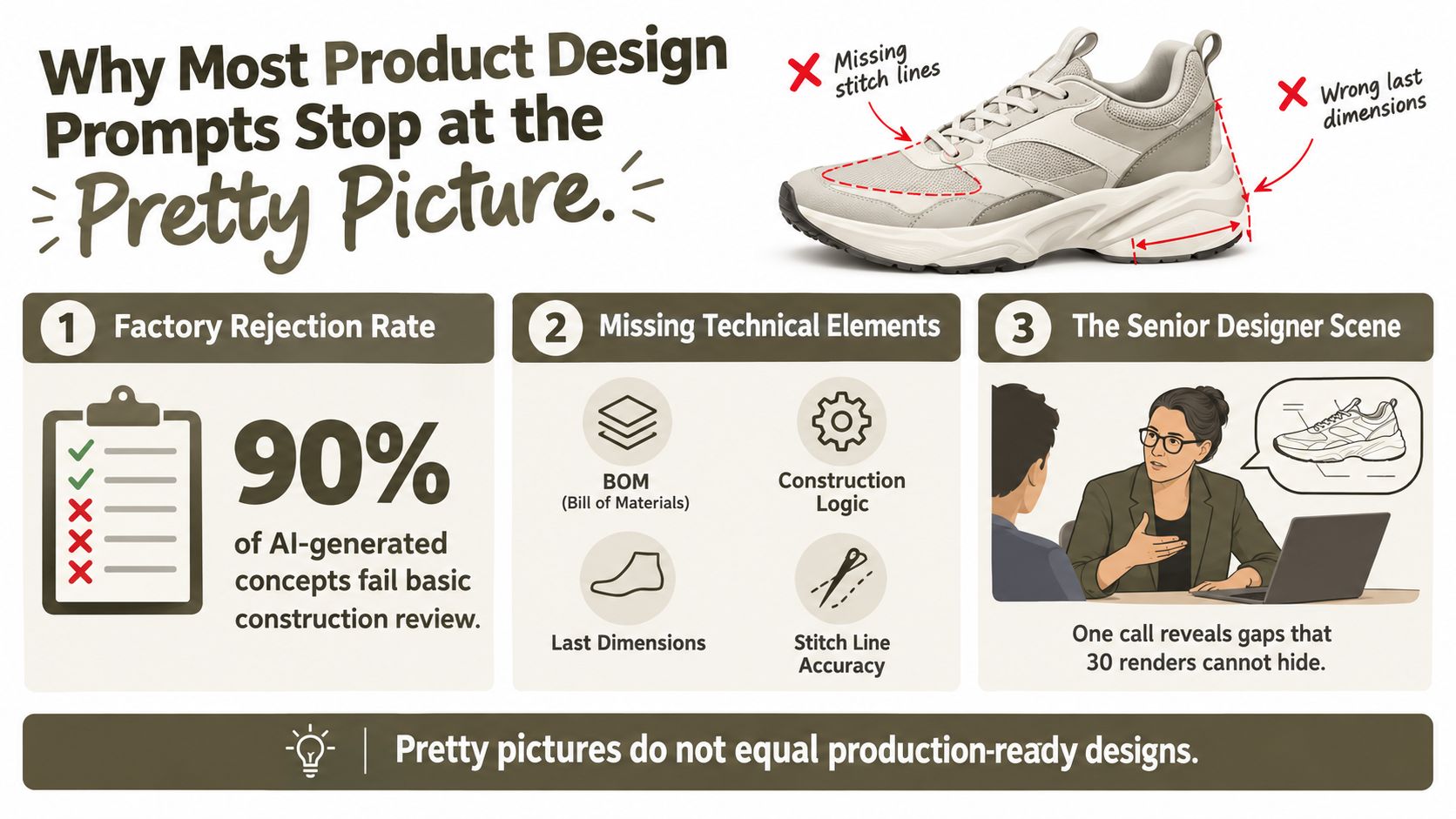
A senior designer can usually spot the problem within minutes. A team reviews a page of AI-generated sneaker concepts, and none survives the factory call. The images show convincing leather, dramatic soles, and carefully staged lighting, but they omit stitch paths, panel relationships, last dimensions, component breakdowns, and construction logic.
That isn't a failure of visual generation. It's a failure of the brief.
The three breaks in the workflow
Most prompt guides break down in three predictable places:
- No useful input assets: A text-only prompt asks the system to invent the product without a sketch, reference object, moodboard, or approved precedent.
- No production constraints: The prompt describes the look but says nothing about material behavior, scale, component availability, seam placement, or assembly.
- No handoff format: The output is a hero render rather than a coordinated view set, construction annotation, BOM, or editable tech-pack field.
A beautiful render answers one question, namely what the product might look like from one angle. A buildable product must answer several others. It needs enough visual and written information for a technical designer, supplier, and factory to interpret the same intent without guessing.
The distinction matters more as AI moves deeper into engineering workflows. One ABI Research forecast says mechanical product design and simulation is already the leading area for AI deployment among manufacturers, with 62% currently running AI projects there and 89% expecting to do so within three years. Those figures appear in the generative AI product design market report, and they point to a practical shift. Product design prompts aren't staying in the concept-art lane. Teams are applying them to technical decisions, simulation, sourcing, and production preparation.
Practical rule: If the prompt only describes appearance, expect an appearance-first result.
The fix isn't to make every prompt enormous. It's to give the system the right inputs, define the role it should play, constrain the output, and provide a reference for the standard you'll accept. That structure turns prompting from image roulette into a design loop that can move toward specification.
The Four Building Blocks of a Product Design Prompt
A useful product design prompt is a four-part system, not a clever sentence. Industrial-design research describes these components as input context, system instructions, output constraints, and few-shot examples. Missing one increases ambiguity, especially when the product must satisfy both visual and manufacturing requirements. The essential AI product design tools can support this broader workflow, but the prompt still needs to carry the design logic.
Consider a stainless-steel water bottle. The weak version gives the model a category and an adjective. The strong version tells it what to inspect, how to behave, and what to return.
| Building Block | Weak Prompt | Strong Prompt |
|---|---|---|
| Input context | “Design a premium stainless-steel water bottle.” | “Use the uploaded cylindrical bottle sketch and attached reference bottle for proportions. Preserve the indicated shoulder transition and cap diameter relationship.” |
| System instructions | “Make it modern and stylish.” | “Act as an industrial designer preparing a manufacturable reusable bottle. Follow the stored brand silhouette rules, avoid ornamental parts without a functional purpose, and keep the product suitable for stainless-steel forming and a separate cap assembly.” |
| Output constraints | “Show the final design.” | “Return coordinated front, side, top, and three-quarter views. Use a neutral background, consistent scale, clear view labels, and editable fields for material, finish, component, and construction notes.” |
| Few-shot examples | No example. | “Match the attached approved bottle view for line weight, corner softness, cap-to-body proportion, and annotation style. Treat it as the visual standard, not as a design to copy.” |
1. Input context gives the model something real to preserve
Upload a line sketch, reference product, moodboard, or approved prior view. The input doesn't need to be complete. It needs to establish the relationships you don't want reinvented, such as the handle position, opening size, or overall silhouette.
2. System instructions define the job
Tell the system whether it should act as a concept designer, technical designer, or specification assistant. Add brand guardrails and category rules. “Premium” is an impression. “Double-wall stainless steel body, removable polymer cap, restrained surface treatment, no exposed fasteners” is an operating brief.
3. Output constraints control the handoff
Specify the view set, naming, aspect ratio, annotation requirements, and editable fields. A single perspective image encourages interpretation. A coordinated multi-view output lets the team compare proportions and identify inconsistencies.
4. Few-shot examples establish the acceptance bar
One approved example can communicate line quality and construction conventions more effectively than a paragraph of adjectives. It also separates the desired style of the output from the new product direction.
Strong prompts trade some uncontrolled novelty for repeatability. That's a good trade when the product has to survive design review, costing, sampling, and supplier interpretation.
From Open Ideation to Refined Concept Prompting
Real design teams don't start with every constraint at once. Early prompting should open the design space. Later prompting should close it deliberately.
Phase one starts broad
For a footwear brief, begin with a prompt such as:
“Generate six to eight distinct chunky retro-runner silhouette directions for an everyday lifestyle sneaker. Explore outsole profile, upper volume, collar height, toe shape, and overlay geometry. Prioritize meaningful differences in form. Keep materials, colors, and graphics open. Label each direction with a short design rationale.”
This prompt is useful because it asks for form exploration, not production detail. At this stage, you're looking for a silhouette worth developing. Adding leather grade, stitch color, and a complete tech pack now would slow the search and encourage the system to decorate weak forms.
The historical shift toward iterative prompting supports this approach. A 2026 analysis of 210,000 AI design prompts found that 40% of generations were iterations rather than first drafts, with a median prompt length of 806 characters and activity across 160 countries. The dataset is discussed in this analysis of prompt engineering, and it reflects a workflow built around revision rather than one-shot generation.
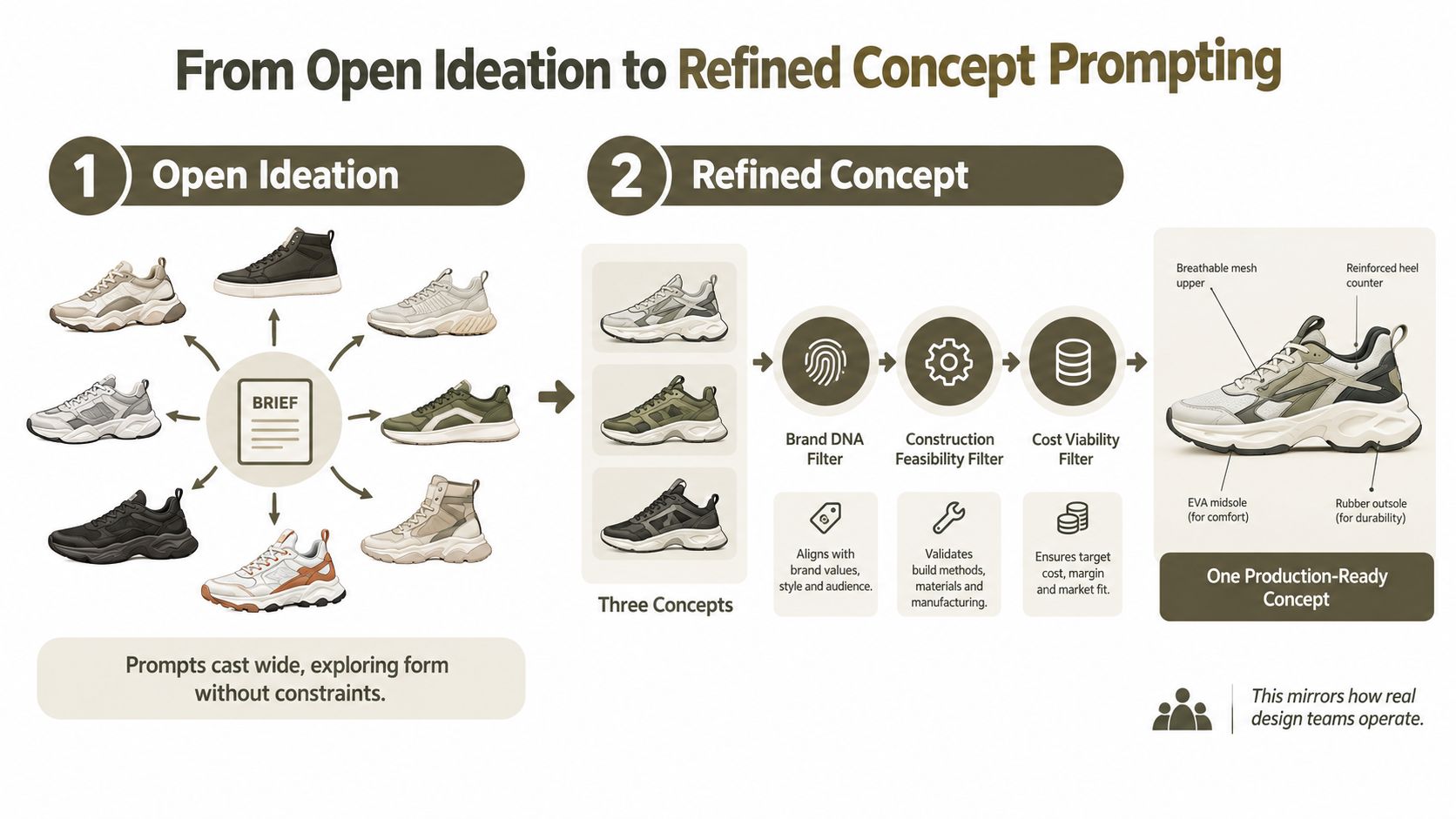
Phase two turns the selected silhouette into a brief
Once one direction earns a review, stop asking for new silhouettes. Lock the chosen reference and refine it:
“Refine the selected chunky retro-runner silhouette. Use full-grain leather on the toe and quarter panels, suede on the eyestay and heel overlay, recycled mesh at the vamp, and a molded rubber outsole. Use tonal stitching, visible double-needle seam lines where panels join, and a padded textile tongue. Preserve the approved silhouette and panel proportions. Return coordinated front, side, three-quarter, and top-down views at consistent scale. Add material callouts, seam locations, outsole construction, and editable measurement placeholders.”
Every detail has a job. The leather grade affects stiffness and fold behavior. The suede overlay changes the visual hierarchy and seam definition. The mesh placement indicates breathability. The view set exposes proportion errors that a three-quarter render can hide. The annotations create a starting point for technical review instead of forcing the factory to reverse-engineer the image.
Use the same discipline for the commercial context. If the concept will support a product launch, a practical ecommerce email marketing guide can help connect product development with the later merchandising workflow. For the production handoff itself, this AI product design workflow from prompt to production follows the same principle, keep the approved intent connected to downstream assets.
A prompt-driven workflow works best when each rerun answers a specific design question. Change the sole construction, not the entire brief. Test a new material while preserving seam behavior. Adjust the collar height while keeping the approved panel map. This is how you avoid spending credits on re-ideation when the team only needed a controlled revision.
Five Editable Prompt Templates You Can Use Today
These templates use the four building blocks above. Replace the bracketed fields, attach the relevant input, and keep the output requirement explicit. In Genpire, activate the Brand DNA slot only when the project has approved brand references to enforce.
| Template | Primary Input | Typical Output | Best Used When |
|---|---|---|---|
| Sketch-to-multi-view | Hand-drawn line sketch | Front, side, back, three-quarter, and exploded construction views | A rough idea needs coordinated visual development |
| Brand DNA lock | Brand library, moodboard, and palette tokens | On-brand silhouette and detail variations | A collection must remain visually coherent |
| Material swap | Approved product render | Re-rendered material options with seam behavior preserved | Materials are still being evaluated |
| Colorway expansion | Approved hero design | Coordinated color variants with material callouts | Merchandising needs a controlled range |
| Tech-pack fields | Selected concept and construction references | Editable notes, measurement placeholders, BOM lines, and stitch specifications | The concept is moving toward supplier review |
Sketch-to-multi-view
“Use the attached hand-drawn line sketch as the input context. Act as a product designer preparing the concept for technical review. Preserve the sketch silhouette and major component relationships. Return front, side, back, three-quarter, and exploded construction views, all at consistent scale and with editable labels for panels, materials, and assembly order.”
Brand DNA lock
“Use the attached product brief as the creative direction. Apply the active Brand DNA layer for silhouette rules, palette tokens, hardware language, materials, and recurring trim signatures. Create [product category] for [season or drop] aimed at [target user]. Preserve the stored brand constraints and return [view set] with editable material and detail callouts.”
Material swap
“Use the approved render as the fixed design reference. Re-render the product in [material options]. Preserve silhouette, panel map, seam placement, and component dimensions. Show how each material behaves at folds, edges, overlays, and attachment points. Return labeled views with editable material fields and a comparison note for production review.”
Colorway expansion
“Use the approved hero design and active Brand DNA palette tokens. Generate [number of variants] coordinated colorways while preserving the silhouette, material map, hardware finish, and construction details. Label each colorway by component and return front, side, and three-quarter views at consistent scale.”
Tech-pack fields
“Use the selected concept and attached construction references. Prepare editable fields for product measurements, material callouts, component names, BOM lines, seam and stitch specifications, hardware, finishing, and assembly notes. Flag unknown values as placeholders rather than inventing them. Return coordinated views linked to the corresponding fields.”
The last instruction is essential. A system should mark an unknown measurement for review, not quietly manufacture a precise-looking answer.
Grounding Prompts in Brand DNA
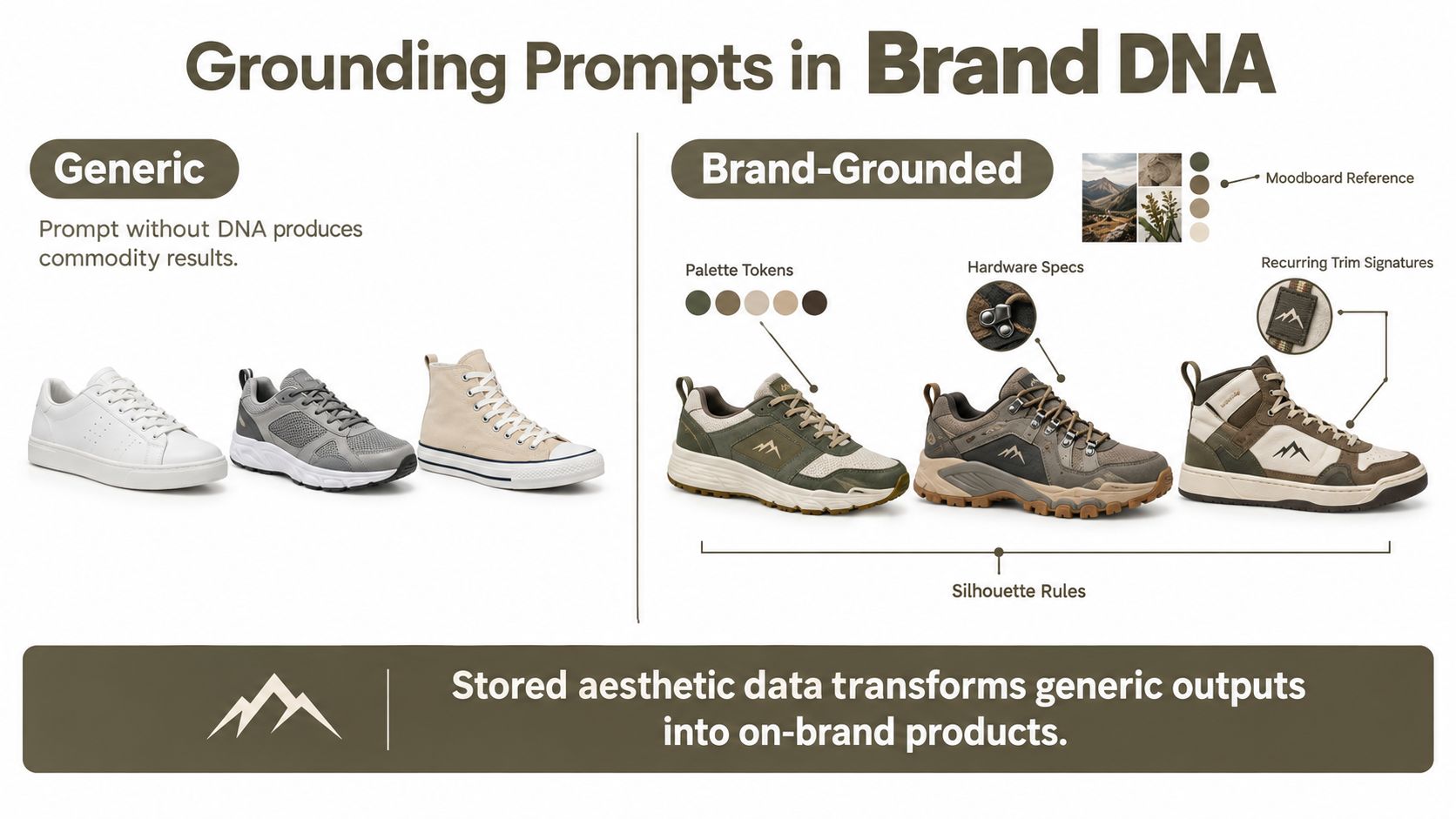
Generic prompts produce generic products because they describe a category without defining the visual decisions that make a brand recognizable. “Minimal sneaker with premium details” can point almost anywhere. A stored Brand DNA layer gives the system a narrower, reusable design vocabulary.
That layer can include:
- Silhouette rules: Preferred proportions, toe shapes, volume, curvature, and visual balance.
- Palette tokens: Approved color relationships and usage patterns.
- Hardware specifications: Buckles, eyelets, zippers, closures, and finishes.
- Material references: Accepted leather, textile, polymer, metal, and surface treatments.
- Recurring trim signatures: Edge treatments, piping, perforation logic, logos, and other repeatable markers.
- Moodboard references: Images that establish the emotional and visual territory.
Keep stable rules out of the prompt box
The prompt should carry what changes for the specific product, such as the season, drop, target user, activity, performance requirement, and commercial role. Stored brand data should carry what stays consistent across the collection.
Without DNA, a brief might produce a generic low-profile sneaker in neutral tones with familiar hardware. With DNA enabled, the same brief can preserve the brand's established proportion, color logic, hardware language, and trim behavior while still exploring a new seasonal direction. The output becomes easier to recognize, compare, and review because the model isn't rebuilding the brand from adjectives each time.
The mechanics matter. Silhouette rules can filter out proportions that don't belong to the brand. Palette tokens can enforce approved relationships without requiring the designer to list every shade. Hardware references can prevent a decorative closure from appearing just because the prompt used the word “premium.”
For a deeper view of this approach, the Brand DNA workflow for consistent collections shows why reusable aesthetic data belongs beside, not inside, each individual brief.
Store the decisions that should remain stable. Prompt the decisions that should change.
Brand DNA won't make an infeasible concept manufacturable by itself. It solves a different problem, namely consistency. You still need to specify material behavior, construction, views, and technical fields for production work. But keeping those layers separate makes the prompt shorter, clearer, and easier to revise when the seasonal direction changes.
Decision-Ready Prompting Over Output Volume
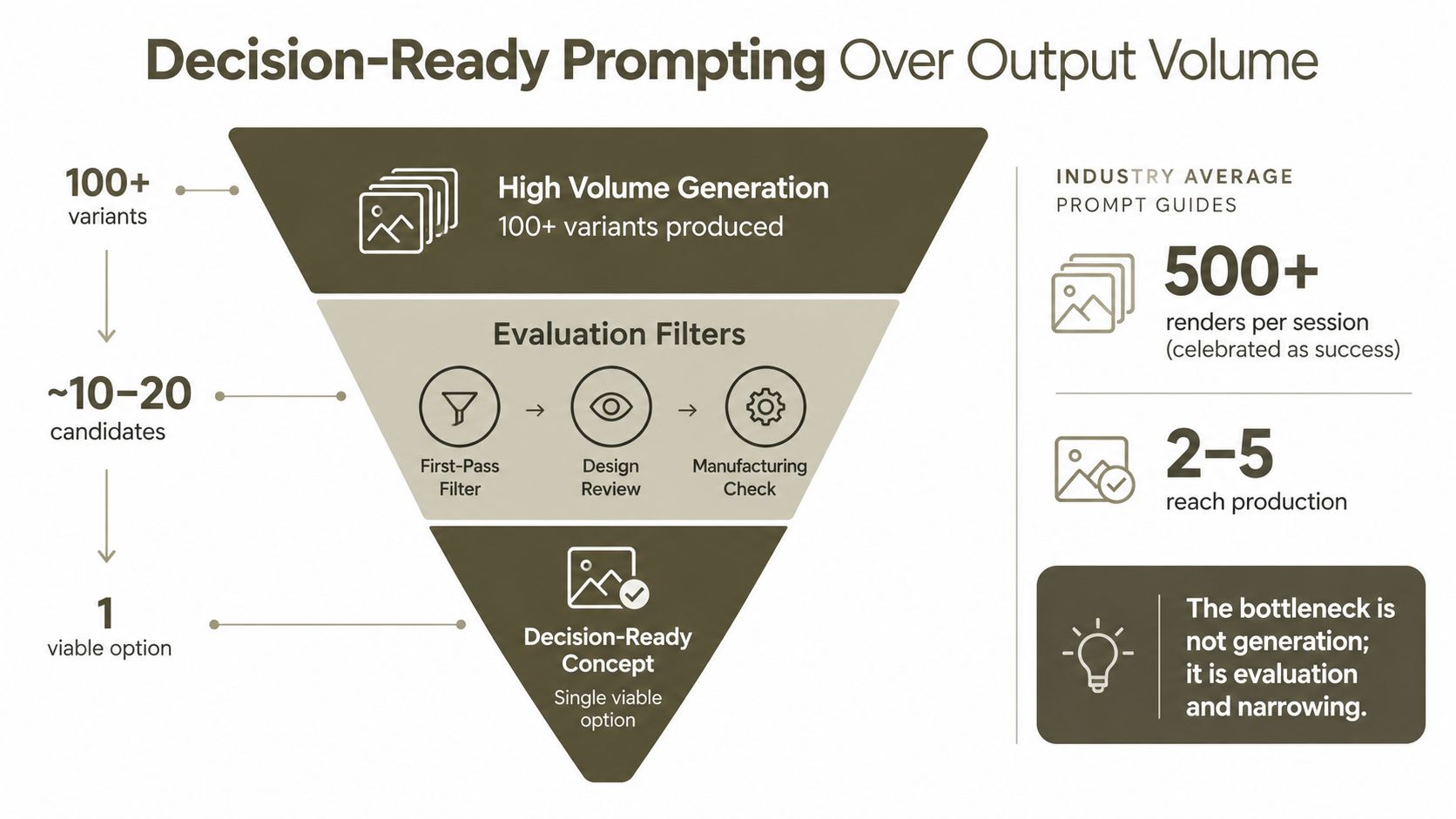
More renders don't automatically produce a better decision. They often produce a larger review burden.
McKinsey notes that generative AI can create dozens of concepts quickly, while also warning that too many choices can overwhelm stakeholders and that human designers must validate and refine outputs because many aren't manufacturable. The practical implication is simple. The bottleneck moves from generation to evaluation and narrowing, as described in this analysis of generative AI in physical product design.
A decision-ready prompt forces the trade-offs into the brief:
“Develop two finalist sneaker concepts and one contrarian option for the approved silhouette. All finalists must use available hardware, a controlled panel count, and construction that supports the specified material. Keep the target material cost within the project's approved ceiling and protect the target margin band. For the contrarian option, violate exactly one guardrail and identify the resulting cost, construction, or margin risk. Return a comparison matrix covering silhouette, materials, panel count, stitch complexity, hardware, risk, and recommended next action.”
This pattern does more than request alternatives. It asks the system to make constraints visible. The contrarian option is useful because it exposes what the team gives up when it chooses a more complex sole, extra overlay, unusual hardware, or difficult material.
Filter the review deliberately
Use three gates:
- First-pass filter: Remove concepts that miss the category, user, or Brand DNA.
- Design review: Compare form, material expression, comfort cues, and product distinction.
- Manufacturing check: Verify seams, panels, components, material behavior, and technical fields.
Four evaluated prompts can be more valuable than forty unreviewed renders because each prompt produces evidence for a decision. Your credit budget should fund meaningful exploration, controlled iteration, and specification work, not endless variants that nobody can assess.
The rule is blunt and useful: if a prompt doesn't force a choice, rewrite it.
A Prompting Checklist and Common Failure Modes
Keep this checklist beside the prompt editor:
- Define the category: Name the product and its intended use.
- State the user: Describe who uses it, where, and under what conditions.
- Anchor the brand: Activate Brand DNA or attach the approved references.
- Specify construction: Name materials, components, seams, closures, finishes, and assembly expectations.
- Request coordinated views: List the exact front, side, back, top, three-quarter, or exploded views required.
- Exclude unwanted outcomes: State what the system shouldn't add, change, or invent.
- Verify editable fields: Confirm that measurements, BOM lines, material callouts, and stitch specifications remain editable before export.
Five mistakes that burn credits
- Vague opener: “Design a cool bag” gives the system no useful decision criteria. Replace it with a target user, use case, silhouette, material direction, and required output.
- Missing scale constraints: A product can look plausible while its proportions are unusable. Add reference dimensions or measurement placeholders and flag unknowns for review.
- Ignored construction seams: A render may hide where panels join or how an opening is assembled. Request seam paths, component relationships, and an exploded view.
- Volume over iteration: Generating more candidates doesn't solve a weak selection process. Ask for differentiated options against explicit filters.
- Non-editable handoff: A flattened image creates another manual reconstruction step. Require structured, editable fields before exporting the tech pack.
The most reliable product design prompts don't ask AI to replace design judgment. They make that judgment explicit, preserve what has already been approved, and return outputs that the next person can inspect and edit.
Genpire turns prompts, sketches, and references into multi-view product concepts, factory-ready specifications, and production assets across categories including footwear, accessories, furniture, home goods, and electronics. Start a real concept with Brand DNA grounding, controlled revisions, and editable tech-pack fields by visiting Genpire.