You're probably staring at a backpack sample right now, or at least at a sketch that feels one factory e-mail away from becoming a headache. The shape looks right, the fabric note is there, the laptop sleeve seems obvious, and yet you know the first production run can still come back with a crooked front panel, a weak strap anchor, or hardware that shifts because no one pinned it down hard enough.
A tech pack backpack should stop that drift before a cutter touches fabric. In practice, it's not a moodboard with measurements. It's the file set that tells a factory how the pack carries weight, where it must hold its shape, what can vary, and what absolutely can't.
Table of Contents
- What a Factory-Ready Tech Pack Backpack Actually Includes
- Freezing the Brief and Load Before You Draw
- Multi-View Sketches and Measurement Points
- Construction Details and Component Breakdown
- Materials, Hardware, Trims, and Labels
- Tolerances, Test Methods, and Acceptance Criteria
- Export-Ready Files and Final Factory QA
What a Factory-Ready Tech Pack Backpack Actually Includes
The first bad sample usually starts with a sentence like “make the front panel medium.” That sounds harmless until the factory interprets medium as its own template and the finished sample comes back 12 mm taller than the mockup. That kind of miss isn't a sewing problem, it's a specification problem.
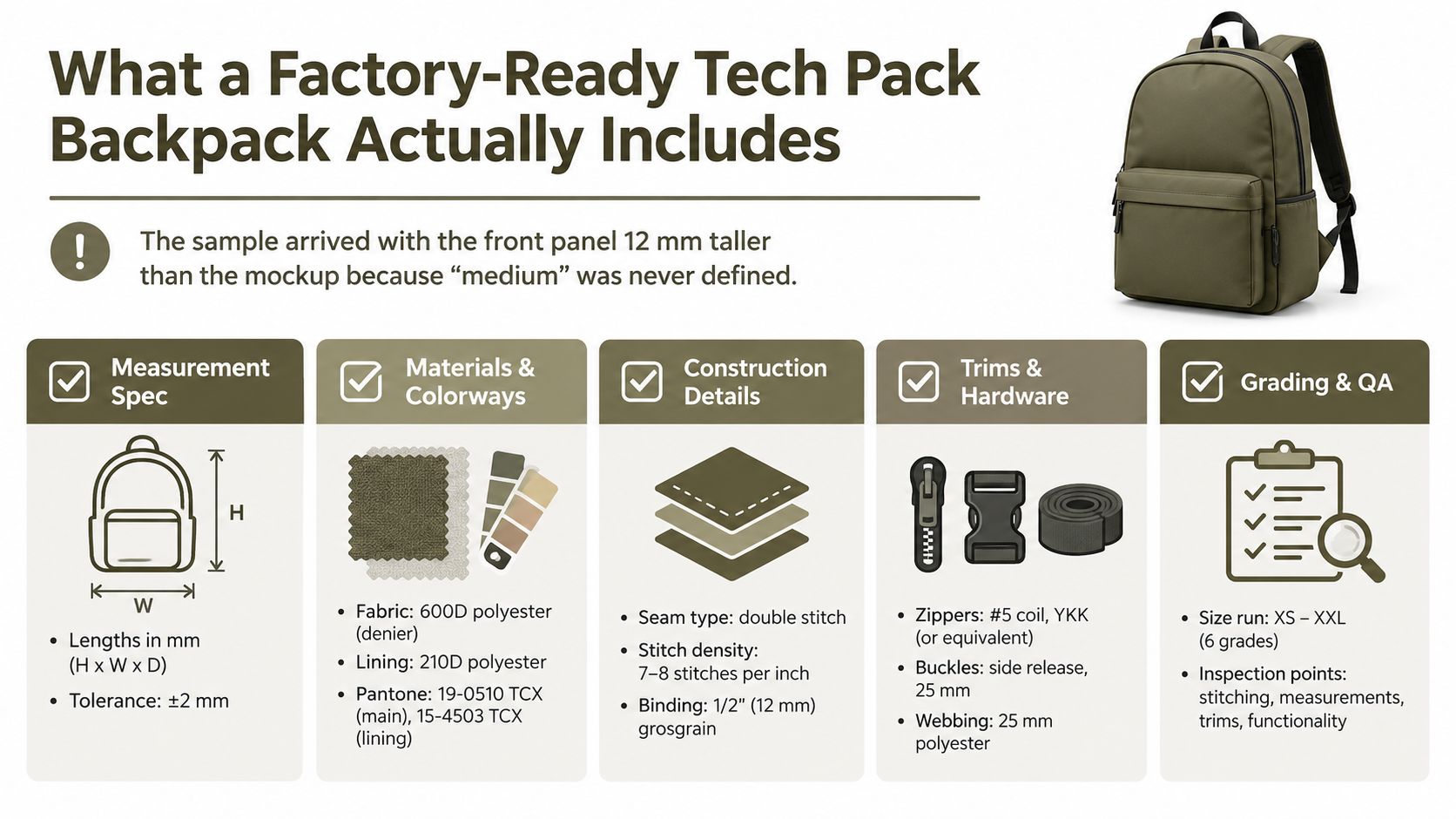
A factory-ready backpack spec needs to behave like a contract, not a loose design brief. The most reliable pack files I've sent overseas always bundled six pages together, a cover with revision history, multi-view sketches with measurement points, construction callouts, a bill of materials, tolerance and test tables, plus packaging and export notes. When one of those pages is missing, somebody in sampling fills the gap with habit.
Practical rule: if a cutter, sewing operator, or QC inspector would have to ask a follow-up question, the tech pack wasn't specific enough.
The sketch page tells the factory what the bag looks like. The BOM tells procurement what to buy. Tolerances tell QA where the edges are. The test page proves the bag can survive real use, not just a studio render. If you need a baseline for what a tech pack is before you get specific to backpacks, this overview of a tech pack is a useful companion reference.
| Input Variable | Value to Lock | Drives Spec Field |
|---|---|---|
| Target user | Commuter, student, traveler, outdoor user | Pocket map, harness, internal organization |
| Carry capacity | Liters and usable packing volume | Overall dimensions and panel proportions |
| Maximum load | Daily carried weight | Strap geometry, reinforcement, test loads |
| Closure style | Roll-top, flap, or zipper | Top construction and hardware count |
| Laptop size | Device dimensions and sleeve clearance | Sleeve depth, padding, opening width |
The important shift is to treat every page as a downstream instruction to the factory. If the measurements live only in a sketch and the BOM lives only in a spreadsheet, misreads creep in. The best packs I've shipped were the ones where every page said the same thing in a different way.
Freezing the Brief and Load Before You Draw
Before Illustrator opens, the brief has to stop moving. If the target user, carry capacity, load, and price ceiling are still floating, the tech pack will wobble all the way into sampling. A backpack is a load-bearing product, so the earliest decisions control almost everything that follows.
Start with the person who will carry it. A commuter with a laptop and charger needs different strap behavior than a student hauling books, and a traveler with a camera insert pushes the bag into a different geometry again. The point isn't to build for everyone, it's to define the use case tightly enough that every panel and pocket has a job.
Lock the carrying scenario
Once the user is defined, lock the payload. A 25L commuter pack carrying electronics and gym gear asks for a different stress map than a smaller daypack, even if the styling is similar. If you don't freeze the carry standard, the factory will overbuild one area and underbuild another.
| Input Variable | Value to Lock | Drives Spec Field |
|---|---|---|
| User type | Commuter, student, traveler | Organization layout, comfort targets |
| Capacity | Usable liters | Body dimensions, pocket allocation |
| Load profile | Laptop, charger, bottle, extras | Strap strength, base structure |
| Price ceiling | Retail target tier | Material architecture, hardware grade |
| Closure type | Roll-top, flap, zipper | Opening pattern and seam structure |
A backpack spec gets expensive when you let “nice to have” details sneak into the first round of drawings.
Freeze the silhouette language too. A roll-top, a clamshell zipper, and a flap-top are not cosmetic variants, they change the whole pattern logic. The same goes for a hydration sleeve, a hip belt, or a rigid laptop compartment. Each one adds bulk, sewing operations, or reinforcement, and the factory needs those decisions before cutting a sample.
The cleanest tech packs I've seen are the ones that force a few hard choices early. That saves days later because the pattern team isn't rebuilding the bag around guesses. It also keeps sourcing aligned with the intended retail tier, instead of drifting into a material package that looks impressive but makes no commercial sense.
Multi-View Sketches and Measurement Points
A sketch without measurement points is decoration. The factory can admire it, but it can't build from it with confidence. That's why the core drawing page needs front, back, side, top, bottom, and one open interior view laid out at the same scale, with every important dimension called out on the page itself.
A common practice for a mid-size pack is to keep the views consistent and use a quarter-scale reference grid so the sample room can spot-check proportions. I've found that annotation density matters more than fancy line work. The factory doesn't need art direction here, it needs readable geometry.
Number the points, not the feelings
Each key measurement should have a point number, a leader line, and a tolerance in the same visual field. That might include overall height at center back, width at the widest point, base depth, strap attachment height, and handle drop. A 25L pack often ends up with a surprisingly dense map of callouts, because one bag can have many places where a small change creates a big carry difference.
| MP # | Location | Dimension (mm) | Tolerance | Tool |
|---|---|---|---|---|
| MP-01 | Center back height | 420 | ±2 | Steel ruler |
| MP-02 | Widest body width | 300 | ±2 | Caliper |
| MP-03 | Base depth | 170 | ±2 | Caliper |
| MP-04 | Strap attach height | 520 | ±3 | Tape measure |
| MP-05 | Handle drop | 40 | ±2 | Tape measure |
The numbered system helps QC, but it also protects you when the factory asks what “about here” means. I've seen too many rounds of sampling stall because a designer marked a pocket visually and never defined its opening width or its placement reference. Once the measurement map exists, both sides can talk about the same point with the same language.
This bag-spec workflow is a useful reminder that accessories become much easier to source once measurement points are standardized. The same discipline applies here, but backpacks punish vague drawing even faster because the load distribution changes the whole silhouette when the dimensions drift.
Construction Details and Component Breakdown
The construction page is where the backpack stops being a drawing and starts becoming a sewing order. This is the sheet that tells the factory how the main body, gusset, base, lid, and internal sub-assemblies are supposed to meet. If that page is thin, the sample room fills the gaps with whatever construction habit they already use.
Build the body as a cut plan
A clean construction sheet starts with panel orientation, grain line, and seam path. Then it shows how the front, back, base, and side gussets connect, including which edge gets binding and which edge gets enclosed in the seam. For load-bearing bags, I always call out the weak points separately, strap roots, grab-handle bases, zipper ends, and lower base corners.
Reinforcement isn't decorative. It needs a place, a size, and a stitch rule. If the back panel uses foam, the spec should state thickness and lamination stack. If a rigid board supports the base or back, the insert dimensions need to be documented as a separate part, not implied by the pattern.
Name the seam and closure logic
The factory can't guess whether a seam should be flat-felled, bound, or welded. It also can't infer stitch density from a sketch. That's why the page has to name the seam type, seam allowance, SPI, thread type, bar tack positions, and the zipper system in plain manufacturing language.
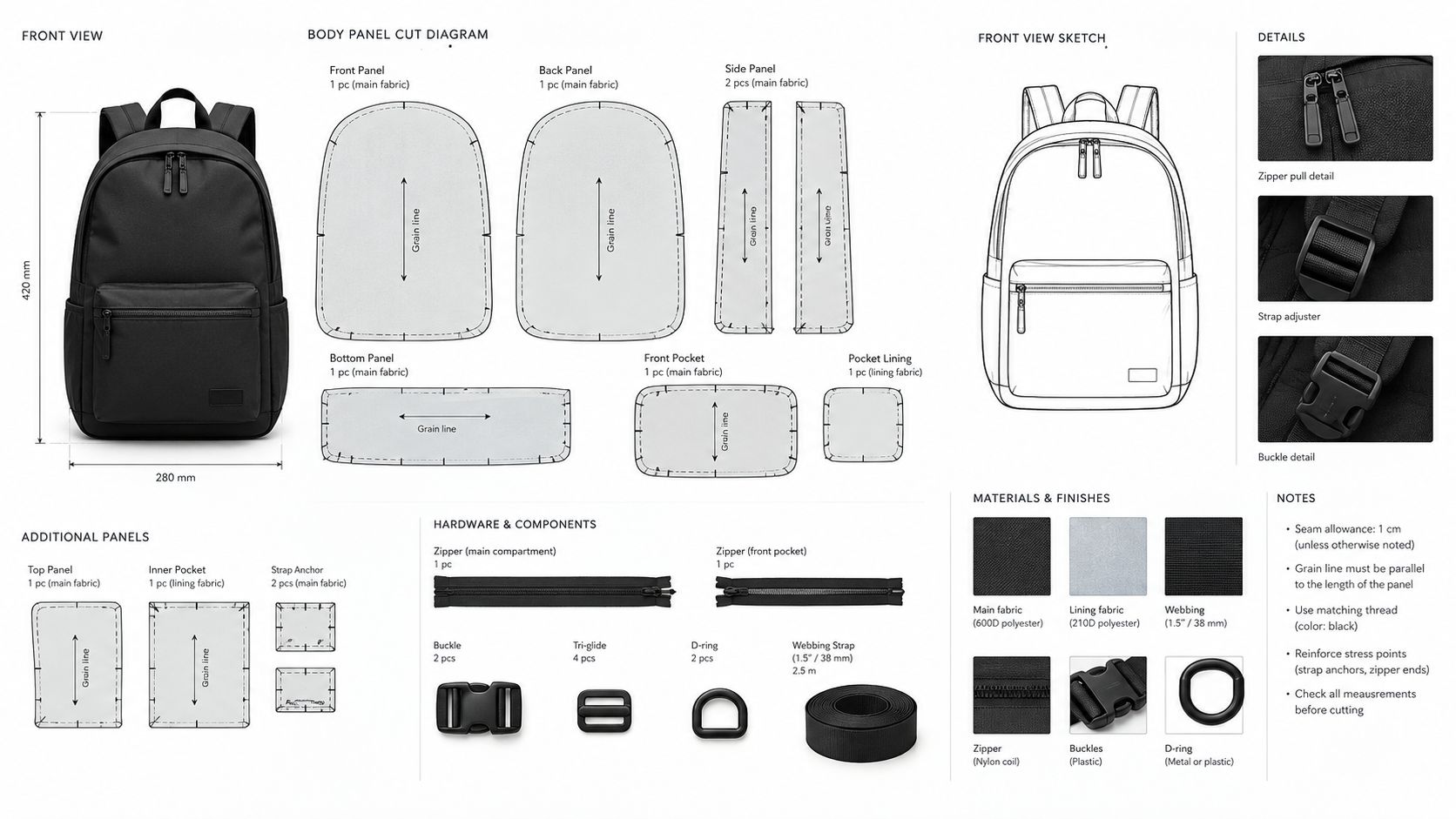
If the pack includes a laptop sleeve or hydration hanger, draw it as its own exploded sub-assembly. Pattern makers work faster when they can build each module cleanly, instead of reverse-engineering a cluttered main view. That's especially true for packs with internal organization, because one hidden pocket can change the stitching order for the whole inside shell.
The strongest backpack specs don't just show where parts go, they show in what order the factory should build them.
A good rule is to make the weakest load path obvious on the page. That usually means the strap anchor, grab handle root, zipper termination, and bottom seam get the clearest callouts. If the bag fails there, no one cares that the face fabric was beautiful.
Materials, Hardware, Trims, and Labels
A sourcing team can only quote what you name. If the BOM says “nylon,” the factory has too much freedom and not enough guidance. A backpack spec needs fabric, lining, foam, webbing, hardware, trims, and labeling written at the part level, so each item can be quoted and substituted only with approval.
Build the BOM like a sourcing sheet
For each fabric, list fiber content, denier or weight, weave, coating, finish, and color reference. A decent backpack BOM might also separate shell fabric from base reinforcement, because those two parts do different jobs and don't need the same surface feel. The same applies to lining, foam, and webbing, they're all structural decisions as much as material decisions.
| Component | Material / Part | Spec | Color / Finish |
|---|---|---|---|
| Shell | Recycled polyester | 600D, PU-coated | Charcoal, Pantone-coded |
| Lining | Polyester | Lightweight woven lining | Contrast interior |
| Zipper | Coil zipper | Reverse coil, brand-grade part | Matte black |
| Webbing | Reinforcement webbing | Load-bearing strap webbing | Match shell |
| Label | Brand label | Woven main label and care label set | Custom print |
Don't leave hardware vague
A hardware line should identify the exact part family, not just the function. If the zipper changes, the whole pack can shift in look, feel, and failure mode. Buckles, sliders, adjusters, reflective trim, binding tape, zipper pulls, and elastic all need the same treatment.
The labeling page matters more than many teams expect. Care content, fiber ID, hangtags, and carton marks all need to be defined before export, especially when the pack will move through different markets with different compliance expectations. If you leave labels to the end, the factory often treats them as a final add-on instead of part of the controlled build.
Backpacks also fail when trims are under-specified. Webbing, for example, isn't just “webbing.” It's a part with width, feel, and load behavior, and it should be called out like one. The same logic applies to binding tape and zipper pulls, because small omissions there can produce a finished bag that looks right but feels unfinished in hand.
Tolerances, Test Methods, and Acceptance Criteria
This is the page that stops arguments during QC. Every critical dimension needs a tolerance, and every performance claim needs a test method attached to it. If the factory can't pass or fail the sample without asking for a designer's opinion, the spec isn't ready.
Tie the weak points to the test first
I start with the load paths that fail first, strap junctions, handle roots, zipper ends, base seams, and pocket openings. Those are the places where an otherwise good bag becomes a reject. For a backpack, durability is never one single test, it's a chain of small tests that all need to hold together.
| Spec Field | Test / Method | Acceptance Criterion |
|---|---|---|
| Shoulder strap anchor | Tensile pull test | No failure at target load |
| Seam performance | ISO 13935 or comparable sewn-seam method | No yarn breakage or slippage beyond limit |
| Abrasion resistance | ISO 12947 or ASTM D4157 | Meets project threshold |
| Zipper function | Cycle testing | Operates through required cycles |
| Water resistance | Hydrostatic or spray test | No leakage at agreed threshold |
The exact pass level should be written by the brand, not assumed from a lab standard. A standard tells you how to test, but not always what commercial failure looks like for your product. That's why the acceptance line has to mention visible damage, permanent deformation, leakage, or functional failure in plain terms.
Practical rule: test the weakest load path first, because a strong fabric means nothing if the strap root tears out.
You also need a defect grid. Critical defects are the ones that stop sale or use. Major defects affect function or durability. Minor defects affect appearance but not immediate performance. Once those buckets are defined, the factory knows when to rework, when to hold, and when to reject.
The most common sample rejects trace back to spec gaps like these, not to one mysterious production failure. A clean tolerance table, sample count, and acceptance threshold reduce that back-and-forth faster than any style note ever will.
Export-Ready Files and Final Factory QA
A finished tech pack should leave your desk as if someone else will open it in a factory office with no context and still build the right bag. That means the export package has to be tidy, locked, and named in a way that leaves no room for version confusion. If the files are messy, the best spec in the world can still go wrong in transfer.
Package the files the way production actually receives them
The safest export set is a single folder with layered art or PDF sketches, an editable BOM spreadsheet, flat pattern files, and a cover page listing sheet titles, revision, and date. Before export, convert editable text to outlines where needed and embed the fonts so dimensions don't shift on someone else's machine. Then name every file consistently, so the sample room knows which version is current.
A final QA pass should be mechanical, not emotional. Spot-check a few random measurements against the master spec, verify every BOM component appears on at least one construction page, and confirm the tolerance and test sheets are signed. That simple checklist catches a lot of expensive mistakes before the first cut.
If your team likes to review complex builds visually, a short video handoff can help reduce misunderstanding. A practical reference is win more bids with video walkthroughs, because the same clarity that helps engineering proposals also helps when a supplier needs to see how the pack is supposed to close, compress, and carry.
Lock revision control before sending
Version control is where a lot of good backpack specs go to die. One designer sends R02, merchandising replies to R01, and the factory samples a half-updated blend of both. A written revision log and a clean naming convention stop that drift before it starts.
For teams that want a more automated path, Genpire can generate backpack-specific tech packs with technical views, measurements, a bill of materials, and construction notes, then export production files for handoff. It's one option among several, but the core requirement stays the same, the factory needs a single version it can trust.
If you're building a tech pack backpack and want a cleaner handoff from concept to factory file, use Genpire to turn the brief into structured specs, component breakdowns, and export-ready production assets. It's built for teams that need fewer misreads, tighter revision control, and a faster path from sketch to sample room.