Virtual try-on for shoes is moving from novelty to infrastructure. The market was valued at USD 15.18 billion in 2025 and is projected to reach USD 48.10 billion by 2030, implying a 25.95% CAGR, while footwear is projected to expand at a 26.89% CAGR over the same period, according to Mordor Intelligence's virtual try-on market report. The commercial question is no longer whether shoppers enjoy seeing a shoe on their foot. It's whether the experience reduces uncertainty enough to improve the purchase decision and prevent a costly fit-related return.
That distinction changes how brands should evaluate the technology. A convincing render matters, but a beautiful overlay that misrepresents width, toe-box space, or size creates false confidence. The strongest implementations connect camera input, foot geometry, product lasts, 3D assets, size data, and ecommerce analytics into one workflow.
This guide takes a product-led view of virtual try on for shoes. It explains what the technology does, how the main approaches differ, how a session works, where the business case is strongest, and how to integrate the capability into a real footwear product workflow rather than launching it as an isolated marketing demo.
Table of Contents
- What Virtual Try On for Shoes Actually Does
- The Main Technology Approaches Behind AR Shoe Fitting
- How a Shoe Try-On Session Works From the Shopper's Side
- Business Impact on Conversion, Returns, and Engagement
- Choosing Between Build, Buy, and Platform Solutions
- Integrating Shoe Try-On Into a Product and Ecommerce Workflow
- Where Shoe Virtual Try-On Still Falls Short and When to Use It
What Virtual Try On for Shoes Actually Does
Virtual try-on for shoes is a pre-purchase visualization and fit-confidence tool. It uses a shopper's camera, foot geometry, or saved profile to render footwear on or around the shopper's feet. Depending on the implementation, the system can show appearance in real time, estimate a suitable size, compare foot dimensions with the shoe's last, or combine all three.
The useful question isn't only, “Does this shoe look good on me?” It's also, “Does the system give me enough evidence to choose a size with less risk?” That risk has two commercial expressions. A shopper may abandon a product page because the fit is uncertain, or complete the order and return the shoes because the physical fit doesn't match the digital expectation.
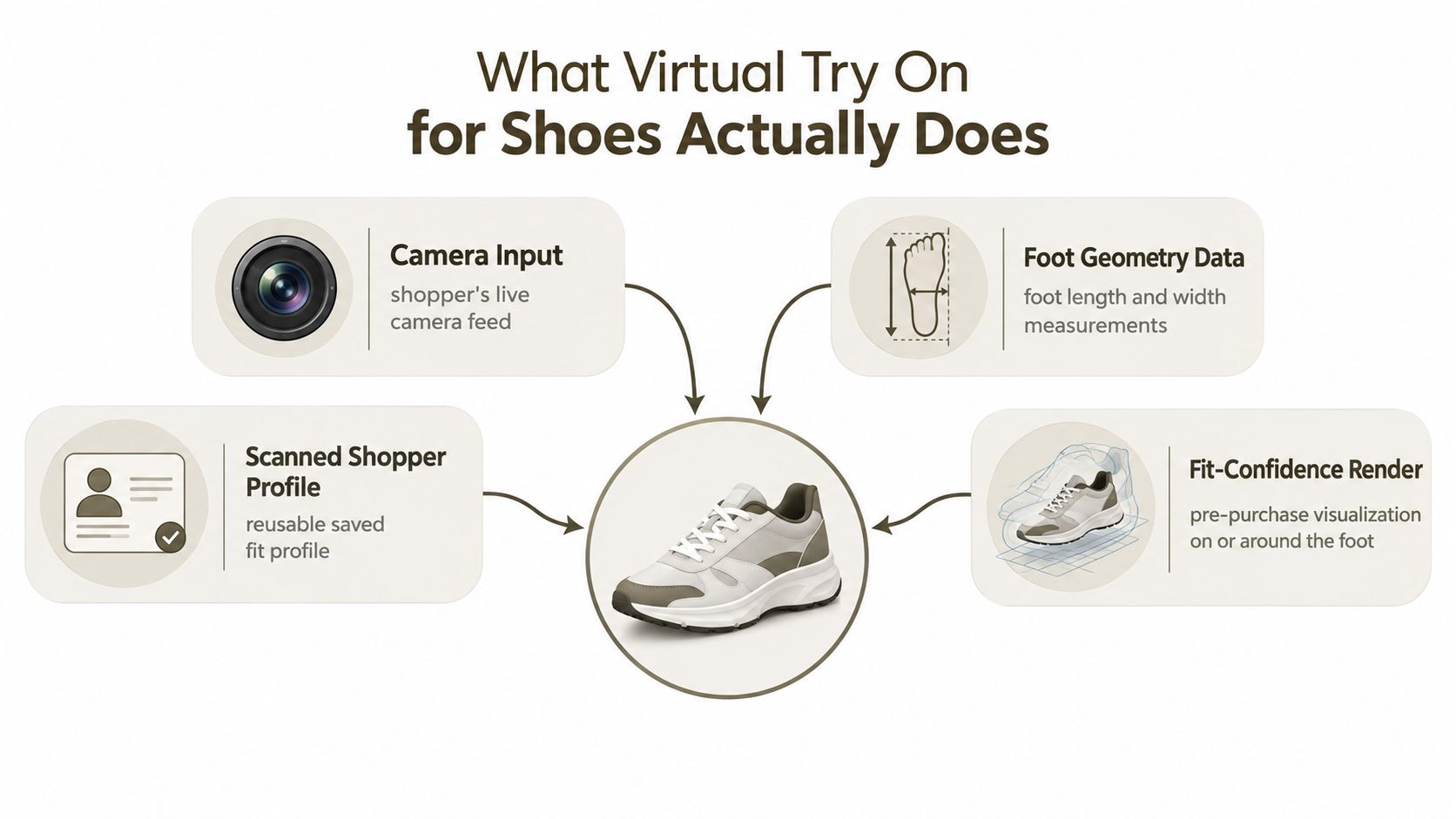
The experience has two separate jobs
The first job is visual reassurance. The shopper wants to see proportions, color, silhouette, and styling in a context that feels more personal than a studio product image. This is valuable for sneakers, boots, loafers, and other products where shape and styling influence the decision.
The second job is fit-risk reduction. That requires more than placing a shoe-shaped image over a foot. The system needs reliable information about foot length, width, orientation, and sometimes arch or volume. It also needs product information that reflects the physical shoe, including the relevant last, size mapping, and construction differences between variants.
A virtual try-on experience can therefore sit at several points on a maturity curve:
- Visual overlay: Shows how a selected style appears on the shopper's foot.
- Geometry-aware render: Uses detected landmarks or a 3D foot representation to improve scale and alignment.
- Size guidance: Maps estimated foot measurements to the brand's size system.
- Decision support: Combines visual output, fit confidence, product data, and a recommended next action.
The last option is the one most likely to influence commercial outcomes, but it also demands the strongest data discipline.
Practical rule: Treat the render as evidence for a purchase decision, not as proof that the shoe will feel perfect.
A brand should define success before selecting a vendor. If the primary problem is low engagement with new silhouettes, visual AR may be enough. If the problem is inconsistent sizing across a broad catalog, the implementation must include measurement and size logic. If the business wants to reduce returns, it needs a way to connect try-on behavior with selected size, delivered product, return reason, and customer feedback.
That's why shoe try-on belongs in the product workflow. The experience depends on the quality of the digital shoe, the accuracy of its physical measurements, the quality of the foot data, and the way the ecommerce team interprets the resulting signals.
The Main Technology Approaches Behind AR Shoe Fitting
There isn't one universal shoe try-on architecture. Most production implementations combine one of four approaches, each with a different balance of visual quality, fit usefulness, shopper effort, and operational complexity.
2D AR overlay
A 2D overlay places a prepared shoe image over a detected foot region. The shopper usually grants camera access, points the phone toward the foot, and moves slightly while the system tracks position. The brand needs correctly cropped product images, transparent layers, and orientation variants. The pipeline ingests camera frames, foot detection coordinates, product identifiers, and display rules.
This approach is relatively straightforward to deploy and can work well when the primary goal is visual discovery. It's less suitable when the shopper needs to judge depth, heel height, toe-box shape, or how the upper wraps around the foot. A flat asset can look persuasive from one angle and break down as soon as the shopper changes perspective.
3D model-based rendering
A 3D approach anchors a real shoe model to foot landmarks or a detected floor plane. The shopper can rotate the phone, change the viewing angle, and inspect how the product sits in space. The brand must provide a clean 3D asset, material definitions, texture maps, product metadata, and a reliable relationship between model scale and physical dimensions.
The data pipeline typically includes a GLB or USDZ asset, product and variant identifiers, camera pose, foot landmarks, lighting estimates, and render events. This approach creates a stronger foundation for visual merchandising and can support more useful fit context, but the model must represent the physical product accurately. A visually polished asset with the wrong proportions is still misleading.
Foot scanning
Foot scanning uses depth sensors, LiDAR, structured light, or photogrammetry to capture a three-dimensional foot representation. The shopper may need to follow a guided capture process, place the foot in a defined position, or use a compatible device. The brand needs last geometry, size-specific measurements, and rules that compare the captured foot against the product's internal dimensions.
The pipeline ingests a foot mesh or depth map, measurement landmarks, scan quality indicators, product last data, and size mappings. It can provide more useful geometry than a simple visual overlay, but additional capture steps create friction. The experience also has to explain what the shopper should do when the scan is incomplete or confidence is low.
AI-based foot geometry
AI-based systems infer foot length, width, and other characteristics from a photograph or short camera sequence. In many cases, the output feeds a size recommendation service rather than a full 3D render. The shopper's input is lighter than a structured scan, but the result depends heavily on camera angle, scale references, lighting, footwear obstruction, and model coverage across different foot shapes.
The brand needs a size chart that reflects its own products, plus consistent measurements for lasts and variants. The pipeline may ingest images, detected landmarks, estimated dimensions, confidence scores, and the recommended size. A well-designed system should expose uncertainty rather than present an estimate as a guarantee.
Teams building a broader digital product workflow may also connect the shoe asset to concept and specification tools such as a prompt-to-3D product design workflow. That can accelerate upstream asset creation, but it doesn't remove the need to validate the model against the physical sample.
Comparing the four shoe virtual try-on approaches
| Approach | Shopper Input | Brand Asset Need | Fit Accuracy | Typical Use Case |
|---|---|---|---|---|
| 2D AR overlay | Camera access and a visible foot | Prepared 2D images and overlay rules | Limited fit evidence | Visual discovery and campaign experiences |
| 3D model-based rendering | Camera movement and foot detection | Scaled 3D shoe models, materials, and metadata | Stronger visual and spatial context | PDP visualization and digital merchandising |
| Foot scanning | Guided scan or depth capture | Foot measurements, last geometry, and size rules | More useful for geometry-led recommendations | Size guidance and high-consideration footwear |
| AI-based foot geometry | Photo or short camera sequence | Size charts, last measurements, and trained inference service | Variable, depending on capture conditions | Low-friction size recommendation |
The practical choice is rarely about selecting one approach for every SKU. A brand may use 3D rendering for all launch products, add AI-based sizing for repeatable silhouettes, and reserve structured scanning for categories where fit risk is especially high.
How a Shoe Try-On Session Works From the Shopper's Side
A successful session feels simple, but several model calls and data exchanges happen behind the interface. The product team should design the flow around the shopper's attention, not around the internal architecture. Every additional permission, instruction, or loading state creates a chance to lose the session.
Step 1 starts on the product detail page
The shopper taps a try-on button beside the product images or size selector. The page loads the try-on SDK or embedded experience, creates a session token, and requests camera permission. The interface should explain why the camera is needed and what the shopper should do next.
Permission handling is a product issue, not a technical footnote. If the prompt appears without context, shoppers may reject it. If the experience doesn't work after permission is granted, they may not try again.
Step 2 detects the foot
The device processes camera frames through a platform capability such as ARKit or ARCore, or through a dedicated foot-detection model. The system looks for the foot region, estimates orientation, and checks whether the image is usable.
At this stage, the experience should give direct guidance. Ask the shopper to move the phone, improve lighting, remove an obstructing object, or place the foot within a visible area. A vague loading spinner hides the reason for failure and makes the technology feel unreliable.
Step 3 extracts geometry and size context
The system identifies landmarks and may estimate length, width, orientation, or a confidence score. A size mapping service can then compare the estimate with the brand's size chart and product-specific rules.
The recommendation must account for the shoe, not just the foot. A running shoe, a narrow loafer, and a structured boot can use different fit logic even when the shopper's foot measurements remain unchanged.
Step 4 loads the digital shoe
The client fetches the relevant 3D asset, material data, product variant, and size context from a content delivery layer. The asset should be tied to the exact product and colorway the shopper selected. A mismatch between the PDP image and the try-on model damages trust quickly.
Step 5 renders and updates the shoe
The engine anchors the model to detected landmarks or a floor plane. It updates scale, orientation, occlusion, lighting, and material response as the shopper moves. The render should remain stable when the phone angle changes, while the interface should make it clear that the output is a visualization rather than a physical fitting.
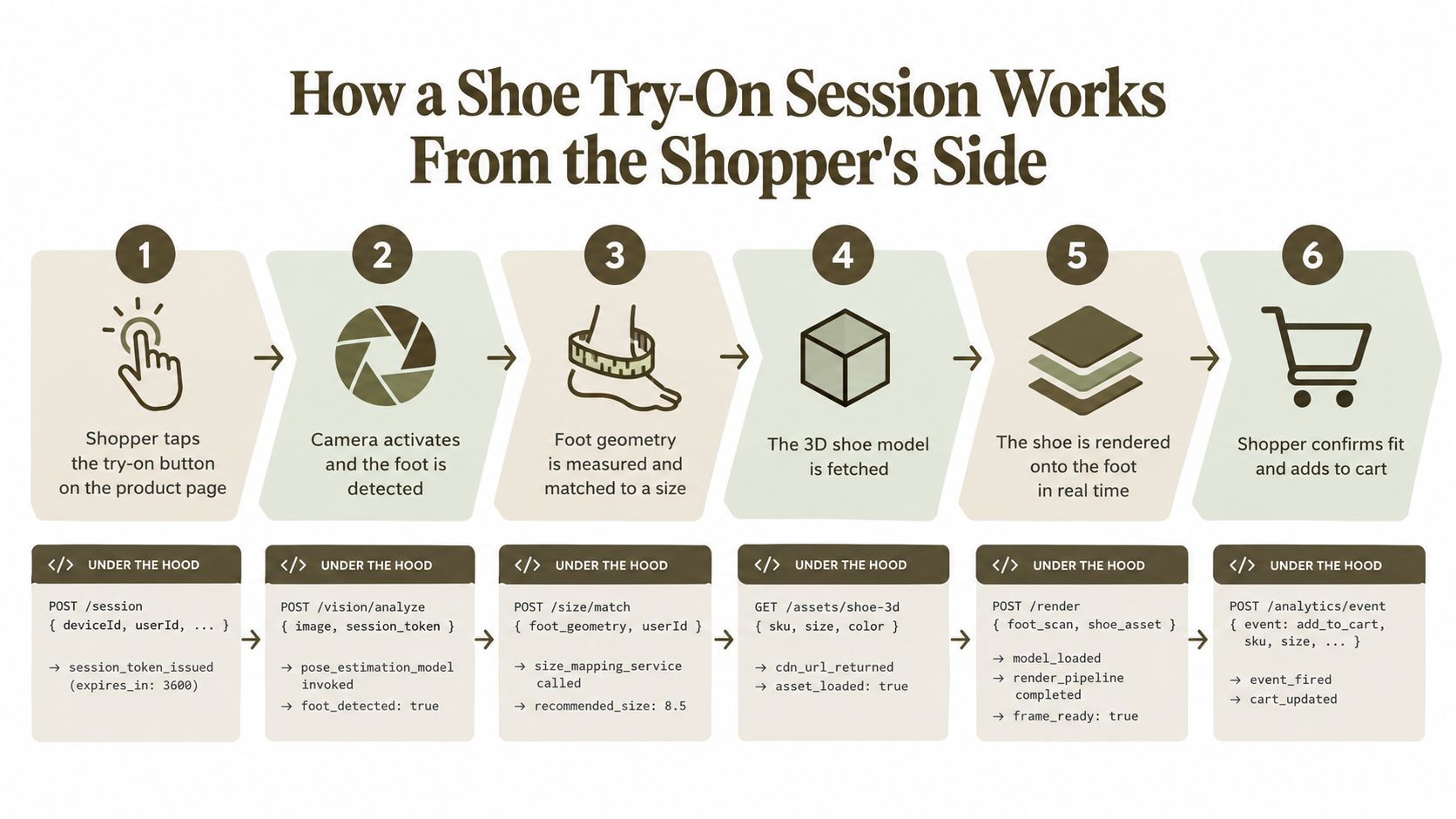
Step 6 turns the session into a decision
The shopper confirms a size, returns to the product page, or adds the product to the cart. The platform can send events for try-on start, successful detection, completion, selected size, recommendation acceptance, and cart action. With the right consent and data controls, the brand can also connect the session with later purchase and return outcomes.
The most important design choice is the handoff. Don't make the shopper repeat a size selection after completing try-on. Carry the recommendation into the PDP and cart, show the confidence level in plain language, and provide a conventional size guide for shoppers who want to verify the choice manually.
Business Impact on Conversion, Returns, and Engagement
The commercial value of shoe virtual try-on depends on which uncertainty it removes. A visual overlay may increase attention to a product, but it won't necessarily solve a width problem. A foot measurement tool may improve size confidence, but it can lose shoppers if the capture flow feels intrusive or unreliable.
The strongest business case usually appears when the product has meaningful consideration, the catalog contains repeatable sizing logic, and the brand can connect the digital experience to downstream outcomes. Boots, performance footwear, unfamiliar silhouettes, and higher-priced products often give shoppers more reason to seek reassurance. Low-risk basics may not create enough uncertainty to justify an elaborate experience.
Measure the complete funnel
A try-on button click is not a business outcome. Product teams should separate the experience into stages:
- Exposure: How often eligible shoppers see the try-on option.
- Start: How often they launch the experience from the PDP.
- Capture success: How often the system detects a usable foot.
- Completion: How often shoppers reach a stable render or recommendation.
- Size action: How often they accept, change, or ignore the recommended size.
- Commercial action: How often the session leads to add-to-cart and purchase.
- Post-purchase outcome: Whether the order is returned for fit or sizing reasons.
This sequence exposes where the implementation is failing. A low start rate can indicate poor placement or unclear value. A large gap between start and completion points to camera, permission, device, or instruction problems. Strong completion with no size action suggests that the render is entertaining but not decision-ready.
Understand the return relationship
Return analysis needs a control group or a credible comparison across comparable products. Track fit-related return reasons by SKU, size, device type, try-on status, and recommendation acceptance. Don't assume that every return reduction comes from the AR feature. Product photography, copy, reviews, stock availability, and merchandising can all influence the same outcome.
A useful operating model connects the digital asset to the physical product record. If a last changes, the model, size table, and recommendation rules must change together. Otherwise, analytics may show engagement while the operational result remains poor.
Where the economics concentrate
| Surface | Conversion Lift | Fit-Related Return Reduction | Engagement Signal |
|---|---|---|---|
| DTC product pages | Strongest when shoppers need help choosing a style or size | Dependent on product-specific measurement quality | Try-on starts, completion, size acceptance, and cart actions |
| Marketplaces | Useful as a visual merchandising differentiator | Harder to attribute when seller data is inconsistent | Product interaction depth and movement from visualization to purchase |
| In-store mirrors or kiosks | Helpful when shoppers compare styles or colors | Depends on staff guidance and product data quality | Assisted sessions, saved products, and follow-up actions |
| Low-consideration basics | Often limited unless the brand has a clear fit problem | Requires reliable size logic to matter | Session starts may be high while purchase influence remains modest |
Teams exploring an AI-led product pipeline can also connect footwear visualization with AI product design across footwear and home goods. The value comes from preserving the relationship between the concept, the digital asset, the specification, and the finished product, not from adding another disconnected visualization layer.
Engagement metrics should support a decision, not replace one. A high number of sessions can reflect curiosity, campaign traffic, or novelty. The meaningful question is whether shoppers who use the feature choose sizes more confidently and experience fewer fit-related problems after delivery.
Choosing Between Build, Buy, and Platform Solutions
The right implementation path depends on two forms of maturity: the brand's ecommerce capability and its 3D asset capability. A company with a strong 3D pipeline may want control over rendering and size logic. A brand with no modeling team may get better results from a managed product that includes asset preparation, deployment, and maintenance.
In-house development
An internal AR team offers the greatest control over the shopper experience, device support, analytics, and fit logic. It also creates the largest responsibility for model training, browser compatibility, asset optimization, privacy controls, QA, and ongoing maintenance.
This path makes sense when try-on is a strategic capability across many categories and the organization already operates mobile or computer-vision products. It is a poor first move when the initial business question is whether shoppers will use the experience.
SDK licensing
An SDK from a specialist vendor can shorten the path to launch while preserving more control than a fully managed platform. The brand still needs to prepare product assets, map catalog data, handle integration, and decide how recommendations appear in the purchase flow.
The hidden work often sits outside the license. Each SKU may require modeling or photogrammetry, material cleanup, scale validation, device testing, and updates when the physical product changes. Vendor dependency also matters. If the provider changes supported devices or rendering behavior, the brand must adapt.
Ecommerce plug-ins
A Shopify or BigCommerce plug-in is attractive for a small technical team because it can add a PDP component without a large custom build. It generally works best when the catalog structure is clean and the brand can accept the plug-in's interaction model.
Customization may be limited. The plug-in may not understand unusual size systems, complex variant relationships, or a brand's existing analytics taxonomy. Before choosing one, test the complete journey from product page to cart, including mobile permission flows and accessibility.
Full-stack 3D commerce platforms
A full platform can combine asset creation, product data, rendering, analytics, and workflow management. This reduces the number of separate systems the team must maintain, but it introduces an ongoing platform dependency and may require migration or normalization of existing product data.
The evaluation should include more than a demo. Ask how the platform handles asset versioning, physical measurement changes, material variants, low-bandwidth devices, failed captures, and return-data feedback.
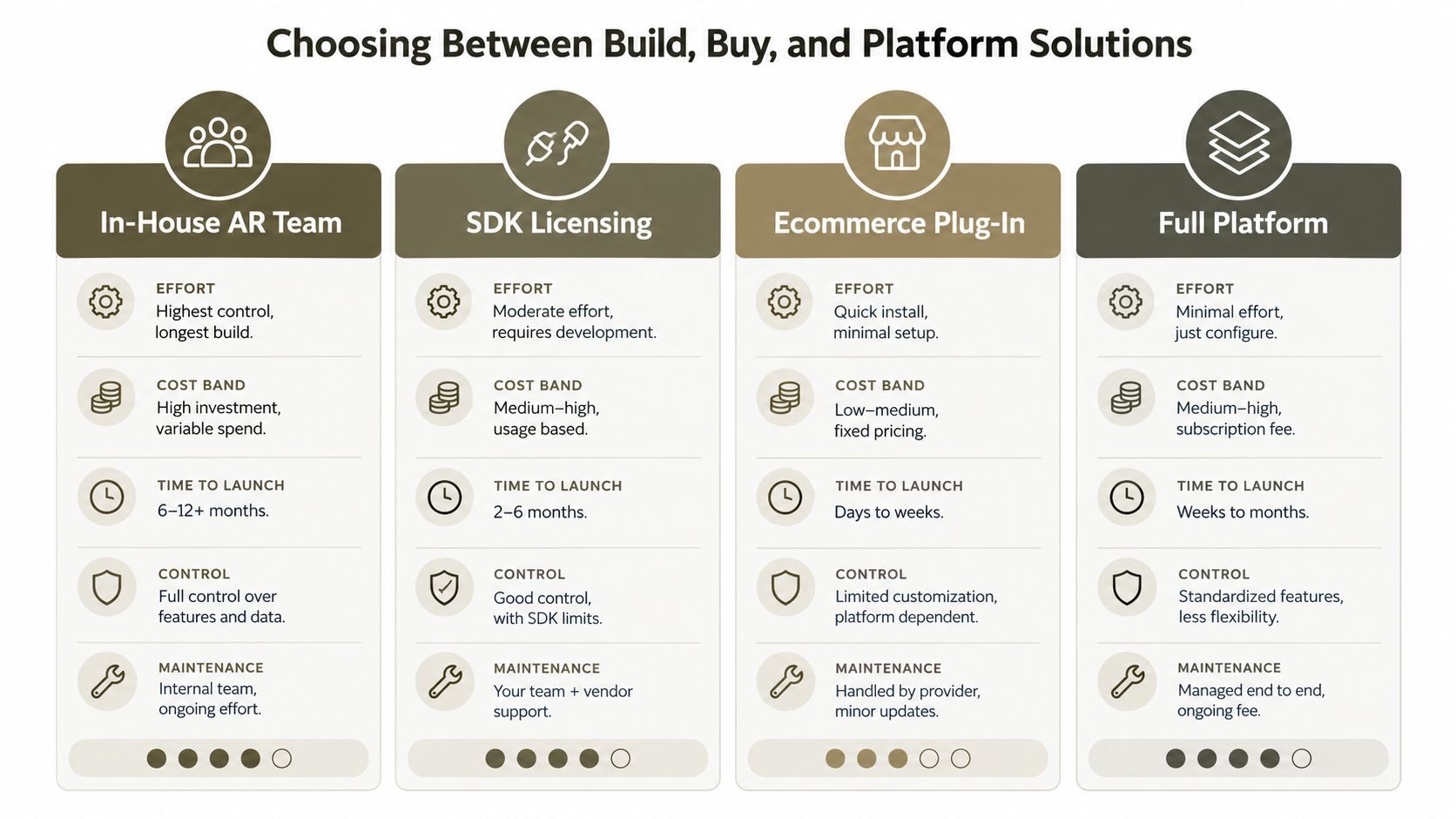
A practical selection rule
Choose an in-house build when you have a capable AR or computer-vision team and need deep control across a broad roadmap. Choose an SDK when you have a 3D team and want to own more of the customer experience. Choose a plug-in when speed and low implementation overhead matter more than customization. Choose a full platform when you need asset production, product data, and consumer visualization managed as one operating process.
Whatever route you choose, price the unglamorous work. Include modeling per SKU, asset QA, last measurement maintenance, device testing, analytics implementation, consent handling, and the cost of investigating incorrect recommendations. Those line items determine whether the solution can operate beyond a launch campaign.
Integrating Shoe Try-On Into a Product and Ecommerce Workflow
The integration should start with the physical product record, not the AR interface. A product team first needs to establish what the shoe is, how it is constructed, how its sizes map to measurements, and which digital assets represent the final approved version.
Start with a trusted 3D asset
Create or capture the shoe from CAD, photogrammetry, a scan, or another approved source. Validate silhouette, sole thickness, heel height, upper construction, material response, and scale against a physical reference. Separate color and material variants cleanly so the render reflects the selected product.
A generated or accelerated concept asset can support early visualization, but the production model needs a validation gate. The system shouldn't publish a model merely because it looks plausible. It must match the shoe that will be manufactured and shipped.
Make the PIM or DAM the source of truth
Store the model, textures, product identifiers, variant relationships, size data, and approval status in a controlled product or digital asset system. Connect each digital model to the correct physical style and version. If the same shoe appears in multiple regions or size systems, define those mappings explicitly.
The essential data contract joins three records:
- Physical measurements: Last dimensions, size increments, and relevant construction details.
- Commercial product data: SKU, colorway, size options, availability, and regional sizing.
- Digital representation: Model file, materials, scale, orientation, and render metadata.
If one record changes without the others, the shopper may receive a confident but incorrect recommendation.
Add the visualization layer
The try-on service receives the product identifier, loads the approved asset, and applies the foot detection or measurement logic. The PDP component can be a native module, an iframe, or an SDK integration. The choice should preserve page performance and make the action visible near the product images or size selector.
Prompt-to-3D tooling can operate upstream when the team needs to turn concepts, sketches, or references into digital product views before specification. A footwear product lifecycle workflow can then connect prototype creation, fit testing, and performance validation with the assets used in the shopper-facing experience.
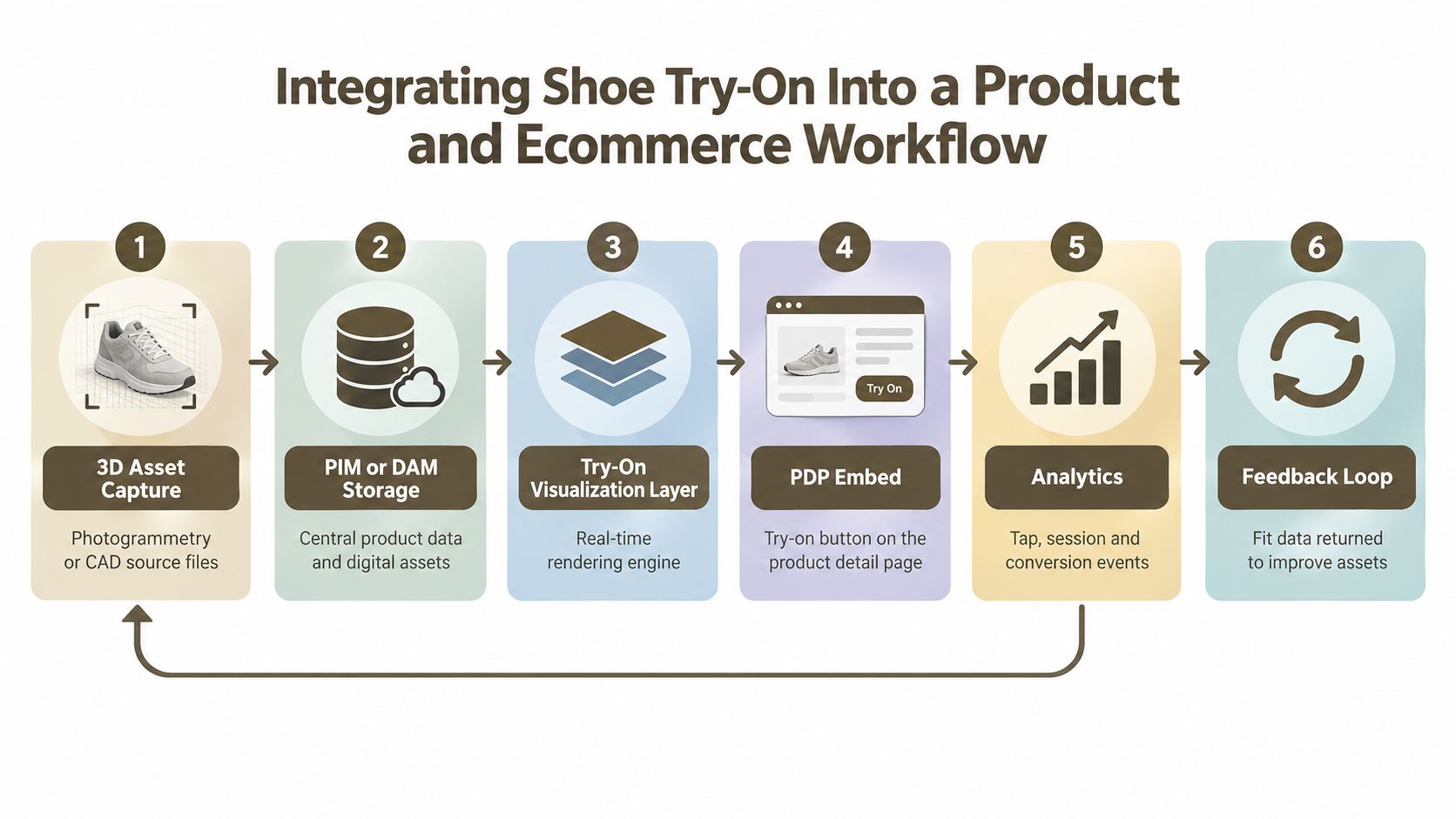
Wire analytics before launch
Define events for exposure, start, permission result, foot detection, capture failure, render completion, size recommendation, recommendation acceptance, add-to-cart, purchase, and return reason. Attach product and variant identifiers to each event while minimizing personal data.
CRM hooks can support follow-up sizing guidance, but the message should reflect the shopper's action. Someone who completed a scan and abandoned a cart may need a reminder about the selected size. Someone who couldn't complete capture needs troubleshooting, not another product promotion.
Iterate against physical outcomes
Review performance by product category, device type, camera conditions, size system, and foot shape where that data is collected responsibly. Investigate complaints alongside return codes and customer service conversations. When a model fails, determine whether the cause was the render, the measurement, the size table, the capture instruction, or the physical product itself.
The feedback loop should update assets and rules, not just dashboards. A try-on program becomes useful when product, ecommerce, analytics, and sourcing teams share the same version of the truth.
Where Shoe Virtual Try-On Still Falls Short and When to Use It
Virtual try-on can improve confidence, but it can't reproduce every part of a physical fitting. Comparative footwear research found that VR and AR can improve usability and presence while still failing to match real try-on, with negative interaction factors reducing perceived quality, as discussed in the footwear comparison study.
The measurement problem
Standard phone cameras don't provide the same depth information as structured-light systems. One cited comparison reported height error of up to ±2.0 cm for phone cameras, compared with ±0.5 cm for structured-light devices, improving to ±0.3 cm when combined, according to the foot measurement research. Those figures don't mean every shopper receives the worst result, but they show why a phone-based estimate should be communicated as a recommendation with confidence, not a guarantee.
Foot shape also varies in ways a basic length estimate can miss. Width, instep volume, toe spread, arch profile, socks, and the shoe's construction can all change perceived fit. A visual render may show the correct silhouette while saying little about pressure points or comfort.
The asset and interaction problems
Occlusion can fail around textured uppers, thick soles, layered footwear, or unusual heel structures. Lighting can make materials appear more realistic than they are, while device latency can make the shoe drift or detach from the foot. These failures are especially damaging when the interface gives no explanation.
Trust is another constraint. A systematic review of 69 virtual try-on studies found that perceived risk and technological constraints can still impede adoption, even when the technology influences purchase decisions, as summarized in the review of virtual try-on research. Older or less tech-comfortable shoppers may prefer a conventional size guide, reviews, and clear return terms to a camera experience.
When shoe virtual try-on pays off vs. when to hold back
| Condition | Deploy try-on | Defer or skip |
|---|---|---|
| Product type | Repeatable sneakers, boots, loafers, and styles where appearance or size creates uncertainty | Highly bespoke products with changing construction or one-off fitting requirements |
| Data quality | Consistent lasts, approved 3D assets, and product-specific size mappings | Fragmented sizing, incomplete measurements, or models that don't match physical samples |
| Shopper need | High-consideration purchases where confidence affects the decision | Products that are simple to understand and carry little fit uncertainty |
| Technical environment | Mobile experience has reliable capture guidance, fallback content, and performance testing | Camera permissions, device support, or asset loading remain unstable |
| Fit complexity | Standard consumer sizing with clear recommendations | Orthopedic needs, custom orthotics, or comfort claims that require physical evaluation |
| Measurement strategy | The brand can show confidence levels and validate outcomes against returns | The team plans to present estimates as precise guarantees |
A systematic review of the category also indicates that adoption is uneven, despite growing usage. European market reporting cited in the research brief says 44% of European consumers have used virtual try-on while shopping online, while a footwear vendor reported more than 31,000 end-user interactions for footwear brands in the previous twelve months, as documented in the 2026 footwear vendor comparison. Momentum is real, but adoption alone doesn't prove fit accuracy or commercial value.
Deploy when the catalog has reliable product data, the team can measure the full funnel, and the target shopper has a meaningful reason to seek reassurance. Hold back when the physical fit is highly specialized, the digital asset is unverified, or the experience can only create visual excitement without improving the decision.
Genpire connects AI product creation, production assets, specifications, and Virtual Try-On Studio workflows for consumer goods teams that need to move from concept toward a usable digital product model. Visit Genpire to evaluate how that workflow can support footwear visualization and fit-review processes.