44% of U.S. online shoppers have used virtual try-on, and 69% of those users purchased the product either online or in-store. That makes virtual try-on software a measurable merchandising layer, not an experimental retail novelty.
The important qualification is that virtual visualization and fit prediction aren't the same capability. A good system can help a shopper understand how eyewear, jewelry, accessories, or a garment may look on them. It usually can't confirm fabric stretch, pressure points, comfort, movement, or manufacturing accuracy without separate measurement and simulation systems.
Table of Contents
- What Virtual Try-On Software Actually Does for Your Brand
- How Virtual Try-On Technology Works Under the Hood
- 2D Augmented Reality versus 3D Garment Simulation
- How to Evaluate Virtual Try-On Vendors Before Committing
- Virtual Try-On Inside a Complete Product Creation Workflow
- The Hidden Risk of Overestimating Virtual Try-On Accuracy
- Real ROI Examples and Implementation Outcomes
What Virtual Try-On Software Actually Does for Your Brand
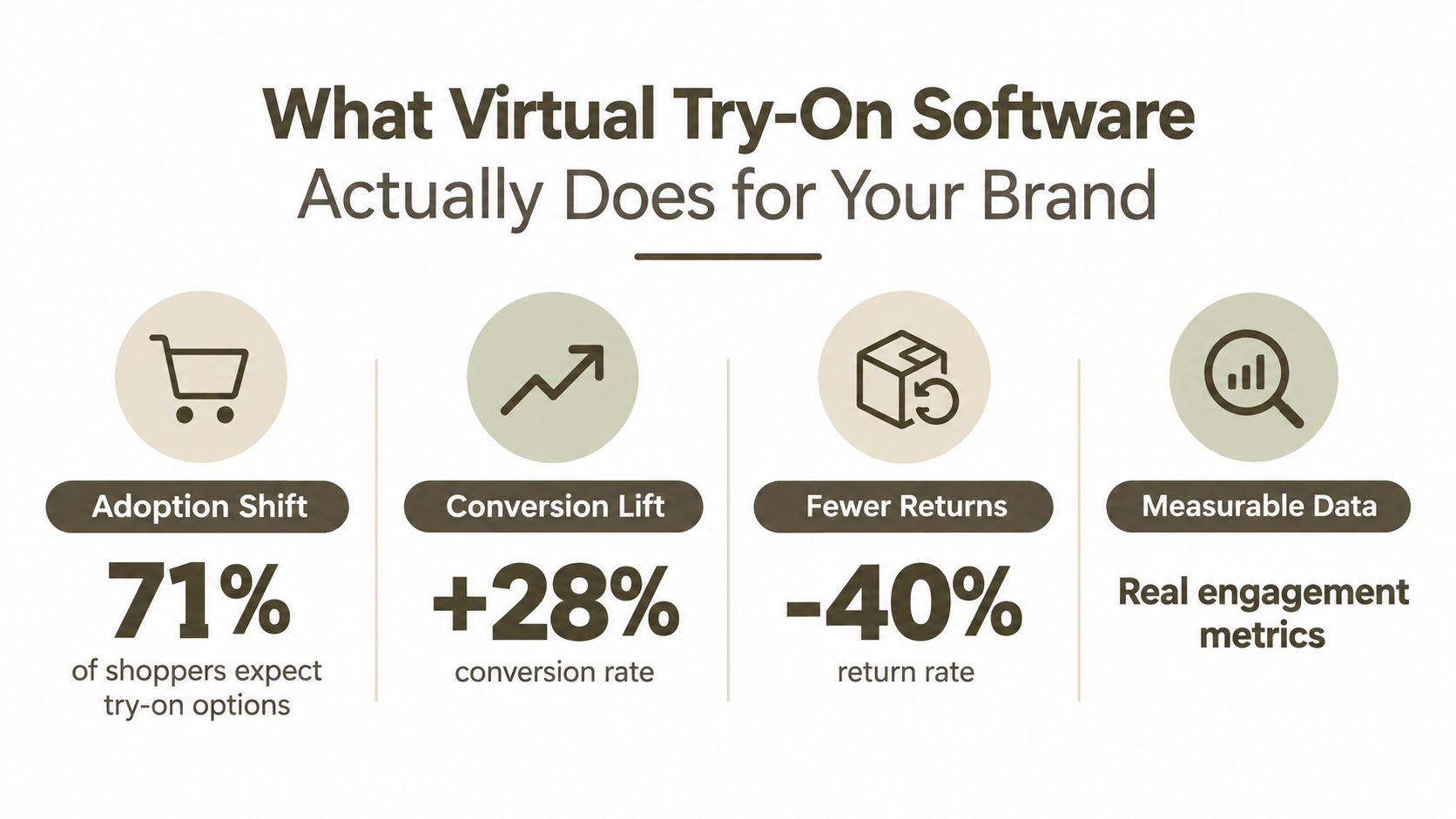
The consumer behavior is already established. A U.S. survey reported by Chain Store Age's virtual try-on coverage found that 44% of respondents had used virtual try-on while shopping on a retail website. Among those users, 69% said the experience led them to purchase the product online or in a physical store. Three-quarters had used the feature within the preceding year, while 77% of people who hadn't used it said they'd like to try it if it were readily available.
That changes the product question. A retailer isn't merely adding an entertaining camera feature. It's giving shoppers another way to evaluate an item before committing, particularly when appearance creates uncertainty. Eyewear and sunglasses stood out, with approximately 70% of respondents selecting them as the product type where virtual try-on would be most useful in a purchase decision.
The practical definition
Virtual try-on software is a visual-representation system. It uses computer vision, augmented reality, or generative image processing to place a digital product over a shopper's photograph or live camera feed. The system may identify facial landmarks for glasses, body landmarks for clothing, or spatial context for products placed in a room.
For a jewelry brand, that can mean showing the apparent scale and styling of a necklace against the customer's image. For an eyewear retailer, it can maintain frame alignment as the shopper turns their head. For an apparel team, it can show a garment on selected avatars or digital models before physical sampling or photography.
Practical rule: Treat virtual try-on as the answer to “How might this look on me?” Treat measurement tools, garment specifications, and physical testing as the answer to “Will this fit and feel right?”
That distinction should shape your product page, analytics plan, customer-support language, and return expectations. The strongest deployment doesn't promise certainty the software can't provide. It reduces visual ambiguity, then connects that experience to reliable product data wherever fit matters.
How Virtual Try-On Technology Works Under the Hood
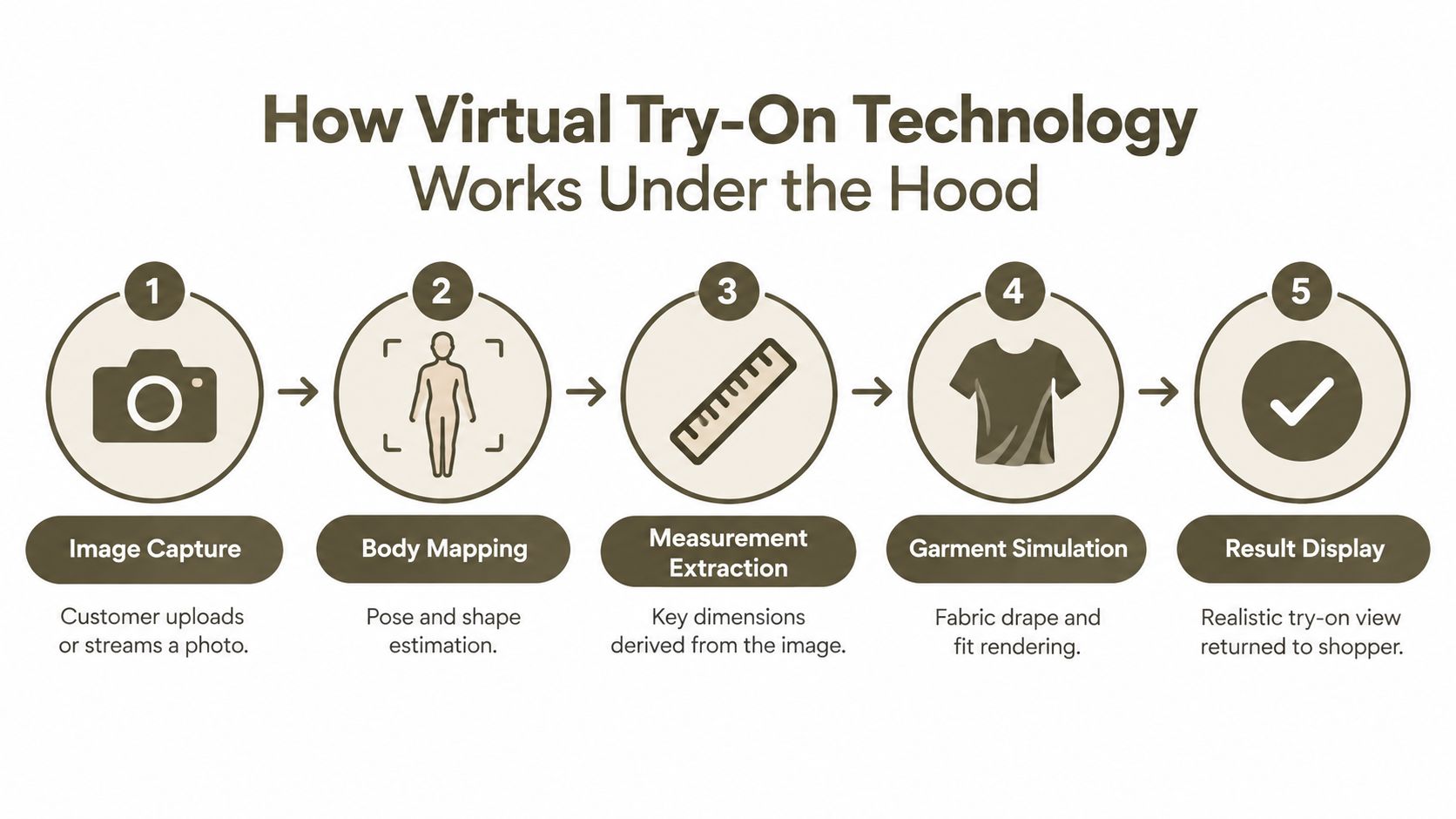
A customer sees a simple camera interaction. Behind it, the system runs a pipeline that has to interpret an image, understand the subject, transform a product asset, and render the result quickly enough to feel responsive.
The first stage is image capture. The shopper uploads a photograph or grants camera access. Computer-vision models then identify relevant landmarks, such as shoulders, waist, hips, elbows, eyes, nose, or the outline of a face. The landmarks provide reference points for placing a product in a consistent position.
From landmarks to rendered product
Next, the system estimates pose and shape, separates the person from the background, and maps the product onto the relevant area. A garment may be positioned and deformed around detected shoulders and hips. Glasses need stable facial tracking. Jewelry requires attention to neck, ears, wrists, or fingers, plus occlusion handling when hair or hands overlap the product.
The rendering stage determines how convincing the result looks. Texture placement, lighting, shadows, garment edges, hands, hair, sleeves, and hems all create potential artifacts. A flat overlay can be fast and effective for simple products, while more advanced models may generate a new image that attempts to preserve the user's pose and appearance.
Teams building production workflows should keep structured garment assets, including clean masks, category labels, measurements, and multi-view references. Better-aligned inputs give the model more useful information and can reduce deformation errors. Genpire's explanation of its workflow shows why concept assets and downstream specifications matter when visualization sits inside a broader product process.
What the image cannot tell you
This pipeline improves perceived product understanding, but it doesn't automatically infer garment ease, fabric stretch, pressure points, or movement comfort. A convincing image can show apparent silhouette and styling while concealing an inaccurate size relationship.
Training data also affects fidelity. Paired examples, where an image of a person wearing a specific garment aligns with the corresponding garment representation, help models learn texture placement, occlusion, and pose-specific deformation. Unpaired training is harder because the model must separate body shape, pose, garment identity, lighting, and background without direct correspondence. A recent review of virtual try-on methods reports stronger results from diffusion-based approaches for texture detail and photorealism, while paired datasets outperform unpaired settings in benchmark evaluation.
The implication is operational, not academic. Evaluate outputs across poses, body types, skin tones, garment constructions, and lighting conditions. Don't approve a vendor because one model image looks excellent.
2D Augmented Reality versus 3D Garment Simulation
The right choice depends on the buying uncertainty your product creates. AR accounted for more than 63% of global virtual try-on market revenue in 2023, according to Grand View Research's virtual try-on market analysis. That share reflects the practical value of camera-based overlays for fast, accessible product visualization.
2D AR works well when reach, speed, and simple interaction matter most. A brand can place a frame, shade, watch, or other accessory over a live image without building a fully simulated garment. Asset preparation is usually lighter, and the experience can fit into an existing product page or mobile flow.
3D garment simulation represents the product as a three-dimensional asset and models how it behaves in space. It supports more realistic drape, layering, camera movement, and size visualization. The trade-off is operational: teams need better source assets, more preprocessing, material definitions, and greater rendering capacity.
| Factor | 2D Augmented Reality | 3D Garment Simulation |
|---|---|---|
| Asset creation effort | Lower for simple overlays and product images | Higher, with detailed 3D assets and material preparation |
| Integration complexity | Often lighter for websites and mobile experiences | More involved, especially when simulation or real-time rendering is required |
| Visual fidelity | Effective for appearance, placement, and simple tracking | Better suited to depth, drape, layering, and spatial interaction |
| Strong product categories | Eyewear, jewelry, makeup, footwear, and accessories | Apparel, structured products, furniture, and complex spatial use cases |
| Deployment speed | Usually faster when existing product imagery is usable | Slower when assets need modeling, testing, and optimization |
| Common formats | JPEG and PNG for basic overlays | glTF and USDZ for interactive 3D |
| Downstream specification use | Limited | Still separate from manufacturing documentation |
| Specification-grade outputs | Typically SVG or PDF must be generated elsewhere | SVG, PDF, or related exports remain separate deliverables |
Match fidelity to the buying uncertainty
Choose fidelity based on what shoppers need to assess. Eyewear buyers often need visual proportion and face compatibility. Apparel buyers may need appearance, but they also need information about size, ease, drape, and movement. A simple overlay cannot establish those properties.
Higher visual fidelity only helps when the underlying product data supports it. Missing measurements, material behavior, or construction details can produce a polished image that sets the wrong expectation. Teams comparing apparel workflows can review CLO3D, Browzwear, and Style3D to understand how digital garment systems differ in asset preparation and simulation requirements.
Use 2D AR for visual confidence and quick deployment. Use 3D simulation when depth, material behavior, or spatial interaction affects the purchase decision. Confirm that measurements, material behavior, and construction details exist before investing in a higher-fidelity 3D pipeline.
How to Evaluate Virtual Try-On Vendors Before Committing
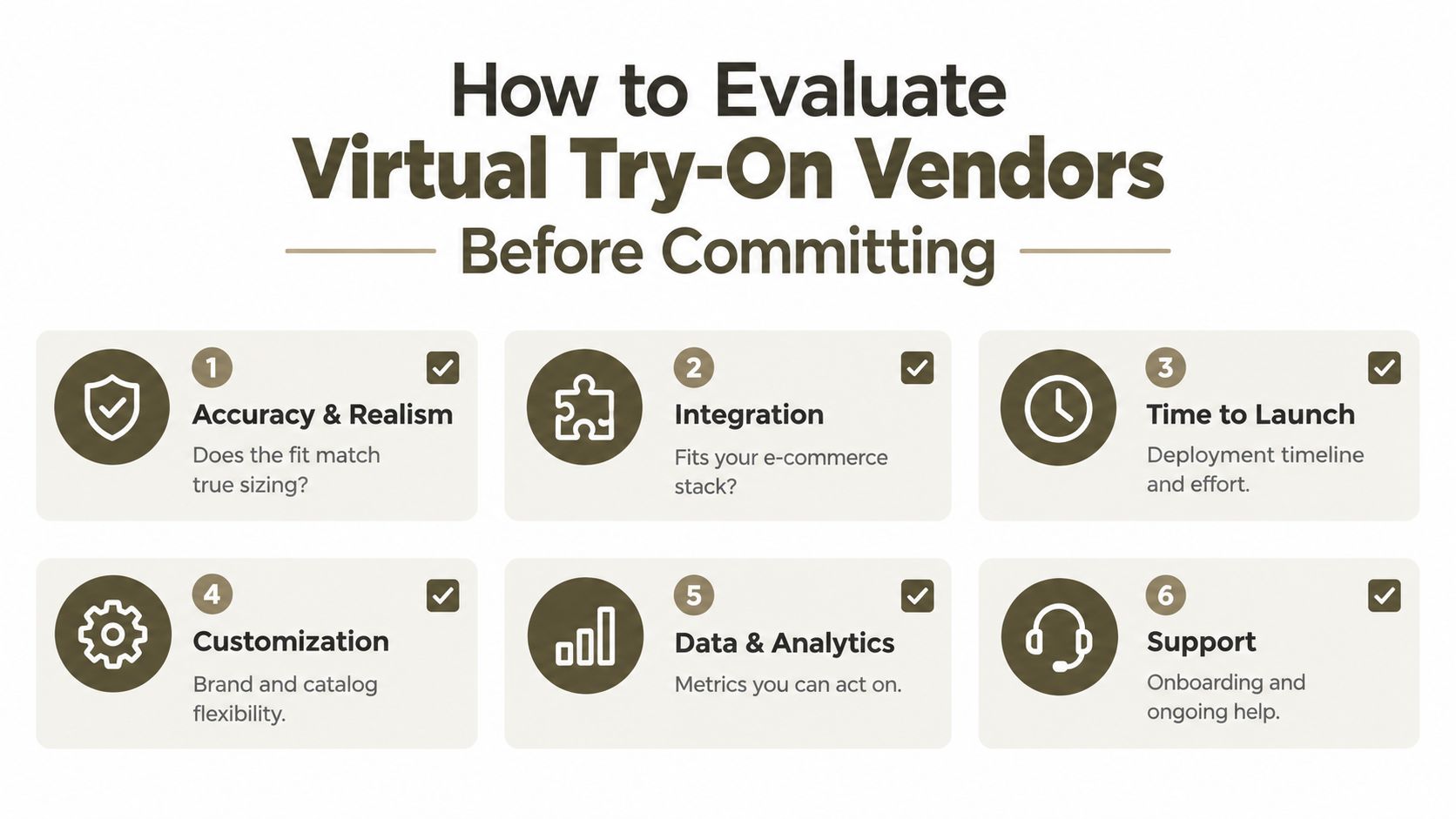
A vendor demo shows the product under controlled conditions. Your evaluation should test whether it holds up in production. Provide difficult, representative inputs and ask the vendor to explain failure modes, confidence levels, and the boundary between visual output and fit advice.
Start with validation, not visual polish
Ask whether the vendor has ground-truth fitting validation across body types, product categories, and size groups. One attractive image cannot show whether performance changes for plus-size, petite, older, disabled, transgender, or culturally diverse users. It also leaves “accuracy” undefined. The term may refer to visual resemblance, garment measurements, comfort, or correct size selection.
Request subgroup reporting and confidence scores. If the system recommends a size, ask how that recommendation was tested separately from the visualization. If the platform only creates an image, keep product copy from turning that image into an unsupported fit promise.
Build the demo around real merchandising conditions:
- Representative inputs: Test different poses, lighting conditions, skin tones, body shapes, and garment constructions.
- Difficult assets: Include sleeves, hems, layered garments, patterned materials, reflective surfaces, hair overlap, and hands near the product.
- Failure reporting: Ask what happens when an image is unsuitable. The system should flag the limitation instead of returning a plausible but misleading result.
- Subgroup evidence: Require accuracy reporting by size and body-shape subgroup, rather than relying on one overall score.
- Business metrics: Track engagement, assisted conversion, size-selection accuracy, user-rated fit, and returns as separate measures.
Then test the operating model
Technical fit matters as much as image quality. Confirm whether the platform offers an SDK, API access, mobile support, standard e-commerce integrations, analytics, catalog synchronization, and a workable process for updating assets. Clarify who owns the product models, how revisions are versioned, and what happens when a product changes after launch.
Adoption does not follow polish automatically. Plan for an interaction that loads reliably on the product page, makes its purpose clear, and answers a genuine shopper question. Treat demo quality as a weak proxy for usage.
For Genpire users, tool consolidation may also shape the decision. Genpire provides prompt-based product creation, technical specifications, a Virtual Try-On Studio, and marketing asset generation within one workflow. That does not replace validation, but it can reduce handoffs between concept assets, visualization, and launch content.
Virtual Try-On Inside a Complete Product Creation Workflow
Virtual try-on performs better when the product asset has a clear history. A concept starts from a prompt, sketch, or reference image. The design team refines the silhouette, material, color, and details. Technical teams add construction information. Only then does the virtual try-on stage have a dependable representation to place on an avatar or digital model.
A fragmented workflow breaks that chain. One tool holds the moodboard, another stores the sketch, a third creates a tech pack, and an agency produces campaign imagery from an older file. Each handoff creates room for version drift. A unified workflow keeps the visual concept, product specifications, try-on output, and marketing assets connected.

Where the layer fits
A practical sequence looks like this:
- Create the concept: Start with text, sketches, or reference images, then generate multi-view visuals and technical sketches.
- Preserve the brand system: Store moodboards and palettes so revisions remain aligned with the intended aesthetic.
- Refine the product: Use an editor to change silhouette, material, color, and details before committing to specifications.
- Generate specifications: Capture construction details and component breakdowns in a structured tech-pack workspace.
- Visualize on people: Use Virtual Try-On Studio to compare how the product appears on selected avatars or digital models.
- Build launch assets: Move approved concepts into marketing scenes, e-commerce flats, editorial imagery, or ad creative.
- Export downstream files: Send factory-ready outputs in SVG, PDF, or Excel formats where required.
The value isn't just fewer logins. It's the shared source of truth. A try-on preview can expose a proportion problem before photography. A technical review can reveal that a visually appealing concept lacks enough construction detail. A marketing asset can be regenerated after a color or silhouette revision without restarting the entire process.
Genpire's library of 500+ editable blanks and sketches can accelerate the starting point, while supplier collaboration and view-only access can keep external partners aligned. The platform's digital prototype workflow illustrates the larger principle: digital visualization has more commercial value when it remains connected to decisions that lead to physical production.
The Hidden Risk of Overestimating Virtual Try-On Accuracy
Virtual try-on can make a garment look right while the physical sample fits badly. That isn't a contradiction. The software may have represented the intended silhouette successfully, but visual resemblance doesn't prove ease, stretch, construction, comfort, or movement behavior.
Available market reporting cites 85% to 92% apparel fit-prediction accuracy, but the range is difficult to interpret without subgroup definitions and test conditions. Independent market analysis of virtual try-on platforms doesn't adequately explain how results vary across plus-size, petite, older, disabled, transgender, or culturally diverse users, or whether the reported result predicts appearance, measurements, comfort, or size choice.
Use a stricter launch gate
Before launch, ask for evidence that reflects your catalog rather than a vendor's showcase set. Conduct ground-truth fittings and report results by size and body-shape subgroup. Measure size-recommendation accuracy separately from user-rated fit, and keep both separate from the quality of the rendered image.
A convincing visualization is evidence of presentation quality, not proof of manufacturability.
Physical samples and standardized garment measurement testing still have a role. They reveal issues that an image can't reliably capture, including arm movement, fabric recovery, seam placement, pressure, and the difference between a garment that looks close and one that feels wearable.
The contrarian position is also the practical one. Virtual try-on may create its strongest value as a rapid concept-validation and merchandising tool. It can help teams compare revisions, prioritize products for sampling, and produce more relevant product imagery. It shouldn't be the final arbiter of comfort or fit unless a separate measurement and validation system supports those claims.
Real ROI Examples and Implementation Outcomes
The business case depends on separating shoppers who use virtual try-on from the wider site audience. Independent industry analysis places return reductions commonly around 5% to 15%, while size-recommendation systems can produce larger reductions because they address sizing errors directly. Reported conversion gains of 20% or more often describe users who actively engage with the feature, rather than every visitor.
Instrument the full path: try-on session, product viewed, selected variant, add-to-cart action, purchase, and any later return. Compare engaged users with an appropriate control group. An assisted sale shows that the experience supported a purchase, but it does not prove the visualization resolved a fit concern.
A market with room to grow
The category is expanding beyond campaign use. As noted earlier, market forecasts place the global virtual try-on market at approximately USD 9.2 billion in 2023, with projections of USD 18.1 billion by 2026 and USD 46.4 billion by 2030. The forecast also gives a 26.4% compound annual growth rate from 2024 through 2030, with North America holding 31.0% of market revenue in 2023 and the United States expected to grow at more than 24% annually during the forecast period.
Market growth provides context, not a business case for every retailer. Your economics depend on category, asset quality, placement, adoption, integration cost, and whether the feature addresses a real purchase uncertainty.
For Genpire workflows, the operational outcome can extend beyond storefront metrics. The platform describes cycle compression of 9 to 13 weeks and approximately 65% reduction versus traditional product-development processes, covering concepting, specifications, visualization, and marketing production. Treat these as platform-specific outcomes, not universal virtual try-on benchmarks.
Use three measures to judge the program: shopper engagement, support for the purchase decision, and product performance after delivery. Answer those questions with controlled testing, and virtual try-on operates as a measurable merchandising layer rather than a decorative demo.
Genpire connects AI product creation, technical specifications, virtual try-on visualization, and marketing asset generation in one workspace for consumer-goods teams. Visit Genpire to see how your team can evaluate product concepts on digital models, refine launch assets, and carry approved designs toward production.